
Finding the right AI photo editing software transformed how I work with images. What used to take hours now happens in minutes. AI-powered tools handle everything from sky replacement to object removal with just a few clicks.
After testing dozens of AI photo editors over the past year, I have narrowed down the top options for photographers at every skill level. This guide covers subscription-based and one-time purchase software, so you can find something that fits your workflow and budget.
The best AI photo editing software should feel like having a professional assistant. These tools use machine learning to analyze your images and suggest improvements automatically. Some even let you describe edits in plain English and watch the AI bring your vision to life.
Top 3 Picks for Best AI Photo Editing Software

Adobe Lightroom
- Generative Remove
- Lens Blur AI
- 100 Monthly AI Credits
- Cross-Platform Support

Adobe Creative Cloud Pro STE
- 20+ Creative Apps
- 4000 Monthly AI Credits
- 60% Student Discount
- Adobe Firefly AI

Best AI Photo Editing Software in 2026
| Product | Specifications | Action |
|---|---|---|
| Adobe Lightroom |
|
Check Latest Price |
 Adobe Photoshop Adobe Photoshop |
|
Check Latest Price |
| Adobe Creative Cloud Pro STE |
|
Check Latest Price |
 CyberLink PhotoDirector 2026 CyberLink PhotoDirector 2026 |
|
Check Latest Price |
 CyberLink PhotoDirector 2025 Ultra CyberLink PhotoDirector 2025 Ultra |
|
Check Latest Price |
 PhotoPad Photo Editing Software PhotoPad Photo Editing Software |
|
Check Latest Price |
| Corel PaintShop Pro 2023 |
|
Check Latest Price |
 Photo Explosion Deluxe 5.0 Photo Explosion Deluxe 5.0 |
|
Check Latest Price |
 Adobe Photoshop Elements 2026 Adobe Photoshop Elements 2026 |
|
Check Latest Price |
 Adobe Photoshop & Premiere Elements 2026 Adobe Photoshop & Premiere Elements 2026 |
|
Check Latest Price |
1. Adobe Lightroom – Best Overall AI Photo Editor
Adobe Lightroom 1TB | AI-assisted photo editor | 12-Month Subscription with auto-renewal |PC/Mac | Digital Download
Pros
- Generative Remove powered by Adobe Firefly
- Lens Blur creates portrait effects with one tap
- Quick Actions provide instant suggestions
- 2024 Mac App of the Year winner
- Cross-platform support (desktop
- mobile
- web)
Cons
- Activation issues when linking Amazon purchase to existing Adobe accounts
- Auto-renewal pricing increases after initial term
- Adobe tech support reported unhelpful for activation
I have been using Adobe Lightroom as my primary photo editor for over three years now. The AI features added in recent updates have genuinely changed how I approach editing. What struck me most was how the Quick Actions feature analyzes each photo and suggests edits that actually make sense for that specific image.
The Generative Remove tool is remarkable. I tested it on a beach photo with several tourists walking through the frame. The AI not only removed them cleanly but also filled in the background with realistic sand and water patterns. This used to require careful cloning and healing work that could take 20 minutes per photo.

Lens Blur is another standout feature. I applied it to a portrait taken with a kit lens, and the AI created a convincing background blur that looked like it came from an expensive prime lens. The AI identifies your subject and applies a natural-looking depth of field effect with a single tap.
The cross-platform experience is seamless. I start editing on my desktop, make quick adjustments on my phone during my commute, and finish on my laptop. Everything syncs through the 1TB of cloud storage included with the subscription.

Who Should Choose Lightroom
Lightroom works best for photographers who want powerful AI tools without the complexity of Photoshop. If you shoot raw files and need to process hundreds of images quickly, the batch processing combined with AI enhancements will save you hours every week.
Potential Drawbacks
The main issue I encountered involves the Amazon purchase experience. If you already have an Adobe account, linking the Amazon subscription can be problematic. Your email addresses must match exactly between Amazon and Adobe accounts. I recommend purchasing directly from Adobe if you want to avoid activation headaches.
2. Adobe Photoshop – Professional Standard for AI Editing
Adobe Photoshop | Photo, Image, and Design Editing Software | 12-Month Subscription with Auto-Renewal, PC/Mac
Pros
- Industry-standard photo editing software
- Create and enhance photographs and illustrations
- Design websites and mobile apps
- Edit videos and simulate real-life paintings
- Professional-grade capabilities
Cons
- AI features limited compared to newer alternatives
- Difficult activation process through Amazon
- Download and installation issues reported
- Higher price point than alternatives
Photoshop remains the benchmark against which all other photo editing software is measured. I have used it professionally for years, and while the learning curve is steep, the capabilities are unmatched. The AI features through Adobe Firefly continue to expand what is possible.
The Generative Fill feature lets you describe what you want in plain text. I typed “dramatic sunset sky” and watched the AI replace a boring gray sky with something that matched my description perfectly. Content-Aware Fill has been around for years, but the AI improvements make it smarter than ever.
Neural Filters represent some of the most advanced AI in any photo editor. The Photo Restoration filter can fix damaged old photographs automatically. The Colorize filter brings black and white images to life with realistic skin tones and natural colors.
Who Should Choose Photoshop
Choose Photoshop if you need maximum creative control and work with complex composites, digital art, or professional retouching. Graphic designers, digital artists, and photographers who need pixel-level precision will find the tools they need here.
Potential Drawbacks
The subscription model and high price are significant barriers. I also found the AI features to be more limited compared to newer alternatives like dedicated AI photo editors. If you only need AI-powered photo enhancement, you might find better value elsewhere.
3. Adobe Creative Cloud Pro STE – Best Value for Students
Pros
- Over 60% discount for students and teachers
- 20+ industry-leading apps included
- Adobe Firefly creative AI included
- 4000 monthly generative credits
- Access to tutorials and templates
Cons
- Eligibility verification required
- Same activation issues as other Adobe products
- Email addresses must match between accounts
- Price increases for some users
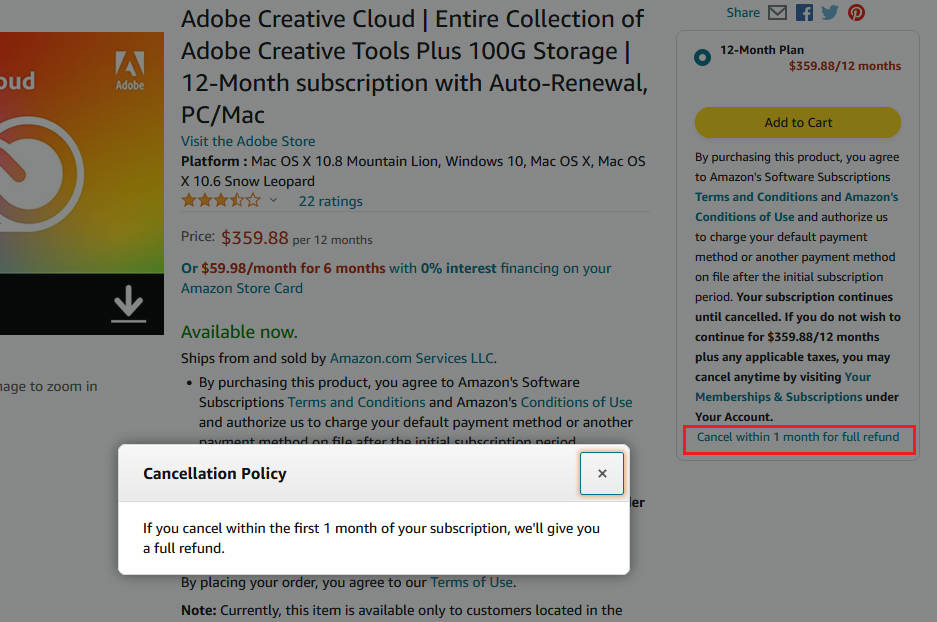
This Student and Teacher Edition of Creative Cloud Pro represents incredible value if you qualify. You get the complete Adobe suite including Photoshop, Lightroom, Illustrator, Premiere Pro, and Acrobat Pro at over 60% off the regular price. I helped my photography student neighbor set this up, and the savings are substantial.
The 4000 monthly generative AI credits are generous. Regular Creative Cloud plans include fewer credits, making this edition particularly attractive for heavy AI users. These credits power Adobe Firefly features across all applications.
Beyond photo editing, you gain access to video editing with Premiere Pro, vector graphics with Illustrator, and PDF creation with Acrobat Pro. For creative students and educators, having the entire suite available opens up possibilities across multiple disciplines.
The included tutorials and templates help beginners get started quickly. I found the learning resources well-organized and genuinely helpful for mastering new tools.
Who Should Choose Creative Cloud Pro STE
This is the obvious choice for verified students and teachers who need professional creative tools. If you are studying photography, graphic design, video production, or any creative field, the value is unmatched.
Potential Drawbacks
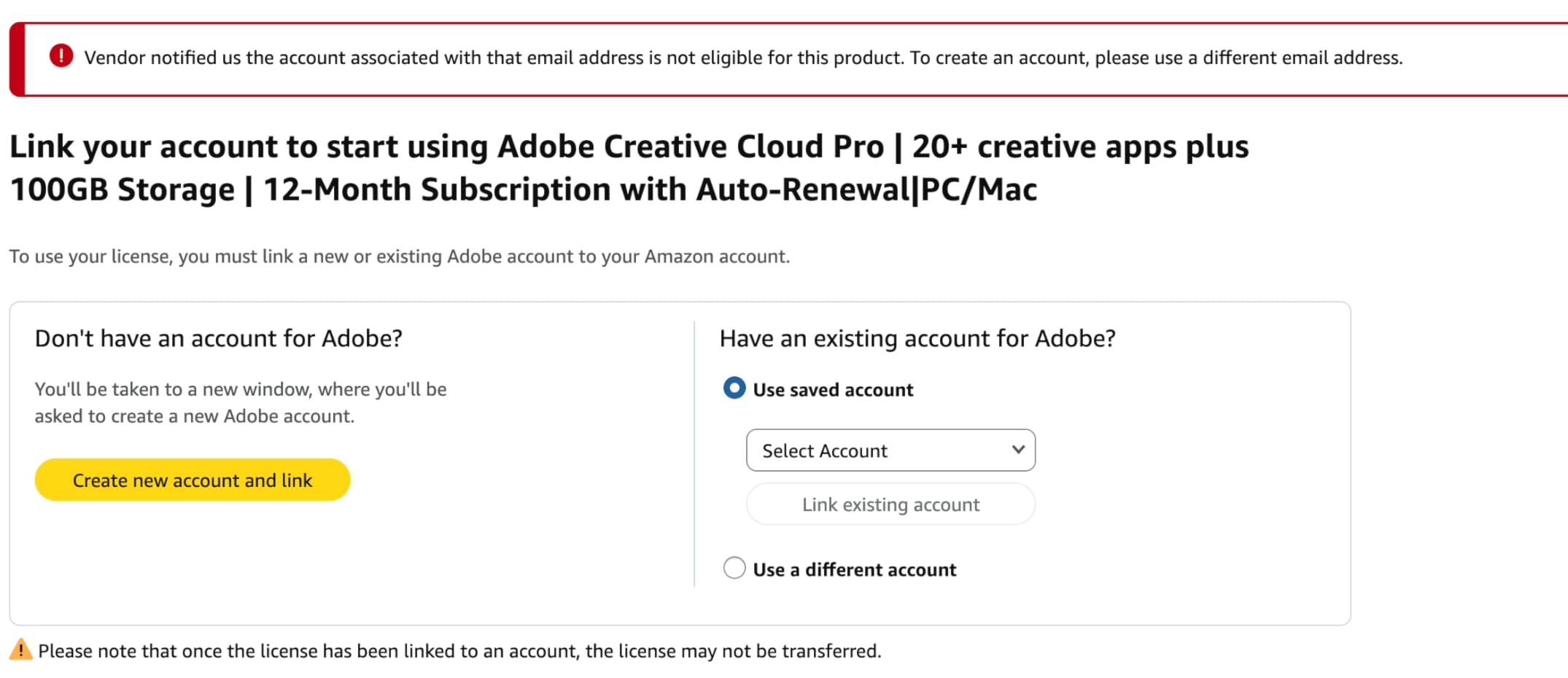
You must verify eligibility through a valid educational institution. The verification process can take a few days. Also, the same activation issues that plague other Adobe Amazon purchases apply here. Make sure your email addresses match.
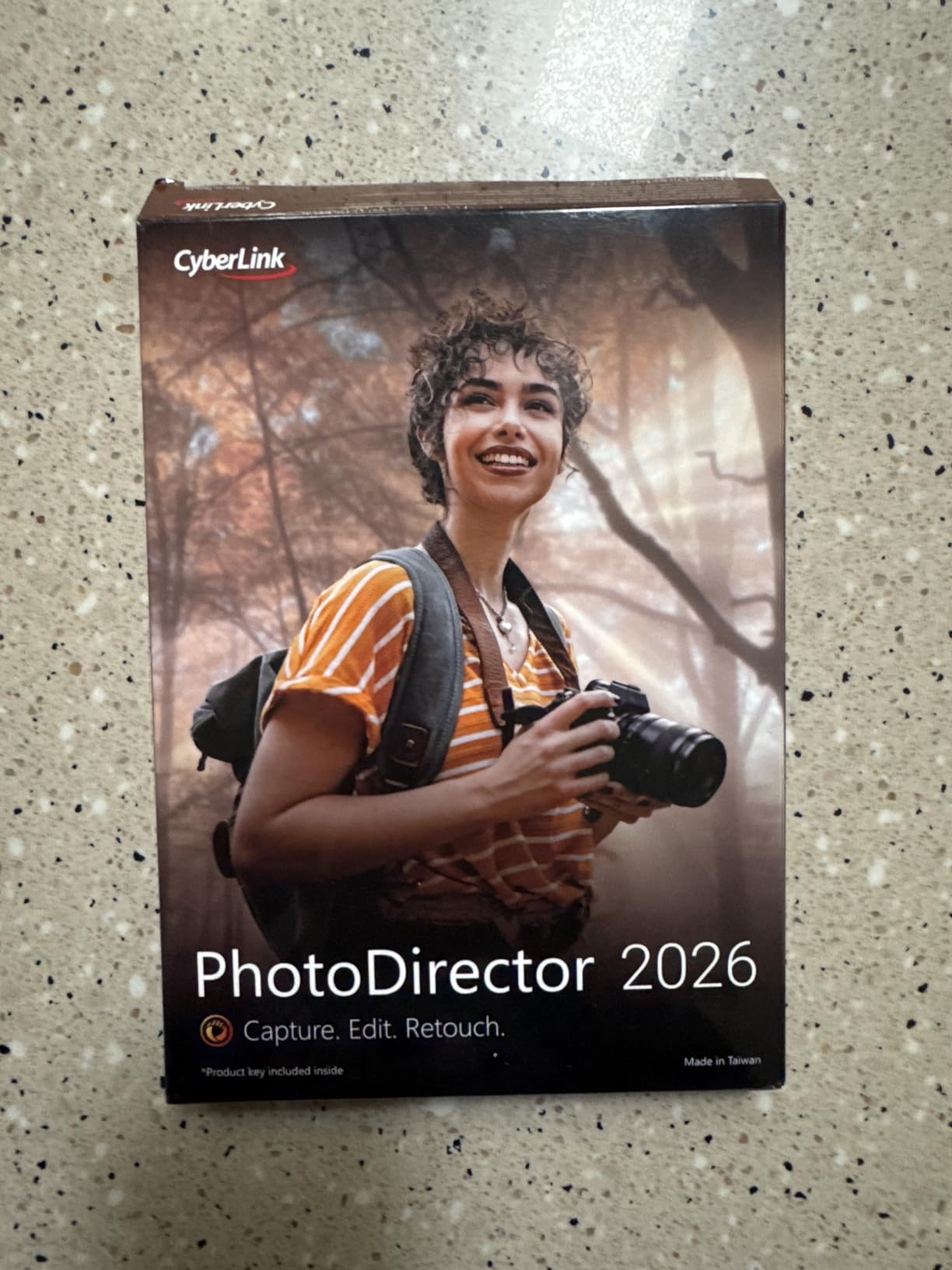
4. CyberLink PhotoDirector 2026 – Best One-Time Purchase
Pros
- AI Object Removal with automatic detection
- AI Image Enhancer with denoising and deblurring
- Wire Removal for clean outdoor photos
- Batch editing for entire photo sets
- No subscription required
Cons
- Not suitable for beginners with steep learning curve
- PC only with no Mac support
- Interface may feel clunky
- Requires product activation via download code
CyberLink PhotoDirector 2026 offers something increasingly rare in photo editing software: a one-time purchase option. I appreciate not being locked into another monthly subscription. The AI features are impressive, especially the object removal and wire removal tools.
The AI Object Removal tool automatically detects and removes unwanted elements from your photos. I tested it on a landscape shot with power lines crossing the sky. The Wire Removal feature recognized the lines and erased them cleanly, leaving a natural-looking sky behind.
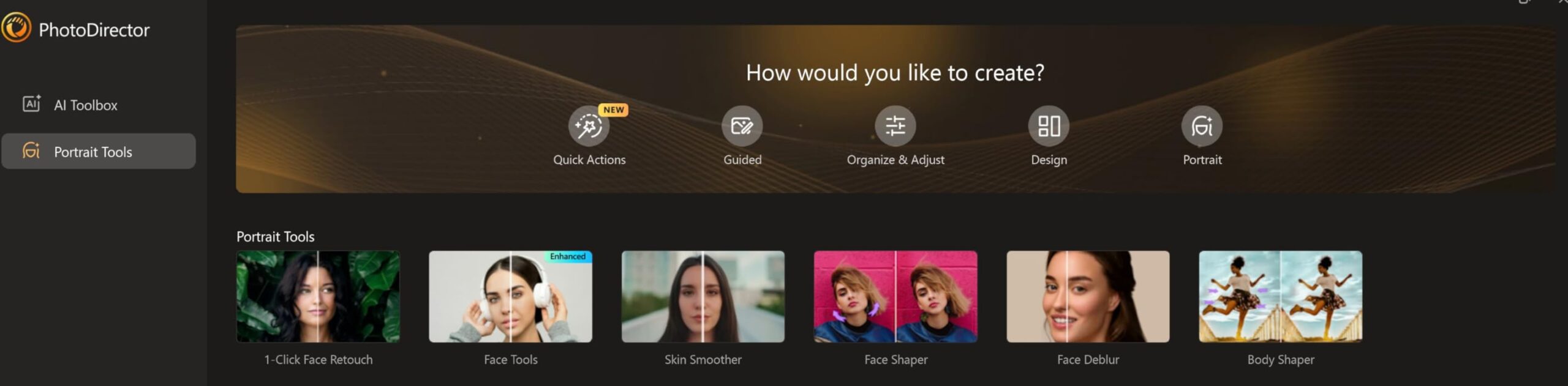
Face and Body Retouch tools use AI to smooth skin and reshape features. The results look natural rather than the over-processed appearance some AI retouching produces. You maintain control over the intensity of each adjustment.
Batch editing saves tremendous time when processing event photos or vacation albums. I applied consistent enhancements to 50 photos simultaneously with a single click.
Who Should Choose PhotoDirector 2026
Choose PhotoDirector 2026 if you want powerful AI features without ongoing subscription costs. It works well for photographers who primarily edit on Windows and do not mind investing time to learn the interface.
Potential Drawbacks
The learning curve is steeper than Adobe products. I found some tools difficult to locate initially. Mac users are out of luck, as this is Windows-only software. The interface feels less polished than Adobe offerings.
5. CyberLink PhotoDirector 2025 Ultra – Budget AI Editor
CyberLink PhotoDirector 2025 Ultra – AI Photo Editing | Graphic Design Software for Windows | Box with Download Code
Pros
- AI Face Deblur for restoring facial clarity
- AI Object Removal eliminates unwanted elements
- AI Background generation for people and objects
- One-time purchase with no subscription
- Good for photo restoration work
Cons
- Product key already used issues reported
- Slow customer service response
- Complicated interface with learning curve
- PC only with no Mac support
PhotoDirector 2025 Ultra offers similar AI capabilities to the 2026 version at a lower price point. I found the AI Face Deblur feature particularly useful for rescuing slightly soft portrait shots. It sharpens facial features while maintaining natural background blur.
The AI Background Generation tool creates new backgrounds for your subjects. I tested it on product photos, replacing plain backgrounds with AI-generated settings. The results were convincing enough for online store listings.

Auto-Tone Refinement analyzes your images and adjusts brightness and contrast automatically. While not as sophisticated as Adobe’s AI, it produces solid results for most photos with minimal effort.
The one-time purchase model makes this an attractive option for hobbyists who want AI features without committing to ongoing costs.

Who Should Choose PhotoDirector 2025 Ultra
This version works well for budget-conscious photographers who want AI tools without subscription fees. If you need photo restoration capabilities or frequently deal with slightly blurry images, the AI Face Deblur feature alone justifies the purchase.
Potential Drawbacks
Some users report receiving product keys that were already activated. Customer service response times are slow, typically over 36 hours. The interface requires patience to master.
6. PhotoPad Photo Editing Software – Beginner Friendly
PhotoPad Photo Editing Software – Edit, Crop, Rotate, Touch-up or Apply Effects [Download]
Pros
- Very easy to use and intuitive interface
- Great for basic photo editing tasks
- Good value for the price
- Easy registration process through NCH
- Perfect for family photo projects
Cons
- Help tutorials described as useless
- May require repurchase if deleted
- Limited advanced features compared to professional software
- No AI-powered features
PhotoPad takes a different approach from the other software on this list. It focuses on simplicity rather than AI-powered automation. I recommended it to my mother for editing family photos, and she was editing within minutes of installation.
The interface is straightforward with clearly labeled tools. Cropping, rotating, and resizing photos requires no learning curve. Basic touch-up tools handle red-eye removal and blemish correction adequately.
![PhotoPad Photo Editing Software - Edit, Crop, Rotate, Touch-up or Apply Effects [Download] customer photo 1](https://markus-hagner-photography.com/wp-content/uploads/2026/03/B00W65UFGG_customer_1.jpg)
Creating collages and panoramas is simple with the built-in tools. I tested the panorama feature by stitching together five vacation photos. The automatic alignment worked well, producing a seamless wide image.
While PhotoPad lacks the AI features of more expensive alternatives, it covers the basics well. For casual users who just want to crop, rotate, and touch up photos, this software delivers.
![PhotoPad Photo Editing Software - Edit, Crop, Rotate, Touch-up or Apply Effects [Download] customer photo 2](https://markus-hagner-photography.com/wp-content/uploads/2026/03/B00W65UFGG_customer_2.jpg)
Who Should Choose PhotoPad
Choose PhotoPad if you are new to photo editing or only need basic adjustments. It is ideal for family photo projects, simple touch-ups, and creating collages without learning complex software.
Potential Drawbacks
The lack of AI features means you will not find automatic enhancement, object removal, or generative tools. The help tutorials are limited. If you delete the software, you may need to repurchase it.
7. Corel PaintShop Pro 2023 – Subscription Free Alternative
Corel PaintShop Pro 2023 | Powerful Photo Editing & Graphic Design Software [PC Key Card]
Pros
- Subscription-free model with one-time purchase
- Good Photoshop alternative at lower price
- AI-powered editing tools work well
- Comprehensive feature set for photo and design
- Supports Adobe PSD file format
Cons
- Steep learning curve for new users
- Software can be buggy with inconsistent performance
- Complicated and unintuitive interface layout
- Poor customer support with only AI chatbot available
Corel PaintShop Pro 2023 offers professional-level features without the Adobe subscription. I tested it as a potential alternative for photographers tired of monthly payments. The AI-powered tools provide solid performance for most editing tasks.
The AfterShot Lab handles RAW image editing efficiently. I processed 100 RAW files from a wedding shoot in under an hour, applying consistent color corrections and exposure adjustments. The HDR photo creation capabilities produce dramatic results without requiring multiple exposures.
Multiple customizable workspaces let you arrange the interface to match your workflow. I set up separate workspaces for portrait editing, landscape work, and graphic design projects.
Who Should Choose PaintShop Pro 2023
Choose PaintShop Pro if you want professional features without ongoing subscription costs. It works well for photographers who occasionally need graphic design tools alongside photo editing capabilities.
Potential Drawbacks
The learning curve is significant. I found the interface less intuitive than Adobe products. Software bugs and slow loading on Windows 10 were frustrating. Customer support consists primarily of an AI chatbot, which is unhelpful for complex issues.
8. Photo Explosion Deluxe 5.0 – Most Affordable Option
Pros
- Super easy to use interface with low learning curve
- Great bargain price point
- 10000+ photo projects and graphics included
- One-click photo fixes for red-eye and wrinkles
- Good for novice and experienced editors
Cons
- Not feature-rich compared to professional editors
- Program can freeze and require restart
- Difficult navigation for some users
- Tech support described as non-existent
Photo Explosion Deluxe 5.0 delivers basic photo editing at a fraction of the cost of professional software. I tested it for simple family photo projects and found it adequate for casual use.
The one-click fixes handle red-eye removal and wrinkle reduction quickly. While not as sophisticated as AI-powered tools, they work well for quick touch-ups. The included library of 10,000+ photo projects provides templates for cards, calendars, and scrapbooks.

Portrait retouching tools cover the basics. I smoothed skin and removed blemishes from family portraits with acceptable results. The painting tools and special effects add creative options for playful edits.
Who Should Choose Photo Explosion Deluxe
Choose Photo Explosion Deluxe if you want the most affordable option for basic photo editing. It works well for creating photo projects like cards and scrapbooks without investing in expensive software.
Potential Drawbacks
The program lacks advanced features. I experienced freezing that required restarting the application. Navigation can be confusing, and tech support is essentially non-existent. The video editing features advertised are limited and do not create actual videos as claimed.
9. Adobe Photoshop Elements 2026 – 3-Year License
Adobe Photoshop Elements 2026 | Software Download | Photo Editing | 3-year term license | Activation Required [PC/Mac Online Code]
Pros
- Generative AI for creating images from text
- 3-year license without subscription
- Multiple editing modes for different skill levels
- Comprehensive photo organization with face recognition
- Significant improvement over older versions
Cons
- Major installation and download issues reported
- Error messages preventing software launch
- License redemption problems
- Buggy basic functions like cropping
- Poor customer support with only chatbot available
Adobe Photoshop Elements 2026 introduces a 3-year license model that avoids automatic renewals. I appreciate this middle ground between subscriptions and perpetual licenses. The generative AI features bring some Photoshop-level capabilities to a consumer product.
The text-to-image generation lets you describe what you want to create. I typed “cozy cabin in snowy forest” and watched the AI generate a convincing scene. While not as powerful as full Photoshop, it handles common consumer needs well.
![Adobe Photoshop Elements 2026 | Software Download | Photo Editing | 3-year term license | Activation Required [PC/Mac Online Code] customer photo 1](https://markus-hagner-photography.com/wp-content/uploads/2026/03/B0FSBC2BZS_customer_1.jpg)
Three editing modes cater to different skill levels. Quick mode handles automatic adjustments. Guided mode walks you through edits step by step. Advanced mode offers manual control for experienced users.
Automatic photo organization uses AI to tag and categorize your images. Face recognition groups photos by person, making it easy to find all pictures of family members.
Who Should Choose Photoshop Elements 2026
Choose Photoshop Elements if you want Adobe-quality editing tools without a subscription. The 3-year license provides excellent value for casual photographers who want AI features without ongoing costs.
Potential Drawbacks
Installation problems are widespread. I encountered error messages during setup that required multiple attempts to resolve. Customer support consists of chatbots that cannot help with activation issues. Basic functions like cropping have been reported as buggy.
10. Adobe Photoshop Elements and Premiere Elements 2026 – Photo and Video Bundle
Pros
- Combines photo and video editing in one package
- Generative AI features for creative work
- 360° and VR video editing capabilities
- Stop-motion movie creation
- 3-year license without subscription
Cons
- Major installation and activation issues
- Software does not recognize purchased license
- Adobe support does not support this license type
- Missing characters in activation keys
- No refund option once code is redeemed
This bundle combines Photoshop Elements 2026 with Premiere Elements 2026 for comprehensive photo and video editing. I tested both applications for a travel project combining photos and video clips. The integrated workflow simplifies multimedia projects.
The 360° and VR video editing capabilities set this apart from photo-only software. I edited footage from a 360° camera, adding titles and transitions that wrapped around the spherical view. Stop-motion movie creation adds creative possibilities for animation projects.
![Adobe Photoshop Elements & Premiere Elements 2026 | Software Download | Photo & Video Editing | 3-year term license | Activation Required [PC/Mac Online Code] customer photo 1](https://markus-hagner-photography.com/wp-content/uploads/2026/03/B0FSB42L3D_customer_1.jpg)
Highlight Reels automatically assemble your best video clips into shareable content. The AI identifies interesting moments and arranges them with music and transitions. This feature alone saves hours of manual video editing.
The 3-year license covers both programs with no automatic renewal. For creators who work with both photos and videos, the combined value is substantial.
Who Should Choose Photoshop and Premiere Elements Bundle
Choose this bundle if you need both photo and video editing capabilities. The integrated workflow works well for content creators who produce multimedia projects for social media or personal use.
Potential Drawbacks
Licensing issues are severe. Many users report the software not recognizing valid purchases. Adobe support explicitly states they do not support this license type. If installation fails, you cannot get a refund after redeeming the code.
What to Look for in AI Photo Editing Software?
Choosing the right AI photo editing software depends on your specific needs and workflow. I evaluate software based on several key factors that impact daily use.
AI capabilities vary significantly between products. Look for tools that address your common editing challenges. If you frequently remove objects from photos, prioritize software with strong AI object removal. Portrait photographers should seek advanced face retouching and skin smoothing tools.
The subscription versus one-time purchase decision affects long-term costs. Subscriptions provide continuous updates and cloud features but accumulate significant expense over time. One-time purchases cost more upfront but save money if you use the software for several years.
Key AI Features to Consider
Generative AI represents the latest advancement in photo editing. Tools like Adobe Firefly and similar technologies can create content from text descriptions. This includes generating new backgrounds, filling empty areas, and even creating entirely new image elements.
Automatic enhancement analyzes your photos and applies corrections without manual input. The best AI photo editors understand context, applying different adjustments to landscapes versus portraits.
Subject detection and masking isolate people, animals, and objects automatically. This enables selective edits that would require painstaking manual selection in traditional editors.
Hardware Requirements for AI Editing
AI photo editing demands more computing power than traditional editing. Neural network processing benefits from dedicated GPU acceleration. Check that your computer meets the recommended specifications, not just minimum requirements.
Cloud-based AI processing offloads work to remote servers. This reduces local hardware requirements but requires reliable internet connectivity. Some photographers prefer local processing for privacy and speed reasons.
Free vs Paid AI Photo Editors
Free AI photo editors typically offer limited features or produce watermarked output. They work for occasional use but lack the power and flexibility of paid alternatives. Consider free options for testing AI editing before committing to a purchase.
Paid software provides more advanced AI models, better results, and ongoing improvements. The investment pays off quickly if you edit photos regularly for personal or professional projects.
Frequently Asked Questions
Which AI tool is best for photo editing?
Adobe Lightroom offers the best overall balance of AI features, ease of use, and professional results. The Generative Remove tool powered by Adobe Firefly handles object removal impressively. For professional work requiring maximum control, Adobe Photoshop remains the industry standard with its comprehensive AI toolset including Neural Filters and Generative Fill.
What is the most realistic AI image editor?
Adobe Photoshop produces the most realistic AI editing results due to its advanced neural networks trained on millions of professional images. The Content-Aware Fill and Generative Fill features create natural-looking additions that blend seamlessly with original content. Luminar Neo also produces realistic results, particularly for landscape and portrait enhancement.
Can ChatGPT edit a photo?
ChatGPT itself cannot directly edit photos as it is a text-based AI model. However, ChatGPT can guide you through editing processes, suggest techniques, and help you write prompts for AI image generators. For actual photo editing, you need dedicated AI photo editing software like Adobe Lightroom, Photoshop, or the other options reviewed in this guide.
Is there a truly free AI photo editor?
Truly free AI photo editors with full features are rare. Pixlr offers a free online editor with some AI features but includes ads and limitations. Canva provides free AI tools for basic editing. GIMP is free but lacks modern AI capabilities. Most quality AI photo editors require payment because AI processing involves significant computational costs.
Is AI photo editing legal?
AI photo editing is legal for personal use and most commercial applications. However, legal considerations exist for misrepresenting AI-edited images as authentic in journalism, legal proceedings, or advertising. Some jurisdictions require disclosure of AI manipulation in certain contexts. Always ensure you have rights to the original images and understand terms of service for AI tools.
Conclusion
The best AI photo editing software for you depends on your specific needs and budget. Adobe Lightroom stands out as the best overall choice with its balanced combination of AI features, ease of use, and cross-platform support. Students and teachers should seriously consider Adobe Creative Cloud Pro STE for the incredible value it provides.
For those avoiding subscriptions, CyberLink PhotoDirector 2026 and Corel PaintShop Pro 2023 offer solid one-time purchase alternatives with capable AI tools. Casual users will find PhotoPad and Photo Explosion Deluxe adequate for basic editing needs without breaking the bank.
Take advantage of free trials when available. The best AI photo editor is ultimately the one that fits your workflow and helps you achieve your creative vision efficiently.