
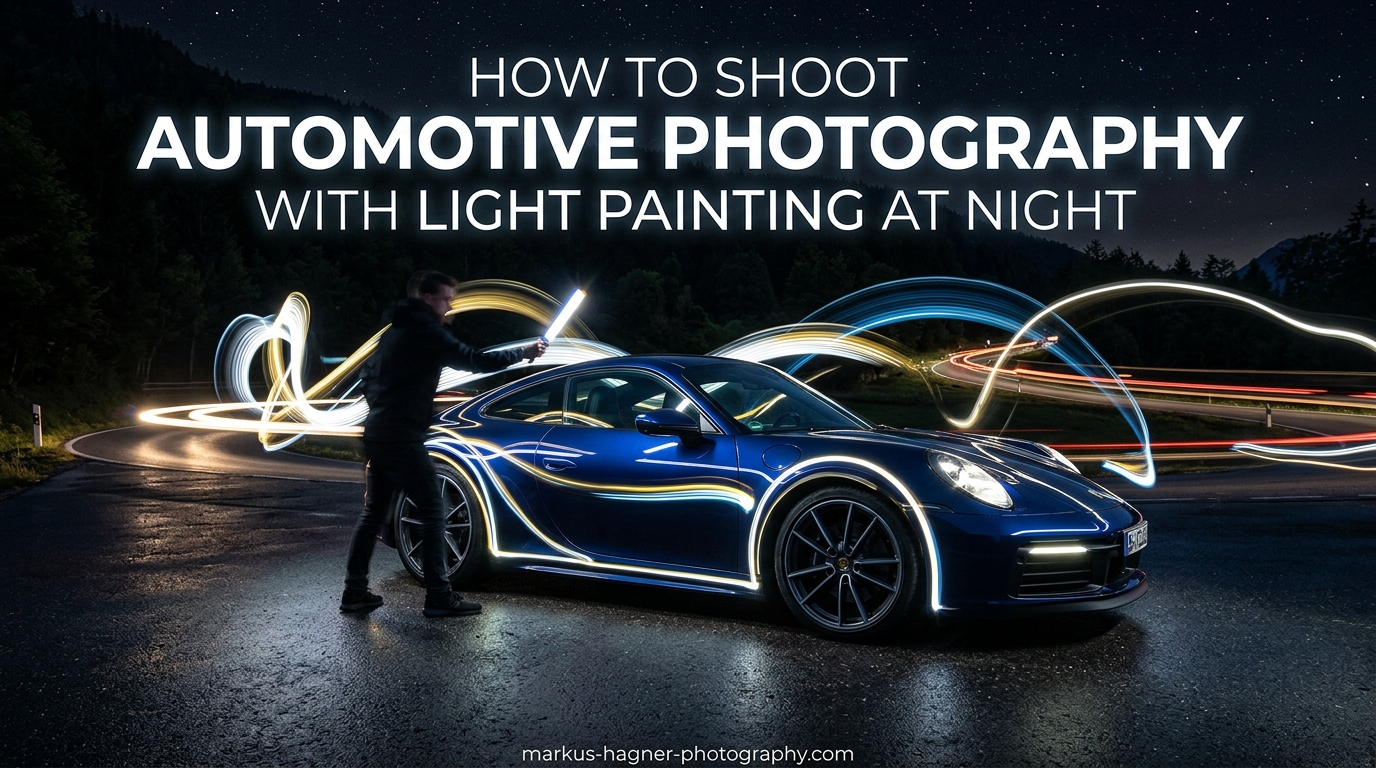
Light painting in automotive photography is a night photography technique where you use a handheld light source to illuminate a car during a long exposure. This creates dramatic, studio-like lighting without expensive strobes or natural light. The method works by setting your camera on a tripod for a long exposure (typically 10-30 seconds), then walking around the vehicle with a constant light source, literally painting the car with light while the shutter is open.
Learning how to shoot automotive photography with light painting at night gives you complete creative control over lighting direction and mood. It can make older cars with imperfect paint look fresh, and it produces professional results with minimal equipment investment. Our team has spent countless nights perfecting this technique, and in this guide, we will walk you through everything you need to know to create stunning light-painted car images.
Essential Equipment for Automotive Light Painting
The beauty of light painting is that you probably already own most of what you need. Let’s break down the gear requirements from essential to optional.
Tripod (Absolutely Critical)
A sturdy tripod is non-negotiable for light painting. Your camera needs to remain perfectly still during exposures lasting 10-30 seconds or longer. Any movement during the exposure will blur the entire image.
I learned this the hard way on an early shoot when my cheap travel tripod shifted slightly during a 20-second exposure. The resulting image had a ghostly double image that ruined the shot. Invest in a solid tripod that can handle your camera weight without wobbling, even on uneven ground like gravel or asphalt.
Light Sources (Many Options Work)
This is where you have flexibility. Photographers successfully use everything from professional LED panels to their smartphone flashlights. Here are the main options:
LED Panels: Portable LED video lights offer consistent output and adjustable brightness. They provide even illumination across larger areas of the car. Many photographers prefer panels in the 5-12 inch range for their balance of power and portability.
Flashlights: A good quality flashlight gives you precise control over where light falls. LED flashlights with adjustable beams work well. Hardware store workshop lights like the Ryobi 18V work light offer excellent power at an affordable price.
Smartphone Flashlight: Your phone’s LED can work in a pinch. Several photographers on the r/carphotography subreddit report getting usable results with just their iPhone flashlight. The output is lower than dedicated lights, so you will need longer exposures or need to move the light more slowly.
Colored Lights: RGB LED lights let you add creative color effects. Blue tones can create a moonlit feel, while warm orange mimics sunset. This works particularly well for accent lighting on wheels or interior shots.
Camera Requirements
Almost any interchangeable lens camera made in the last decade can handle light painting. You need manual mode control and the ability to set long exposures. Most cameras offer a 30-second maximum shutter speed in manual mode, which is often sufficient. For longer exposures, look for a bulb (B) setting that keeps the shutter open as long as you hold the button.
Shooting in RAW format is strongly recommended. RAW files give you much more flexibility when adjusting exposure and white balance during post-processing, which becomes critical when blending multiple exposures.
Optional Accessories
Wear dark clothing to minimize your visibility during long exposures. Black or navy colors work best. A remote shutter release lets you trigger the camera without touching it, reducing vibration. Light modifiers like snoots or grids help direct light precisely where you want it, though these are not essential for beginners.
Camera Settings for Light Painting Cars
Getting your camera settings right before you start shooting saves considerable time and frustration. Here are the settings that work consistently for automotive light painting.
Manual Mode
Switch your camera to full manual mode (M on most cameras). Auto or semi-auto modes will not work because the camera’s metering system cannot account for the light painting process. You need complete control over exposure.
ISO Settings
Start with ISO 100 or the lowest native ISO your camera offers. Some cameras have extended low ISO settings like ISO 50, which can work well too. Keeping ISO low minimizes noise in your images, which becomes more visible in dark areas during long exposures. If you need more light sensitivity, you can increase to ISO 200-400, but avoid going higher unless absolutely necessary.
Aperture Settings
f/8 is a reliable starting point for most light painting scenarios. This aperture provides good depth of field to keep the entire car in focus while still allowing enough light during long exposures. You can open up to f/5.6 if you need more light or stop down to f/11 for greater depth of field on larger vehicles.
Shutter Speed
Set your shutter speed to 10-30 seconds depending on how much time you need to paint the car. A 20-second exposure gives you enough time to walk around a typical sedan and light multiple areas. For larger vehicles or more complex lighting setups, 30 seconds may be necessary. With bulb mode, you can extend this even longer if needed.
White Balance
Set white balance manually rather than using auto. Different light sources have different color temperatures, and auto white balance can shift during the exposure as you move different colored lights around. Try 4000-5000K as a starting point for neutral results, or adjust to taste for warmer or cooler looks.
Focus
Set focus manually before your first shot. Use your camera’s live view to zoom in on a point of contrast on the car, then manually focus until sharp. Once focused, switch your lens to manual focus mode so it does not try to refocus between shots. Many photographers mark the focus ring position with a small piece of tape as insurance against accidental bumps.
Location Scouting and Shoot Preparation
None of the competitor guides we researched cover location scouting, which is surprising given how much it affects your final results. Proper location selection can make or break a light painting shoot.
Finding the Right Location
Darkness is your primary requirement. Light pollution from streetlights, parking lot lights, or buildings will contaminate your long exposures and limit your creative control. Scout locations during the day and return at night to verify how dark they actually are.
Industrial areas after business hours often provide good options with interesting backgrounds. Empty parking structures offer overhead cover from weather and usually have minimal light pollution on upper levels. Rural roads with scenic backdrops can work well if you have a safe place to position the car off the roadway.
Surface Considerations
The ground beneath your car matters more than you might expect. Smooth asphalt reflects light nicely and creates clean reflections under the vehicle. Concrete works too but may show more texture. Gravel or dirt surfaces can add interesting foreground elements but make tripod setup more challenging.
Wet surfaces after rain create beautiful reflections that add production value to your images. Just be extra careful with electrical equipment around water.
Safety and Legal Considerations
Always get permission before shooting on private property. Many industrial areas and parking structures are private property, and security may ask you to leave. Public locations like roadsides require awareness of traffic. Having a friend spot for you adds a safety margin.
Watch your step during long exposures. It is easy to get focused on your light painting path and trip over curbs, debris, or the tripod legs. Scan the area for broken glass, potholes, or other hazards before you start shooting.
Timing Your Shoot
Arrive at your location 30-45 minutes before you plan to start shooting. This gives you time to scout the specific shooting position, set up your equipment, and compose your shot before full darkness. The transition period after sunset often provides some ambient light in the sky that can add depth to your backgrounds.
Check weather forecasts before heading out. Fog or light mist can add atmospheric mood to your images, but heavy rain or wind will make shooting difficult. Clear nights work best for consistent results.
How to Light Paint a Car at Night: Step-by-Step
Now let’s walk through the complete process of creating a light-painted automotive photograph. Follow these steps in order for consistent results.
Step 1: Position the Car and Frame Your Shot
Choose your camera angle before positioning the car. A three-quarter front angle is classic for automotive photography because it shows both the front and side of the vehicle. Position the car, then set up your tripod and compose your frame. Leave some space around the car in your composition for post-processing flexibility.
Step 2: Lock In Your Camera Settings
Set your camera to the settings outlined earlier: ISO 100, f/8 aperture, 20-30 second shutter speed. Focus manually on the car and switch to manual focus mode. Take a test shot without any light painting to verify your exposure is dark enough that only the car and any ambient light appear.
Step 3: Plan Your Light Painting Path
Before triggering the shutter, walk through your planned light painting route. Decide which areas of the car you want to illuminate and in what order. Having a plan prevents you from running out of exposure time or missing key areas.
A typical sequence might be: front grille and hood, driver’s side body line, rear quarter panel, wheels, and finally the interior if desired.
Step 4: Start the Exposure and Begin Painting
Trigger your shutter using a remote release or self-timer. Once the shutter opens, begin your light painting. Keep the light source moving constantly to avoid creating hotspots. A slow, steady sweeping motion works better than quick movements.
Stay aware of where your camera is pointed. You want to light the car from angles that will create appealing highlights and shadows, not flat front-on lighting that looks like on-camera flash.
Step 5: Light the Grille and Hood
Start at the front of the car. Hold your light at a 90-degree angle to the grille and sweep across the surface. This grazing angle brings out texture and detail in the grille mesh or slats. Move up to the hood, skimming the light across the surface at a low angle to accentuate body contours.
Photographers on the r/shootingcars forum recommend getting within 1-2 feet of the surface for maximum texture definition, then moving back for broader coverage.
Step 6: Create the Body Line Reflection
The signature look of professional automotive photography is that perfect light streak reflecting off the car’s body line. To achieve this, hold your light parallel to the car’s side at roughly the same height as the body line. Walk along the length of the car while keeping the light steady and parallel.
This technique requires practice. Too high and the light goes over the car. Too low and it reflects off the lower panels instead of the character line. Expect to experiment with height and angle on your first few shoots.
Step 7: Light the Wheels and Rear
Move to the wheels and illuminate them from multiple angles to show off spoke detail. Wheel wells often benefit from extra light to separate them from the surrounding bodywork. Continue around to the rear of the car, lighting the taillights, trunk, and rear quarter panels.
Step 8: Create Glowing Headlights (Optional)
For a dramatic effect, stand behind the car and aim your light through the headlights toward the camera. This creates a glowing headlight effect without actually turning on the car’s lights. Use a lower power setting or diffused light to avoid creating harsh beams.
Step 9: Add Interior Lighting (Optional)
Reaching inside with a small light can create a subtle interior glow. Use a dimmer light or colored light for this, as interiors can easily become overexposed. Light the steering wheel, dashboard, or seats for different effects.
Step 10: Review and Adjust
After each exposure, review your image on the camera’s LCD. Zoom in to check for focus, even lighting coverage, and any unwanted light streaks where you accidentally pointed your light at the camera. Make adjustments to your technique and reshoot as needed.
Advanced Light Painting Techniques
Once you master the basic technique, these advanced approaches can take your automotive light painting to the next level.
Multi-Exposure Compositing
Professional automotive photographers rarely capture their final image in a single exposure. Instead, they shoot multiple exposures, each lit for a different part of the car, then combine the best parts in post-processing.
Shoot one exposure focused on the front grille, another on the side body line, a third on the wheels, and so on. This approach gives you maximum control and lets you perfect each area independently. Later in Photoshop, you stack these exposures and use layer masks to reveal the best lighting from each frame.
Creating Rim Lighting
Stand 15-20 feet behind the car and aim your light toward the camera, skimming past the edges of the vehicle. This creates a dramatic rim light that outlines the car’s silhouette. The technique works especially well for sports cars with defined rear lines.
Using Light Modifiers
Snoots, grids, and diffusers give you more precise control over your light. A snoot (a tube attached to your light source) narrows the beam for accent lighting on specific details like emblems or door handles. A diffuser softens the light for smoother coverage on large panels.
You can make simple modifiers from black cardboard or foam core. A rectangular tube about 6 inches long creates an effective snoot for flashlight-sized light sources.
Solo vs Team Shooting
Light painting solo requires more planning and multiple takes, but it gives you complete control over timing. Working with a friend lets one person trigger the camera while the other focuses entirely on light painting. This can speed up your workflow significantly.
If shooting solo, use your camera’s self-timer or a remote release. A 2-3 second delay gives you time to get into position before the exposure begins.
Fog and Atmospheric Effects
Foggy or misty conditions add atmosphere to your images. The moisture in the air catches light and creates visible beams that can enhance the mood. This works best when you position your light source to rake across the fog layer rather than pointing it directly at the camera.
Post-Processing: Removing Light Streaks and Compositing
Post-processing is where good light painting images become great ones. Here is the workflow our team uses.
Import and Organize
Import your RAW files into Lightroom or your preferred RAW processor. Rate your exposures and group shots from the same position together. Identify the frames with the best lighting for each area of the car.
Basic Adjustments
Apply consistent basic adjustments to all exposures: lens correction, white balance, and exposure tweaks. Keep adjustments subtle at this stage. Export your selected frames as TIFF or PSD files for Photoshop work.
Layer Stacking in Photoshop
Open your exposures as layers in a single Photoshop document. Select all layers and set the blend mode of the upper layers to “Lighten.” This blending mode shows only the lightest pixels from each layer, effectively combining your lighting from multiple exposures.
Removing Unwanted Light Streaks
Even with careful technique, you may capture unwanted light streaks where your light source pointed toward the camera. To remove these, add a layer mask to the affected layer and paint with black over the streak. This reveals the darker area from the layer below.
This masking approach gives you surgical control over which parts of each exposure appear in the final composite.
Final Adjustments
Once your composite is complete, apply final adjustments: curves for contrast, selective color tweaks, and any cleanup with the clone stamp or healing brush. Many photographers add a subtle vignette to draw attention to the car.
Tips and Troubleshooting Common Issues
Even experienced photographers encounter problems with light painting. Here are solutions to the most common issues.
Uneven lighting with hotspots: Keep your light source moving constantly. If you notice bright spots, you are lingering too long in one area or holding the light too close.
Camera picking you up in the shot: Wear dark clothing and keep moving. If you must stand still, position yourself in shadows or behind the car.
Overexposed light sources: Use a dimmer light, move faster, or hold the light farther from the car. LED panels with adjustable brightness help tremendously.
Inconsistent results between shots: Maintain consistent light painting speed and distance. Counting to yourself or using a metronome app can help establish rhythm.
Wind or weather issues: Use a heavier tripod or add weight to your tripod’s hook. Wait for gusts to subside before triggering exposures.
Frequently Asked Questions
What are some tips for light painting in car photography?
Wear dark clothing to avoid appearing in shots, keep your light source constantly moving to prevent hotspots, and shoot multiple exposures for compositing. Start with simple lighting patterns before attempting complex setups, and always review your images between shots to adjust your technique.
How do you light paint a car at night?
Set your camera on a tripod with ISO 100, f/8 aperture, and 20-30 second shutter speed. Trigger the shutter, then walk around the car with your light source, painting each section while the exposure is open. Keep the light moving constantly and review each shot to refine your technique.
What equipment do you need for automotive light painting?
You need a sturdy tripod, a camera with manual mode and long exposure capability, and a handheld light source such as an LED panel, flashlight, or even a smartphone. Optional but helpful items include a remote shutter release, dark clothing, and light modifiers like snoots or diffusers.
What camera settings for light painting cars?
Use manual mode with ISO 100-400, aperture f/5.6 to f/11 (f/8 is a good starting point), and shutter speed between 10-30 seconds. Set white balance manually around 4000-5000K, shoot in RAW format, and focus manually before switching your lens to manual focus mode.
How to achieve light painting effect in car photography?
The light painting effect comes from moving a constant light source around the car during a long exposure. The camera records the car being lit from multiple angles in a single frame, creating studio-like lighting. You can enhance results by shooting multiple exposures and compositing them in Photoshop using the Lighten blend mode.
Conclusion
Light painting opens up creative possibilities that would require expensive studio lighting equipment to achieve otherwise. With a tripod, any camera with manual controls, and a simple light source, you can create professional automotive photographs at night that rival commercial work.
The technique does require practice. Expect your first few shoots to produce mixed results as you learn the timing and angles that work best for different vehicles. Each shoot teaches you something new about light behavior and how to control it.
Start with the basic single-exposure approach outlined in this guide. Once comfortable, experiment with multi-exposure compositing for even more control. Most importantly, have fun with the process. Light painting for automotive photography combines technical skill with creative expression, and the results can be genuinely stunning when everything comes together.