
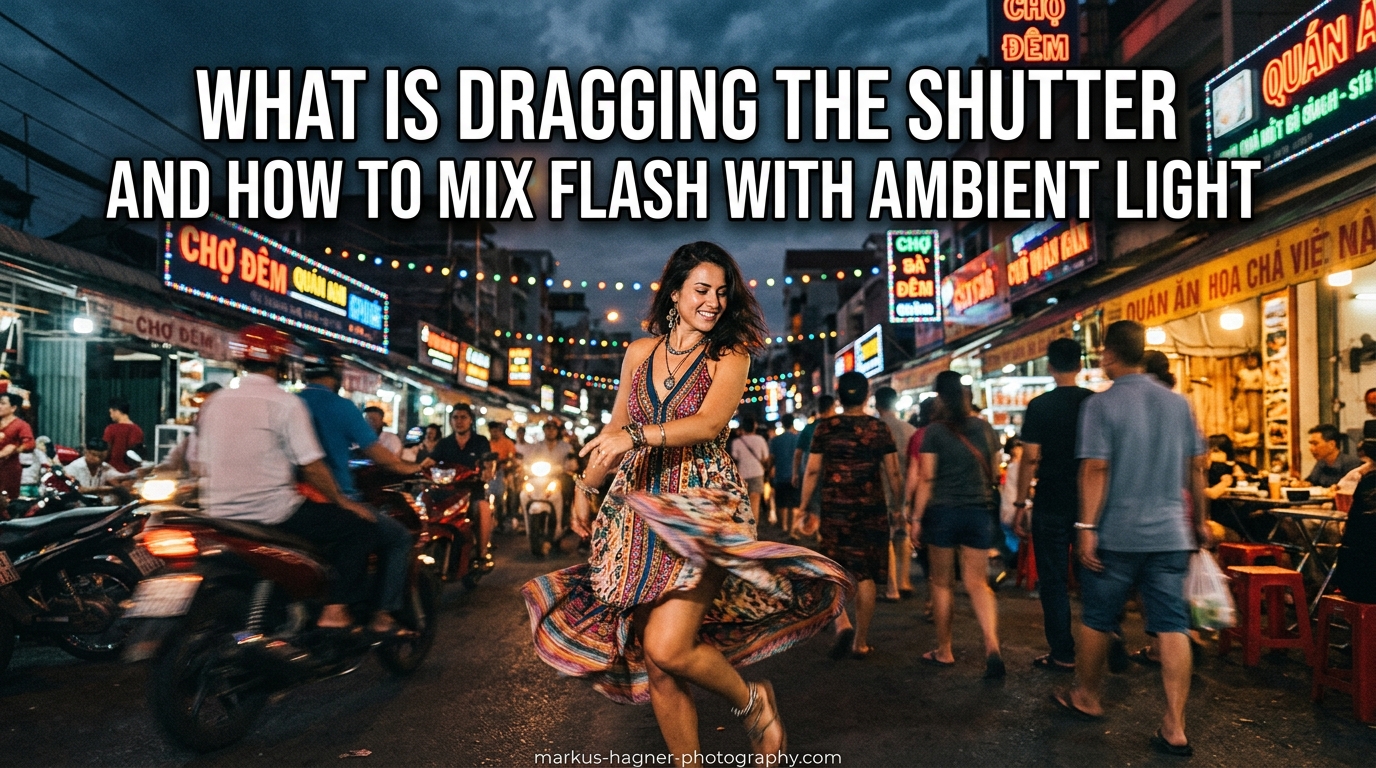
Have you ever taken a flash photo at an event only to end up with a perfectly lit subject against a pitch-black background? It is one of the most frustrating experiences for photographers working in low-light situations. The good news is there is a simple technique that solves this problem and adds depth and atmosphere to your images. It is called dragging the shutter, and mastering it will transform how you mix flash with ambient light.
In this guide, I will walk you through exactly what dragging the shutter means, how it works mechanically, and the step-by-step process to balance your flash exposure with the available light in any scene. Whether you shoot weddings, concerts, or events, this technique will help you create more natural-looking images that capture the mood of the environment.
What Is Dragging the Shutter?
Dragging the shutter is a flash photography technique that uses a slower shutter speed than your camera’s maximum sync speed to balance flash exposure with ambient light. When you drag the shutter, you are essentially capturing two exposures in a single frame: a flash-frozen subject and a longer ambient exposure that reveals the background.
Think of it this way: your flash fires in a tiny fraction of a second (often around 1/1000th or faster), which freezes your subject instantly. Meanwhile, your shutter stays open longer, allowing whatever ambient light exists in the scene to continue exposing the sensor. This creates an image where your subject is sharp and properly lit, but the background is also visible instead of falling into darkness.
The technique gets its name from the idea that you are “dragging” or extending the shutter speed below the typical flash sync threshold. Most cameras have a maximum flash sync speed between 1/160 and 1/250 second. When you shoot at faster speeds, the shutter curtain blocks part of the sensor during the flash. But when you slow down to 1/60, 1/30, or even slower, you give ambient light time to contribute to the exposure.
How Flash and Ambient Light Work Together
Understanding why dragging the shutter works requires grasping a fundamental concept: flash exposure and ambient exposure are controlled by different settings. This is what makes the technique possible, but it is also where many photographers get confused.
The Two-Exposure Concept
When you mix flash with ambient light, you are creating two separate exposures that combine into one image. The flash exposure is controlled primarily by your aperture and flash power. Your shutter speed has almost no effect on flash exposure because the flash duration is so brief.
Ambient exposure, on the other hand, responds to all three exposure controls: aperture, ISO, and shutter speed. This means you can adjust your shutter speed to brighten or darken the background without affecting how your flash-lit subject appears. It is like having independent control over foreground and background exposure.
Understanding Sync Speed
Your camera’s flash sync speed (also called X-sync) is the fastest shutter speed at which the entire sensor is exposed at once. Most focal plane shutters use two curtains that travel across the sensor. At fast shutter speeds, the second curtain starts closing before the first curtain finishes opening, creating a narrow slit that moves across the frame.
If your flash fires while this slit is moving, only part of the sensor receives light from the flash, resulting in a dark band across your image. That is why you cannot use shutter speeds faster than your sync speed with standard flash. The sync speed represents the fastest shutter where both curtains are fully open simultaneously, allowing the entire sensor to receive the flash burst.
Why Slower Shutter Speeds Work
When you drop below the sync speed to 1/60, 1/30, or even 1/4 second, the first curtain opens fully, the flash fires, and then the shutter stays open while ambient light continues to hit the sensor. Your subject remains frozen because the flash duration is so short, but the background gets brighter with each passing moment the shutter remains open.
This is why you can handhold at 1/15 second and still get a sharp subject. The flash freezes motion regardless of your shutter speed. However, any movement from your subject after the flash fires may create ghosting, and camera shake during the longer exposure can blur the ambient portion of the image.
How to Drag the Shutter: Step-by-Step Guide
Let me walk you through the exact process I use when dragging the shutter. This approach works whether you are using speedlights, monolights, or studio strobes.
Step 1: Set Your Camera to Manual Mode
Switch your camera to full manual mode. You need complete control over all three exposure settings for this technique to work consistently. Automatic modes will fight against you by trying to expose for the entire scene rather than letting you balance flash and ambient separately.
Step 2: Choose Your Sync Speed as a Starting Point
Set your shutter speed to your camera’s maximum sync speed (usually 1/160 to 1/250 second). Take a test shot with your flash turned off. The image should be dark or nearly black. This confirms your ambient exposure is low enough that your flash will dominate the subject exposure.
Step 3: Set Your Aperture Based on Depth of Field
Choose an aperture that gives you the depth of field you want. Remember that aperture affects both flash and ambient exposure equally. I often start around f/5.6 or f/8 for events, which provides enough depth of field for most situations while still letting in adequate light.
Step 4: Set Your ISO Low
Start with ISO 100 or your camera’s native ISO. Lower ISO values give you the cleanest images and more flexibility to drag the shutter longer. You can always raise ISO later if you need more ambient light.
Step 5: Add Flash and Set Power
Turn on your flash and take a test shot. Adjust flash power until your subject is properly exposed. You can do this manually or use TTL mode if your flash supports it. The key is getting the subject exposure right while ignoring the background for now.
Step 6: Drag the Shutter to Bring in Ambient
Now comes the magic. Slowly reduce your shutter speed while watching how the background changes. Go from 1/160 to 1/125, then 1/60, 1/30, and beyond. Each step brightens the background without affecting your subject exposure.
For handheld shots, many photographers find success between 1/15 and 1/30 second. For scenes with more ambient light, you may only need to drop to 1/60 or 1/80. The goal is finding the sweet spot where the background looks natural but not overwhelming.
Step 7: Fine-Tune and Experiment
Review your images and adjust as needed. If the background is too bright, speed up the shutter slightly. If it is too dark, slow down further. Remember that your aperture affects everything, so if you need more ambient without changing shutter speed, you can also open up the aperture and reduce flash power to compensate.
Quick Settings Reference
Here are some starting points I have found reliable across different scenarios:
- Wedding receptions (dim indoor): f/8, ISO 100-400, 1/8 to 1/15 second
- Event photography (moderate indoor): f/5.6, ISO 400-800, 1/30 to 1/60 second
- Concert photography (stage lighting): f/4-5.6, ISO 800-1600, 1/30 to 1/60 second
- Outdoor night portraits: f/4-5.6, ISO 100-400, 1/15 to 1/30 second
Creative Techniques and Curtain Sync Modes
Once you understand the basics of dragging the shutter, you can explore creative effects and different flash timing modes. This is where the technique really opens up artistic possibilities.
First Curtain vs Second Curtain Sync
Your camera offers two different flash timing modes, and understanding the difference is crucial for creative shutter drag effects.
First curtain sync (also called front curtain sync) fires the flash immediately when the shutter opens. This is the default behavior on most cameras. If your subject is moving during a long exposure, the flash freezes them at the start of the exposure, and any subsequent motion creates blur in front of them.
Second curtain sync (also called rear curtain sync) fires the flash just before the shutter closes. This means any motion blur from ambient light appears behind your subject, with the flash freezing them at the end of the movement. This creates more natural-looking motion trails and is preferred for most creative shutter drag effects.
For example, if you are photographing a dancer moving across the frame, first curtain sync will show blur leading into a sharp figure, which looks unnatural. Second curtain sync creates blur trailing behind the sharp figure, which matches our perception of movement.
When to Use Each Mode
Use first curtain sync when your subject is relatively still or when you want the flash to fire at a predictable moment. It is also useful when working with models who need to see the flash to know when to hold a pose.
Use second curtain sync whenever you want motion trails to appear natural behind your subject. This includes dancing at weddings, moving cars, running athletes, or any situation with deliberate subject movement.
Camera Movement Techniques
You can create dramatic effects by intentionally moving your camera during a shutter drag exposure. Try these creative approaches:
Camera panning: Follow a moving subject during the exposure. The flash freezes your subject while the background blurs into streaks, creating a strong sense of motion.
Camera rotation: Twist the camera slightly during exposure for a spinning effect around your subject. This works well for static subjects and can add energy to otherwise simple portraits.
Zoom burst: If using a zoom lens, zoom in or out during the exposure. The flash freezes your subject while the zooming creates radiating lines toward or away from the center.
Concert Photography Applications
Concert photographers use shutter drag extensively to capture the energy of live performances. Stage lighting is often dramatic and colorful, and dragging the shutter lets you preserve that atmosphere while still getting a sharp image of the performer.
Many concert photographers work at 1/30 to 1/60 second, allowing stage lights to create colorful streaks and ambient glow. Some even combine this with second curtain sync so the motion blur trails behind the musician, emphasizing their movement through the frame.
Common Mistakes and How to Avoid Them
Dragging the shutter is a straightforward technique, but several common mistakes trip up photographers who are learning it. Here are the issues I see most often and how to fix them.
Mistake 1: Ghosting and Double Images
Ghosting occurs when your subject moves during the ambient exposure portion of the shot. You see a sharp flash-frozen subject overlaid with a blurry version of them. This happens most often with second curtain sync when your subject keeps moving after the initial ambient exposure begins.
Fix: Work with faster shutter speeds when your subjects are active, or coach them to hold still during the exposure. For events like weddings, 1/15 to 1/30 second usually minimizes ghosting while still capturing ambient.
Mistake 2: Dark Images at Sync Speed
Some photographers set their shutter to sync speed but forget that ambient may still be too dark to register. They expect the background to appear, but it remains nearly black.
Fix: Remember that sync speed is your starting point, not your final setting. You must actively slow the shutter below sync speed to bring in ambient light. Try dropping to 1/60, then 1/30, and observe the changes.
Mistake 3: Color Balance Mismatch
When mixing flash (which is daylight balanced around 5500K) with tungsten ambient light (around 3200K), you often get an orange background with a neutral subject. This color mismatch can look unnatural.
Fix: Use a CTO (color temperature orange) gel on your flash to match tungsten ambient light. Set your white balance to tungsten, and both flash and ambient will render with consistent color. For fluorescent or mixed lighting, experiment with different gel combinations.
Mistake 4: Overexposure from Mixed Sources
Adding ambient light to your flash exposure can push your highlights too far, especially in bright indoor environments or at dusk outdoors.
Fix: Think of ambient as a fill light. Your flash should be your main exposure for the subject. Underexpose the ambient slightly relative to the flash to maintain contrast and separation.
Mistake 5: Camera Shake Blurring the Ambient
At slower shutter speeds, your own camera movement can blur the ambient portion of the image, creating an unsharp background even when your subject is frozen by flash.
Fix: Practice handheld stabilization techniques. Tuck your elbows, control your breathing, and squeeze the shutter smoothly. For very slow speeds (below 1/15 second), consider using a monopod or finding a stable surface.
Pro Tips and Troubleshooting
Here are additional insights I have gathered from years of using this technique in the field.
Handheld Stability Tips
You can successfully drag the shutter handheld down to 1/15 second or even slower with practice. The key is body mechanics: plant your feet shoulder-width apart, press your elbows against your torso, and exhale slowly before firing. Image stabilization in your lens or camera body helps significantly, especially for the ambient portion of the exposure.
Many photographers report that 1/15 to 1/30 second is the sweet spot for handheld shutter drag at events. Fast enough to minimize shake, slow enough to capture meaningful ambient.
Flash to Ambient Ratio
A common question is how much flash versus ambient should appear in the final image. There is no single correct answer, but here is a useful guideline: set your flash exposure for the subject first, then drag the shutter until the background looks natural but slightly darker than your subject. This maintains subject separation and depth.
If you want a more dramatic look with darker backgrounds, stop dragging earlier. For a lighter, more ambient-filled look, drag longer. The choice depends on your creative vision and the mood of the scene.
Working with TTL vs Manual Flash
TTL flash can work well for shutter drag because it automatically adjusts as you change shutter speeds. However, manual flash gives you more consistent results because the output stays constant as you experiment with different shutter speeds.
My recommendation: learn with manual flash first so you understand the relationship between settings. Then switch to TTL for faster-paced situations where you need quick adjustments.
Film Photography Considerations
The shutter drag technique works beautifully with film cameras, though you lose the instant feedback of digital. The same principles apply: flash freezes the subject while longer exposure captures ambient. Film photographers have used this technique for decades, especially in photojournalism and event photography.
Keep in mind that different films respond differently to mixed lighting, so you may need to experiment with color correction filters or embrace the color shifts as part of the aesthetic.
Frequently Asked Questions
How do I do a shutter drag with flash?
To do a shutter drag with flash, set your camera to manual mode, start at your maximum sync speed (1/160-1/250), set your aperture and ISO, expose your subject with flash power, then gradually slow your shutter speed (try 1/60, 1/30, 1/15) until the background reaches the brightness you want. The flash freezes your subject while the longer exposure captures ambient light.
What are common mistakes when mixing flash with ambient light?
Common mistakes include ghosting from subject movement during long exposures, color balance mismatches between daylight-balanced flash and tungsten ambient, overexposure from adding too much ambient, and camera shake blurring the background. Use faster shutter speeds for moving subjects, gel your flash to match ambient color, and practice handheld stabilization techniques.
What shutter speed should I use with flash?
For standard flash photography, use your camera’s sync speed (typically 1/160 to 1/250 second). For dragging the shutter, slow down to 1/60, 1/30, or even 1/15 second to capture ambient light. The exact speed depends on how much ambient you want and how steady you can hold the camera. Most photographers find 1/15 to 1/30 second works well for handheld shots.
What is the difference between first curtain and second curtain sync?
First curtain sync fires the flash at the start of the exposure, so any motion blur appears in front of your subject. Second curtain sync fires the flash just before the shutter closes, so motion trails appear behind your subject. Second curtain sync creates more natural-looking motion effects and is preferred for creative shutter drag with moving subjects.
Conclusion
Dragging the shutter is one of those techniques that seems complex at first but becomes second nature with practice. The core concept is simple: your flash freezes your subject while a longer shutter speed captures ambient light. By understanding that aperture controls flash exposure while shutter speed controls ambient, you gain independent power over foreground and background.
Start at your sync speed, get your flash exposure right, then slowly drag the shutter until the background matches your creative vision. Experiment with first and second curtain sync for different motion effects. Watch for common mistakes like ghosting and color mismatches, and remember that practice is essential for developing the handheld stability needed at slower shutter speeds.
The best way to learn how to mix flash with ambient light is to get out and shoot. Find a dimly lit room, set up a simple flash, and work through the step-by-step process outlined above. Each environment will teach you something new about balancing the two light sources, and soon you will be creating images with depth, atmosphere, and professional polish.