
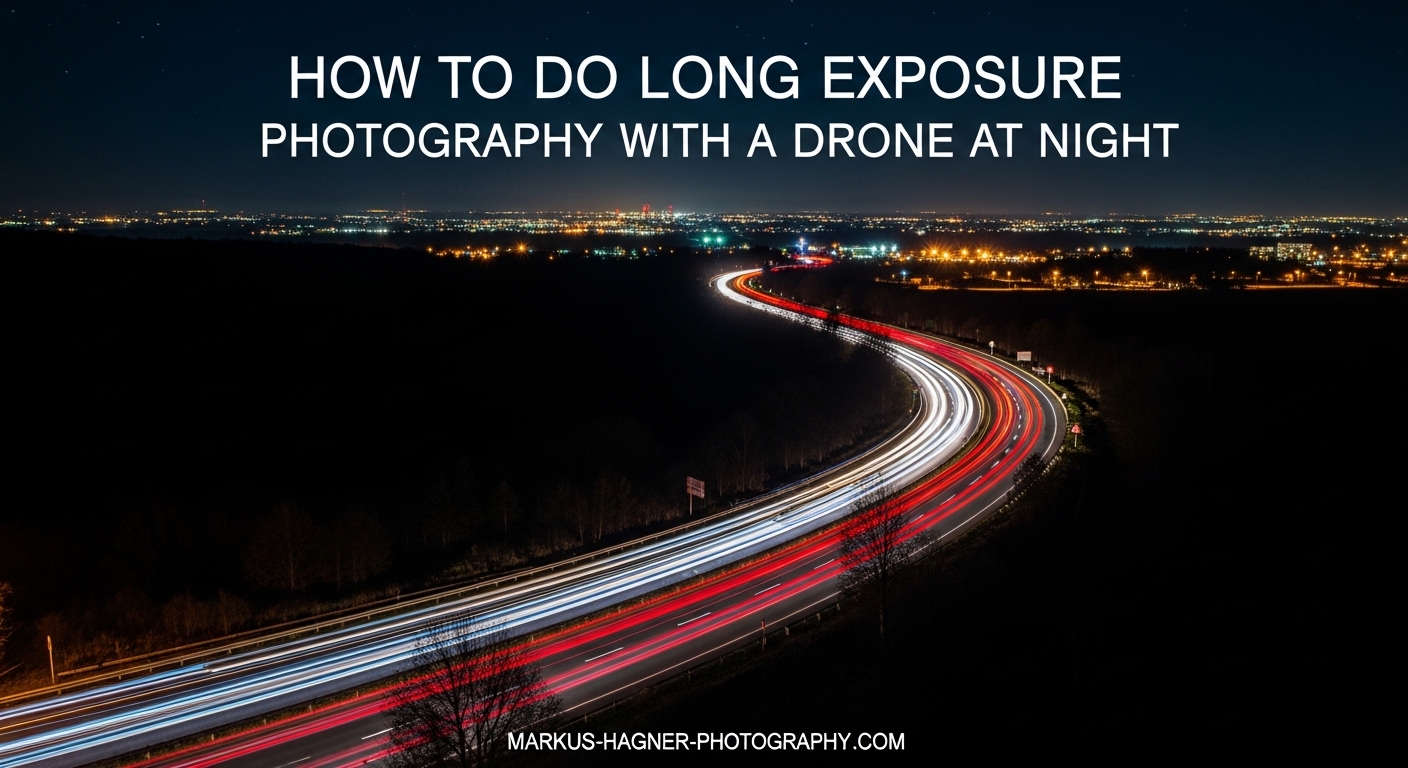
Capturing long exposure photography with a drone at night transforms ordinary scenes into stunning images with light trails, smooth water, and ethereal cityscapes. Unlike daytime aerial shots, night long exposures require precise camera settings, careful timing, and the right equipment to overcome the challenges of low light and drone movement.
I have spent countless nights experimenting with drone long exposure techniques, and the results can be genuinely spectacular when everything comes together. The key is understanding that your drone is both your camera platform and your biggest limitation. Even the most stable drone will drift slightly, which becomes visible during longer exposures.
This guide covers everything you need to know about long exposure photography with a drone at night, from equipment and legal requirements to camera settings and post-processing techniques that will help you create dramatic aerial images.
Equipment You Need for Night Drone Long Exposure
Success with long exposure drone photography starts with having the right equipment. While many modern drones can capture decent night photos, certain features make a significant difference when pushing shutter speeds beyond one second.
Drone Requirements
Your drone needs manual camera controls to perform long exposure photography effectively. Look for models that allow you to set ISO, shutter speed, and aperture independently. DJI drones like the Mavic 3 Pro, Mini 4 Pro, and Air 3 all offer full manual mode through their apps.
RAW format support is essential for night photography. Shooting in RAW gives you much more flexibility during post-processing, especially when recovering shadow details and adjusting white balance. The larger sensor found in drones like the Mavic 3 Pro (1-inch sensor) handles noise better than smaller sensors, but even the Mini 4 Pro with its f/1.7 aperture can produce excellent results.
Gimbal stabilization quality directly impacts your maximum usable shutter speed. A well-tuned gimbal can compensate for minor drone movements, helping you achieve sharper images at slower shutter speeds. I have found that three-axis gimbals on current DJI models perform remarkably well when conditions are calm.
ND Filters for Night Photography
Neutral density filters reduce the amount of light entering your camera without affecting color. For night photography, you may not always need an ND filter since light levels are already low. However, if you are shooting during blue hour or in well-lit urban areas, an ND filter can help you achieve longer shutter speeds without overexposing highlights.
For night long exposure work, I recommend ND8 to ND32 filters depending on the ambient light. Polar Pro and DJI make excellent filters specifically designed for popular drone models. The key is choosing filters that screw onto your lens securely without adding too much weight to affect gimbal balance.
When shooting in near-total darkness, you can often skip the ND filter entirely and rely on your camera’s base ISO and aperture settings to achieve the exposure you want. This simplifies your setup and eliminates one potential source of image quality degradation.
Safety Equipment for Night Flight
Flying a drone at night requires additional safety equipment to remain legal and safe. Anti-collision lights visible for three statute miles are required by the FAA for night operations under Part 107. These strobe lights help you maintain visual line of sight with your drone and alert other aircraft to your presence.
I use small LED strobe lights attached to the top and bottom of my drone for 360-degree visibility. Many drones now include built-in anti-collision lights, but external lights often provide better visibility from greater distances. Always check your lights before takeoff to ensure they are functioning properly.
Legal Requirements and Safety for Night Drone Flight
Before attempting long exposure photography with a drone at night, you must understand and comply with all applicable regulations. Flying at night introduces additional requirements beyond standard daytime operations.
In the United States, Part 107 certified pilots can fly at night without a waiver if they have completed the updated Part 107 training that includes night operations. The key requirements include having anti-collision lights visible for three statute miles, maintaining visual line of sight with your drone, and avoiding flying over people who are not part of your operation.
Civil twilight is an important concept for drone photographers. This is the period when the sun is between 0 and 6 degrees below the horizon, occurring roughly 30 minutes before sunrise and after sunset. During civil twilight, you can often achieve beautiful long exposure results with enough ambient light to compose your shots easily.
Always check local regulations before flying at night. Some areas restrict drone operations after dark, and temporary flight restrictions may apply near airports, stadiums, or emergency response areas. Apps like Aloft and AirMap can help you verify airspace restrictions before you fly.
Camera Settings for Drone Long Exposure at Night
Getting your camera settings right is crucial for successful long exposure photography with a drone at night. Unlike daylight shooting where you have plenty of light to work with, night photography requires careful balance between ISO, shutter speed, and aperture to achieve proper exposure while minimizing noise.
The Exposure Triangle for Night Shots
ISO controls your camera’s sensitivity to light. For drone night photography, I typically start at ISO 100-400 for long exposures. Higher ISO settings introduce more noise, which becomes very visible in dark areas of your image. The larger your drone’s sensor, the better it will handle higher ISO values, but keeping ISO low should be your first priority.
Shutter speed determines how long your camera’s sensor is exposed to light. For long exposure effects, you will want shutter speeds between 0.5 and 8 seconds depending on your subject and conditions. Light trails typically need 2-4 seconds, while smooth water effects may require 4-8 seconds. The challenge is that longer exposures reveal any drone movement as blur.
Aperture controls the size of the lens opening and affects both light intake and depth of field. For night photography, using your lens’s widest aperture (lowest f-number) lets in maximum light, allowing lower ISO and faster shutter speeds. The DJI Mini 4 Pro’s f/1.7 aperture is excellent for night work, while drones with variable aperture like the Mavic 3 Pro can adjust from f/2.8 to f/11.
Recommended Settings by Scenario
For light trails from traffic, I recommend ISO 100-200, shutter speed 2-4 seconds, and aperture at your widest setting. Position your drone above or to the side of the traffic flow and wait for several cars to pass during your exposure. The moving headlights and taillights will create streaks of light across your frame.
For cityscapes at night, try ISO 200-400, shutter speed 1-3 seconds, and aperture f/2.8-f/4. This combination captures the glow of city lights while maintaining sharp details in buildings. Shooting during blue hour adds beautiful color to the sky that contrasts with the warm artificial lights below.
For astrophotography attempts, use ISO 800-1600, shutter speed 8-15 seconds, and your widest aperture. Note that drone astrophotography is extremely challenging due to sensor limitations and drone movement. Image stacking multiple shorter exposures often produces better results than single long exposures.
White Balance and Focus Settings
Auto white balance often struggles with night scenes containing mixed light sources. I prefer setting a custom white balance between 3200K and 4500K for city scenes, which helps maintain consistent color across your images. For areas lit primarily by streetlights, try around 2700K-3200K to neutralize the orange sodium vapor light color.
Manual focus is essential for night photography since autofocus systems struggle in low light. Set your focus to infinity for distant subjects, but be careful as some lenses focus slightly past infinity. Take a test shot at maximum zoom to verify your focus is sharp before committing to a series of long exposures.
Best Timing and Conditions for Night Long Exposure
Timing your night drone photography sessions correctly can make the difference between mediocre snapshots and stunning images. The right conditions minimize technical challenges while maximizing creative opportunities.
Blue Hour vs Civil Twilight
Blue hour occurs during civil twilight, roughly 20-40 minutes after sunset or before sunrise. During this time, the sky takes on a deep blue color that provides a beautiful backdrop for city lights and creates natural separation between buildings and sky. This is often the best time for drone long exposure photography.
The advantage of shooting during blue hour is that you have enough ambient light to compose your shots easily on your controller screen, while still being dark enough for long exposure effects. City lights are just turning on and appear brightest relative to the darkening sky. I schedule most of my night drone sessions to begin about 15 minutes before sunset so I am ready to shoot as blue hour begins.
As twilight fades into full darkness, your exposure times will need to increase. The sky becomes one dark tone rather than the gradient of blue hour, which can work well for certain compositions but requires more careful exposure management.
Wind and Weather Considerations
Wind is the enemy of drone long exposure photography. Even gentle breezes cause your drone to make constant micro-adjustments to maintain position, and these movements become visible blur during exposures longer than 1-2 seconds. For best results, aim to fly when wind speeds are under 5 mph.
I check weather apps before every night session and look for calm conditions. Early morning hours before sunrise often have the calmest air of the day. If there is any wind, I reduce my shutter speed and take more images, knowing my keeper rate will be lower.
Temperature affects both your drone’s battery performance and the density of the air. Cold batteries drain faster, so plan shorter flights in winter conditions. Cold, dense air can actually help your drone hover more steadily, but you will need to monitor battery levels closely.
Location Scouting for Night Sessions
Scouting your location during daylight gives you a huge advantage for night photography. You can identify safe takeoff and landing zones, note potential obstacles that will be invisible after dark, and plan your compositions in advance. Google Maps and Google Earth are valuable tools for initial research.
Look for locations with interesting light sources: highways with steady traffic, waterfronts with reflections, or architecture with dramatic lighting. Consider how moving elements like cars, boats, or clouds will appear during long exposures. The best night photography locations combine static elements with dynamic light sources.
Step-by-Step: How to Take Long Exposure Photos with Your Drone at Night
Follow this process to capture stunning long exposure images with your drone at night. Each step builds on the previous one to give you the best chance of success.
Step 1: Scout your location during daylight. Visit your shooting location before dark to identify the best compositions, check for obstacles, and find a safe area for takeoff and landing. Note where the interesting light sources are and how traffic flows through the area.
Step 2: Prepare your equipment. Attach your ND filter if you plan to use one, check that your anti-collision lights are working, and verify your battery is fully charged. Cold night temperatures reduce battery capacity, so start with maximum charge.
Step 3: Launch and position your drone. Take off from your prepared location and fly to your shooting position. Give yourself time to compose your shot carefully. Use the rule of thirds and leading lines to create compelling compositions.
Step 4: Switch to manual camera mode. Access your drone’s camera settings and switch from auto to manual mode. This gives you full control over ISO, shutter speed, and aperture.
Step 5: Set your initial camera settings. Start with ISO 100-200, your widest aperture, and a 2-second shutter speed. These settings work well as a starting point for most night scenes.
Step 6: Set white balance and focus. Choose a custom white balance appropriate for your scene (3200K-4500K for most city scenes). Set focus to manual and adjust to infinity, then take a test shot to verify sharpness.
Step 7: Enable RAW format. Ensure your drone is shooting in RAW format for maximum post-processing flexibility. This is critical for night photography where you will need to adjust exposure and reduce noise.
Step 8: Take multiple shots using burst mode. Set your drone to capture 3-5 images in quick succession. This increases your chances of getting at least one sharp image and provides multiple frames for image stacking.
Step 9: Check your histogram. After each series of shots, review your histogram to verify proper exposure. Night scenes should show most data in the left half of the histogram without being completely clipped at the shadows.
Step 10: Adjust settings and repeat. Based on your results, adjust ISO, shutter speed, or aperture as needed. Continue shooting until you have captured several sharp images with good exposure.
Troubleshooting Common Long Exposure Problems
Even with careful preparation, long exposure drone photography presents challenges. Here are solutions to the most common problems you will encounter.
Blurry Images from Drone Drift
Drift is the most frustrating challenge in drone long exposure photography. Your drone constantly makes tiny adjustments to maintain position, and these movements become visible blur during longer exposures. The gimbal stabilizes the camera’s orientation but cannot compensate for the entire drone moving laterally.
To minimize drift blur, reduce your shutter speed to 2 seconds or less, shoot in the calmest conditions possible, and position your drone where GPS signal is strongest for better position holding. Taking multiple shots increases your odds of capturing moments when your drone happens to be still.
Some photographers use tripod mode or cinematic mode on their drones, which slows the drone’s response to position changes. This can help reduce the frequency of micro-adjustments, though it may make the drone feel less responsive to your inputs.
Excessive Noise in Night Photos
Small drone sensors produce noticeable noise at high ISO settings, especially in shadow areas. The solution is to keep your ISO as low as possible while still achieving proper exposure. If you must use higher ISO, plan to use image stacking techniques in post-processing.
Image stacking involves taking multiple identical exposures and combining them in software like Photoshop. The software averages the pixel values, which reduces random noise while preserving actual image detail. I typically stack 5-10 images for night shots taken at ISO 800 or higher.
Incorrect Exposure
Night scenes with bright lights and dark shadows can fool your camera’s metering system. Always check your histogram rather than relying on the preview image on your controller screen. A properly exposed night image may look dark on the preview but contain all the data you need in the RAW file.
If your highlights are clipping, reduce your shutter speed or use a stronger ND filter. If your shadows are completely blocked up, increase ISO slightly or extend your shutter speed if conditions allow. Bracketing exposures can help you find the right settings quickly.
Post-Processing Your Drone Night Photos
Post-processing is essential for drone night photography. RAW files from drone cameras typically look flat and dark straight out of camera, but contain tremendous potential for enhancement.
Image Stacking for Noise Reduction
The image stacking technique is a game-changer for night drone photography. By taking multiple shots of the same scene and combining them in Photoshop or specialized software, you can dramatically reduce noise while maintaining detail.
To stack images in Photoshop, open your series of images as layers in a single document. Select all layers and use Edit > Auto-Align Layers to correct for any minor drone movement. Then convert the layers to a Smart Object and set the stack mode to Mean. This averages the pixel values across all images, reducing random noise significantly.
I have achieved 2-3 stops of effective noise improvement using this technique with 5-10 image stacks. The trade-off is that you need multiple identical shots, which requires your drone to remain relatively still for longer periods.
Lightroom and Photoshop Workflow
Start your editing workflow in Lightroom with basic adjustments. Increase exposure to brighten the overall image, then use shadows and blacks sliders to recover detail in dark areas. Be careful not to push these too far or you will introduce noise and unnatural tones.
White balance adjustment is crucial for night photos. City scenes often benefit from cooler tones to counteract warm artificial lighting, while astrophotography typically works best with slightly warmer settings around 4000K.
Local adjustments using adjustment brushes or graduated filters help balance exposure between bright light sources and dark shadows. Reduce highlights on overexposed streetlights while lifting shadows in building facades to create a more balanced final image.
Creative Subject Ideas Beyond Light Trails
While traffic light trails are popular, many other subjects work beautifully for night long exposure drone photography. Water reflections create smooth, mirror-like surfaces during long exposures. Position your drone over harbors, rivers, or lakes where city lights reflect on the water’s surface.
Amusement parks at night offer colorful rides with moving lights that create abstract patterns during long exposures. Ferris wheels and spinning rides are particularly effective subjects that transform into circular light sculptures.
Construction sites with floodlit equipment, airports with runway lights, and industrial facilities with steam or smoke plumes all offer unique opportunities for night long exposure work. Train yards with moving locomotives create dramatic light trails different from automotive traffic.
Frequently Asked Questions
What settings should I use for drone photography at night?
For night drone photography, use ISO 100-400, shutter speed 2-4 seconds for light trails, and your widest aperture (f/1.7-f/2.8). Set white balance between 3200K-4500K for city scenes, shoot in RAW format, and use manual focus set to infinity. Always check your histogram to verify proper exposure.
Can drones do long exposure photography?
Yes, drones can do long exposure photography if they have manual camera controls. Most DJI drones including Mavic, Air, and Mini series support shutter speeds up to 8 seconds or longer. The main limitation is drone movement during the exposure, so calm conditions and multiple shots are essential for sharp results.
What ND filter do I need for drone long exposure?
For night long exposure, you may not need an ND filter since light levels are already low. For blue hour or brightly lit urban scenes, ND8 to ND32 filters work well. The filter strength depends on how much you need to extend your shutter speed without overexposing highlights.
How long of an exposure can I use with a drone?
Most drones support exposures up to 8 seconds, but practical limits are 2-4 seconds due to drone drift. In near-zero wind conditions with a stable hover, you might achieve sharp results at 4-8 seconds. Take multiple shots to increase your chances of capturing moments when the drone is perfectly still.
Is it legal to fly a drone at night?
In the United States, Part 107 certified pilots can fly at night after completing the updated night operations training. You must have anti-collision lights visible for three statute miles, maintain visual line of sight, and comply with all airspace restrictions. Check local regulations as some areas restrict night drone operations.
Conclusion
Long exposure photography with a drone at night opens up creative possibilities impossible to achieve from the ground. By understanding your equipment, mastering manual camera settings, and working within the limitations of drone stability, you can capture stunning aerial images with light trails, smooth water, and dramatic cityscapes.
The key takeaways are to shoot in calm conditions, use the lowest ISO possible, take multiple shots for both selection and stacking, and invest time in post-processing to bring out the best in your images. With practice, you will develop an intuition for the right settings and conditions that produce consistent results.
Start with blue hour sessions where conditions are more forgiving, then progress to full darkness as your skills improve. Each night session teaches you something new about your equipment and technique, building toward increasingly impressive results.