
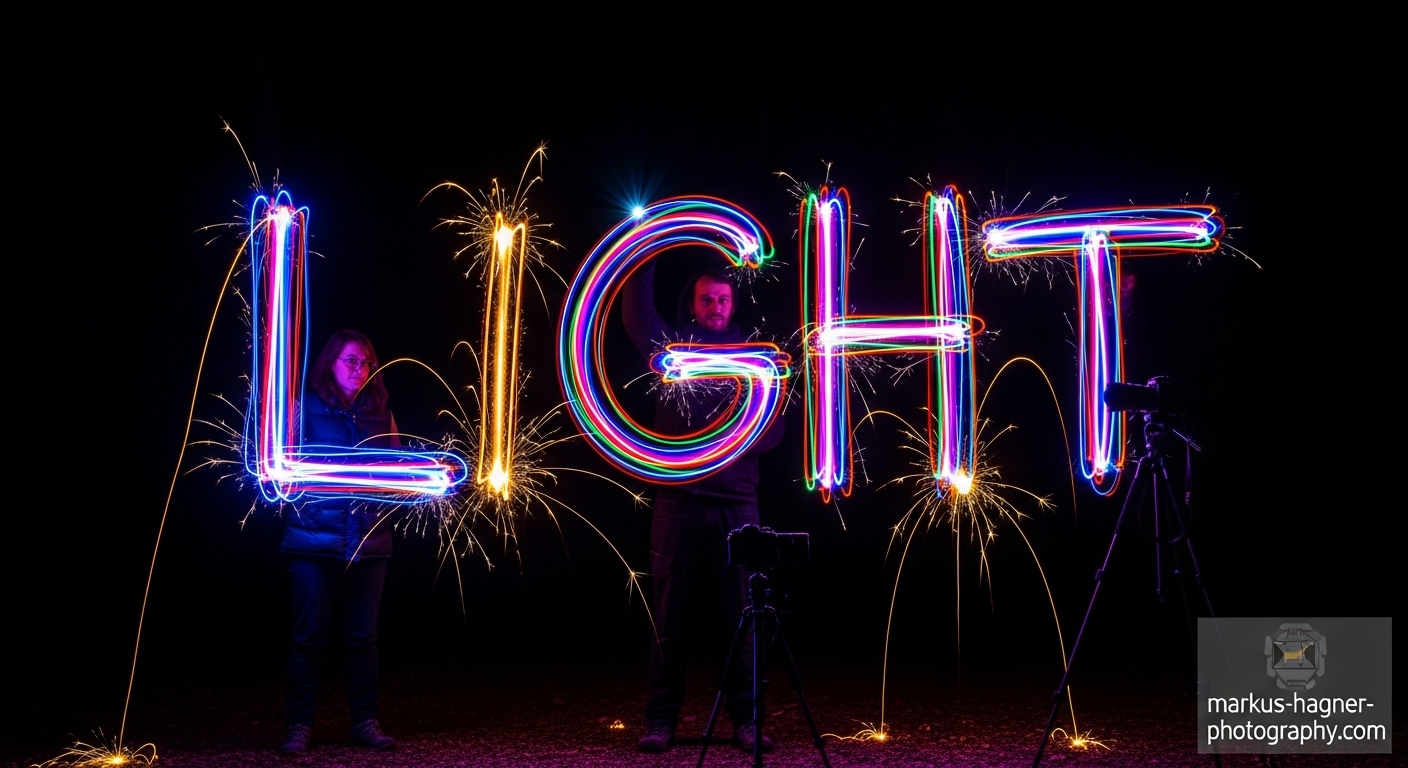
I remember the first time I tried light graffiti photography. I was standing in my backyard at 2 AM, waving a flashlight around like a madman, hoping something magical would happen. When I reviewed that first image, I was hooked! There was something incredibly freeing about being able to “draw” with light in mid-air and capture it forever.
Light graffiti, also known as light painting, is one of the most creative and accessible forms of photography I’ve ever encountered. It’s the perfect blend of technical skill and artistic expression, allowing you to create images that look like they’ve been plucked straight from a dream.
In this comprehensive guide, I’ll share everything I’ve learned about light graffiti photography over the years. From the essential gear you’ll need to advanced techniques that will take your work to the next level, I’ve got you covered. Whether you’re a complete beginner or looking to refine your skills, this guide will help you create stunning light graffiti images that will amaze your friends and followers.
What Exactly is Light Graffiti?
Light graffiti is a photography technique where you use long exposure settings to capture moving light sources as they create patterns, shapes, or images in your frame. Think of it as painting with light – your camera sensor becomes the canvas, and your light source becomes the brush.
I discovered that what makes light graffiti so special is its ability to capture the invisible. We can’t see light trails with our naked eye, but with the right camera settings, these trails become permanent, creating images that look almost magical.
The beauty of light graffiti lies in its simplicity and accessibility. You don’t need expensive equipment or a professional studio – just a camera, a tripod, and some light sources. I’ve created incredible light graffiti images with everything from professional LED lights to my smartphone flashlight.
Essential Gear for Light Graffiti Photography
Camera Equipment
Camera: I’ve found that any camera with manual mode capabilities will work for light graffiti. While I primarily use my DSLR, I’ve created great images with mirrorless cameras, and even smartphones with long exposure apps. The key is having control over shutter speed, aperture, and ISO.
Tripod: This is non-negotiable! I learned this the hard way when my early attempts resulted in blurry messes because I tried to handhold my camera. A sturdy tripod keeps your camera perfectly still during those long exposures. You don’t need anything fancy – even a budget tripod will work as long as it’s stable.
Remote Shutter Release: This has been a game-changer for my light graffiti work. Pressing the shutter button manually can cause camera shake, no matter how careful you are. I use both a cable release and a wireless remote, depending on the situation. If you don’t have one, your camera’s self-timer function can work in a pinch.
Light Sources
Flashlights: My go-to light source for most light graffiti work. I recommend getting flashlights with adjustable brightness settings. I’ve found that LED flashlights work particularly well because they’re bright and battery-efficient.
LED Light Sticks: These are fantastic for creating smooth, consistent light trails. I have a collection of different colored LED sticks that I use for various effects. The best ones have multiple brightness settings and can be set to stay on continuously.
Smartphone: Don’t underestimate your smartphone’s flashlight! I’ve created some of my favorite light graffiti images using just my phone. There are also apps that can turn your screen into different colored light sources.
Sparklers: Perfect for creating dramatic, fiery light trails. I love using sparklers for special occasions or when I want to add some excitement to my light graffiti. Just be careful and follow safety precautions.
Glow Sticks: These are great for longer exposures because they provide consistent light for extended periods. I use them when I need more time to create complex designs.
String Lights: Perfect for creating orbs and other circular patterns. I’ll show you how to use these later in the guide.
Additional Accessories
Color Gels: These translucent colored sheets can be placed over your light sources to create different colored light trails. I have a set of primary colors that I mix and match for different effects.
Diffusers: I’ve found that placing a diffuser (like wax paper or a plastic milk jug) over my flashlight creates a softer, more even light that’s easier to work with.
Extra Batteries: Cold temperatures and long exposures can drain batteries quickly. I always bring at least three sets of spare batteries for every light source I’m using.
Dark Clothing: I learned early on that wearing dark, non-reflective clothing helps me stay invisible in my shots. When I wear light-colored clothes, I sometimes appear as a ghostly figure in my images!
Camera Settings for Perfect Light Graffiti
Getting Started with Manual Mode
I always shoot in manual mode for light graffiti photography. This gives me complete control over every aspect of the exposure. Here are the settings I use as my starting point:
ISO: I keep my ISO as low as possible, usually between 100-200. This minimizes noise and gives me cleaner images. I discovered that higher ISO settings can create unwanted graininess, especially in longer exposures.
Aperture: I typically shoot between f/8 and f/16. A narrower aperture gives me greater depth of field and allows for longer shutter speeds, which is perfect for light graffiti. I’ve found that f/11 is my sweet spot for most situations.
Shutter Speed: This is where the magic happens! I start with 15-30 seconds for simple designs and use bulb mode for more complex creations. In bulb mode, the shutter stays open as long as I hold the shutter button down (or use my remote release).
White Balance: I usually set my white balance to “Daylight” to maintain the natural colors of my light sources. However, I sometimes experiment with different white balance settings to create unique color effects.
File Format: I always shoot in RAW. This gives me maximum flexibility in post-processing, especially when it comes to adjusting exposure and color balance. I’ve saved many shots by shooting in RAW!
Focusing in the Dark
One of the biggest challenges I faced when starting out was getting proper focus in dark conditions. Here’s my foolproof method:
- I have my assistant (or myself, if I’m working alone) stand where I plan to create the light graffiti
- I shine a bright light on them or have them shine a light at the camera
- I use autofocus to lock focus on them
- Once focus is achieved, I switch to manual focus to lock it in
- I double-check that I haven’t accidentally bumped the focus ring
This method has never failed me, and it’s much more reliable than trying to focus in complete darkness.
Testing and Adjusting
Before I start creating my final light graffiti images, I always do test shots. I’ll take a few exposures at different settings to see how they look. I pay attention to:
- How bright my light trails appear
- Whether the background is too bright or too dark
- If there’s any unwanted ambient light affecting the shot
- How long I need for my designs
I’ve learned that it’s better to start with longer exposures and work my way down if needed. It’s much easier to darken an image in post-processing than to recover blown-out highlights.
Basic Light Graffiti Techniques
Simple Light Drawing
This is where I recommend starting if you’re new to light graffiti. It’s straightforward but teaches you the fundamental skills you’ll need for more advanced techniques.
What You’ll Need:
- Camera on tripod
- Flashlight or LED light
- Remote shutter release
Step-by-Step Process:
- Set up your camera with the settings I mentioned earlier
- Focus on the area where you’ll be drawing
- Start the exposure using your remote release
- Turn on your light source and begin drawing your design
- Remember to move smoothly and deliberately
- Turn off your light source before ending the exposure
Pro Tips I’ve Discovered:
- Practice your design before starting the exposure. I often “air draw” my design a few times to get the muscle memory down
- Keep your light source moving at a consistent speed. I’ve found that inconsistent speeds create uneven light trails
- If you need to lift your “pen” (turn off the light), do it quickly and decisively
- Start with simple shapes like circles, hearts, or basic words before attempting complex designs
Writing with Light
Writing words or messages with light is one of the most popular light graffiti techniques. Here’s how I approach it:
The Backwards Writing Challenge: I discovered early on that you need to write backwards if you want the text to be readable in the final image. This takes some practice, but here’s a trick that helped me:
- Write your message normally on a piece of paper
- Hold it up to a light source and look at it from behind
- Practice tracing the backwards letters
Alternative Approach: If writing backwards is too challenging, try this method:
- Face away from the camera
- Write normally (the text will be backwards in your image)
- Flip the image horizontally in post-processing
Timing Tips:
- I count out the letters in my head to ensure consistent spacing
- For longer words, I pause briefly between letters
- I’ve found that cursive writing often looks better than printing because it creates continuous light trails
Light Orbs
Light orbs are circular patterns that look incredibly impressive but are surprisingly easy to create. They’ve become one of my signature techniques.
What You’ll Need:
- LED light on a string (I use a keychain LED attached to a shoelace)
- Camera on tripod
- Remote shutter release
Creating the Orb:
- Hold the string with the light at the end
- Start swinging the light in a circle
- Once you have a steady rhythm, begin the exposure
- Rotate your body 360 degrees while keeping the light swinging
- Complete the rotation before ending the exposure
Tips for Perfect Orbs:
- I keep my arm extended and locked to maintain consistent circle size
- I practice the swinging motion before starting the exposure
- I’ve found that 20-30 seconds is usually enough for a complete orb
- For multi-colored orbs, I use different colored LED lights and create multiple orbs in the same frame
Light Trails and Patterns
Creating abstract light trails and patterns is where you can really let your creativity shine. Here are some techniques I love:
Zigzag Patterns: I move my light source in sharp, angular movements to create geometric patterns. I’ve found that quick, decisive movements work best.
Spiral Designs: Starting from the center and working outward (or vice versa), I create spiral patterns. I vary the speed to create different effects.
Wave Patterns: I move my light source in smooth, wave-like motions. This works particularly well with multiple colors.
Random Abstracts: Sometimes I just let loose and move the light randomly. I’ve created some of my favorite images this way!
Advanced Light Graffiti Techniques
Multiple Exposure Blending
This technique involves creating multiple light graffiti elements in separate exposures and blending them together in post-processing. It’s perfect for complex scenes that would be impossible to create in a single exposure.
How I Do It:
- I set up my camera on a tripod and ensure it won’t move
- I create different light graffiti elements in separate exposures
- I use a consistent background for all exposures
- In post-processing, I blend the images using layer masks
Benefits:
- I can create much more complex scenes
- I have more control over each element
- I can fix mistakes without redoing the entire image
Light Portraits
Combining light graffiti with portrait photography creates stunning, ethereal images. Here’s my approach:
Setting Up:
- I position my model in the frame
- I focus on my model and lock the focus
- I use a flash or brief light source to illuminate my model
- I then create light graffiti around them
Techniques I Use:
- Having my model hold still while I create light trails around them
- Using the model as part of the light graffiti (having them hold lights)
- Creating light “halos” or “auras” around my model
Tips:
- I ask my model to wear dark clothing
- I have them practice holding completely still
- I use a brief flash at the beginning or end of the exposure to freeze them
Steel Wool Photography
This is one of the most dramatic light graffiti techniques, but it requires careful safety precautions.
Safety First:
- I always do this outdoors away from flammable materials
- I wear protective clothing, including a hat and gloves
- I have a fire extinguisher nearby
- I check local regulations and fire restrictions
What You’ll Need:
- Steel wool (grade 000 or 0000 works best)
- Whisk or metal cage
- String or chain
- Lighter
- Protective gear
Technique:
- I stuff the steel wool into the whisk
- I attach the whisk to a string
- I light the steel wool
- I start spinning it in a circle
- I begin the exposure and capture the sparks
Camera Settings:
- I use similar settings to other light graffiti techniques
- I often use slightly shorter exposures (10-15 seconds)
- I may need to adjust my aperture based on the brightness of the sparks
3D Light Extrusions
This advanced technique creates the illusion of 3D objects made of light. It’s challenging but incredibly rewarding.
How I Do It:
- I visualize a 3D object in the space
- I “draw” the edges of the object with my light source
- I move around the object to create different faces
- I use different colors to enhance the 3D effect
Tips:
- I start with simple shapes like cubes or pyramids
- I practice the movements before starting the exposure
- I use a dimmer light for the “back” edges to enhance the 3D effect
Creative Ideas and Inspiration
Seasonal Light Graffiti
I love creating light graffiti that reflects the seasons:
Winter:
- Snowflake patterns
- Holiday lights and decorations
- Ice crystal designs
Spring:
- Flowers and plants
- Rain patterns
- Butterflies and birds
Summer:
- Fireworks effects
- Ocean waves
- Sun and star patterns
Fall:
- Falling leaves
- Pumpkin designs
- Harvest moon effects
Holiday-Themed Light Graffiti
I create special light graffiti for holidays and celebrations:
Halloween:
- Spooky ghosts and ghouls
- Jack-o’-lantern faces
- Spider webs
Christmas:
- Christmas trees
- Snowflakes and reindeer
- Gift boxes and bows
New Year’s:
- Fireworks and sparklers
- Countdown numbers
- Celebration words
Valentine’s Day:
- Hearts and cupids
- Love messages
- Rose patterns
Abstract Art
Sometimes I like to create purely abstract light graffiti:
Color Studies:
- I experiment with different color combinations
- I create gradients and color transitions
- I explore complementary and analogous color schemes
Texture Exploration:
- I vary the speed and movement of my light source
- I create rough and smooth textures
- I experiment with different light intensities
Emotional Expression:
- I use light to express emotions like joy, anger, or sadness
- I create patterns that evoke different feelings
- I use color psychology to enhance the emotional impact
Also Read: Fujifilm Vs Sony
Post-Processing Tips
Basic Adjustments
Even with perfect camera settings, I always do some post-processing to enhance my light graffiti images:
Exposure Adjustments:
- I fine-tune the overall brightness
- I adjust the shadows and highlights
- I ensure the light trails stand out against the background
Color Correction:
- I adjust the white balance if needed
- I enhance or modify the colors of my light trails
- I create consistent color schemes throughout the image
Contrast and Clarity:
- I increase contrast to make the light trails pop
- I use clarity adjustments to enhance detail
- I ensure the background doesn’t compete with the light graffiti
Advanced Techniques
Layer Blending: When I’m working with multiple exposures, I use layer blending techniques to combine them seamlessly. I often use techniques like:
- Lighten blending mode for light trails
- Screen blending for glowing effects
- Normal blending with layer masks for precise control
Noise Reduction: Long exposures can introduce noise, so I use noise reduction techniques:
- I apply selective noise reduction to dark areas
- I preserve detail in the light trails
- I use luminance noise reduction to maintain color quality
Sharpening: I apply careful sharpening to enhance the light trails:
- I use high-pass sharpening for precise control
- I sharpen only the light trails, not the background
- I avoid over-sharpening, which can create artifacts
Creative Effects
Adding Glows: I sometimes add additional glow effects to enhance the light trails:
- I use the Outer Glow layer effect
- I create custom brushes for glow effects
- I blend multiple glow layers for complex effects
Color Grading: I apply color grading to create a specific mood:
- I use gradient maps for dramatic color shifts
- I apply split toning for highlights and shadows
- I create custom color profiles for consistency
Adding Elements: Sometimes I add additional elements to enhance the composition:
- I add stars or other background elements
- I incorporate textures for added interest
- I add lens flares or other lighting effects
Troubleshooting Common Problems
Uneven Light Trails
Problem: The light trails are inconsistent in brightness.
Solution: I’ve found that this usually happens when I’m moving my light source at inconsistent speeds or when I’m varying the distance from the camera. I practice maintaining consistent speed and distance, and I make sure my light source has consistent brightness.
Pro Tip: I count in my head to maintain a steady rhythm, and I practice the motion before starting the exposure.
Camera Shake
Problem: The entire image is blurry, not just the light trails.
Solution: This is almost always caused by camera movement during the exposure. I make sure my tripod is stable, I avoid touching the camera during the exposure, and I use a remote shutter release.
Pro Tip: I hang my camera bag from the center column of my tripod to add weight and stability, especially in windy conditions.
Overexposed Background
Problem: The background is too bright, making the light trails less visible.
Solution: I reduce my ISO, use a narrower aperture, or shorten my exposure time. I also make sure I’m working in a dark enough environment.
Pro Tip: I scout locations during the day to find the darkest spots, and I avoid shooting near street lights or other ambient light sources.
Also Read: Sony 100-400 vs Sigma 100-400
Incomplete Designs
Problem: I run out of time before completing my design.
Solution: I practice my design beforehand and time how long it takes. I adjust my shutter speed accordingly, or I break complex designs into multiple exposures.
Pro Tip: I start with simpler designs and gradually work my way up to more complex ones as I get faster and more confident.
Unwanted Light Sources
Problem: Other light sources (street lights, car lights, etc.) are ruining my shots.
Solution: I either move to a darker location or I use these light sources creatively in my compositions. Sometimes they can add interesting elements to the image.
Pro Tip: I bring a black cloth or reflector to block unwanted light sources if I can’t move to a darker location.
FAQ: Light Graffiti Photography
What’s the best camera for light graffiti photography?
I’ve used everything from professional DSLRs to smartphones for light graffiti, and honestly, any camera with manual mode capabilities will work. The key features you need are manual control over shutter speed, aperture, and ISO, plus the ability to do long exposures (30 seconds or bulb mode). I’ve created stunning images with entry-level DSLRs, mirrorless cameras, and even smartphones with long exposure apps.
Do I need expensive equipment to get started?
Not at all! I started with a basic DSLR, a cheap tripod, and a regular flashlight. You can create amazing light graffiti with minimal equipment. As you get more experienced, you might want to invest in specialized light sources or accessories, but they’re not necessary to begin with.
What’s the best location for light graffiti photography?
I look for dark locations with minimal ambient light. Parks, beaches, rural areas, and even your backyard can work great. The key is finding a place where you can control the light environment. I avoid areas with street lights or other bright light sources that could interfere with my shots.
How do I avoid appearing in my light graffiti photos?
I wear dark, non-reflective clothing and keep moving during the exposure. The more you move, the less likely you are to appear in the final image. I also try to keep my light source between myself and the camera, which helps hide me from view.
What’s the best time of day for light graffiti photography?
I prefer shooting after sunset when it’s completely dark, but I’ve also had success during twilight hours when there’s still some ambient light. The key is having enough darkness to allow for long exposures without overexposing the background.
How long should my exposures be?
This depends on the complexity of your design and the brightness of your light source. I start with 15-30 seconds for simple designs and use bulb mode for more complex creations. The key is to experiment and adjust based on your specific needs.
Can I create light graffiti with a smartphone?
Absolutely! Many smartphones have long exposure modes or apps that allow you to do light graffiti. I’ve created some of my favorite images using just my smartphone. The results might not be as high-quality as with a DSLR, but you can still create impressive light graffiti with a phone.
How do I create different colors in my light graffiti?
I use colored LED lights, color gels over my light sources, or even colored smartphone screens. I’ve also found that different types of lights naturally produce different colors – LED lights tend to be cool (blue) while incandescent lights are warm (orange).
What safety precautions should I take?
I always prioritize safety when doing light graffiti photography. If you’re using fire or sparks (like steel wool), make sure you’re in a safe location away from flammable materials, wear protective clothing, and have a fire extinguisher nearby. Even with regular lights, be aware of your surroundings and don’t put yourself in dangerous positions.
How do I get inspiration for new light graffiti ideas?
I find inspiration everywhere – in nature, architecture, art, and even everyday objects. I also follow other light graffiti artists on social media and study their techniques. Sometimes I just experiment and see what happens – some of my best ideas have come from happy accidents!
Conclusion
Light graffiti photography has been one of the most rewarding creative pursuits I’ve ever undertaken. There’s something magical about being able to create images that seem to defy reality, to paint with light in ways that are impossible with traditional media.
What I love most about light graffiti is its accessibility. You don’t need expensive equipment or years of training to create stunning images. All you need is a camera, a tripod, some light sources, and a willingness to experiment and have fun.
I hope this guide has inspired you to try light graffiti photography for yourself. Remember that practice makes perfect, and don’t be discouraged if your first attempts don’t turn out exactly as planned. Some of my best images have come from “mistakes” and happy accidents.
The most important thing is to have fun and let your creativity run wild. Light graffiti is all about experimentation and self-expression. There are no rules – only techniques to master and endless possibilities to explore.
So grab your camera, find a dark spot, and start creating your own light graffiti masterpieces. I can’t wait to see what you come up with!
Pro Tip: Save this guide for your next light graffiti session! Bookmark it or print it out so you can reference these tips and techniques while you’re creating your own stunning light graffiti images.
Remember to check back for more photography tips and techniques updated regularly throughout September 2026!