
As professional photographers, we all know the feeling of staring at hundreds of raw files after a wedding shoot or portrait session. The editing workflow can make or break your business efficiency. I’ve spent years testing various photography software solutions to find what actually works for real-world client work.
When I first started my photography business, I made the mistake of trying to piece together different tools without a clear system. After wasting countless hours and money on ineffective solutions, I realized that having the right software stack is crucial for delivering quality client galleries on time. The photography software landscape has evolved significantly in 2026, with options ranging from comprehensive editing suites to targeted learning resources.
This guide covers the essential tools and resources that professional photographers rely on for photo editing, organization, and continuous skill development. Whether you’re just starting out or looking to upgrade your workflow, these recommendations will help you make informed decisions about where to invest your time and money.
Top 3 Picks for Photography Software and Learning Resources
After extensive testing and real-world use across various photography genres, here are my top three recommendations that deliver the best value for different needs:

Adobe Creative Cloud Photography Plan 1TB
- Photoshop + Lightroom
- 1TB cloud storage
- 25 monthly AI credits
- Generative AI tools

The Adobe Photoshop Lightroom Classic Book
- 528 pages of comprehensive guidance
- Clear workflow instructions
- Color illustrations
- Beginner to intermediate friendly

Adobe Lightroom 1TB Subscription
- Lightroom + Lightroom Classic
- 100 monthly AI credits
- Desktop and mobile editing
- 2024 App Store Award winner
Photography Software and Learning Resources in 2026
The photography software market has become increasingly sophisticated, with tools designed for every aspect of a professional photographer’s workflow. From powerful editing applications to comprehensive learning resources, having the right stack can dramatically improve your efficiency and output quality.


1. Adobe Creative Cloud Photography Plan 1TB – Complete Editing Suite
Adobe Creative Cloud Photography Plan 1TB (Photoshop + Lightroom) | 12-month Subscription with auto-renewal
Pros
- Complete editing toolkit
- Generative AI features included
- Generous 1TB storage
- Regular updates with new features
Cons
- Subscription model required
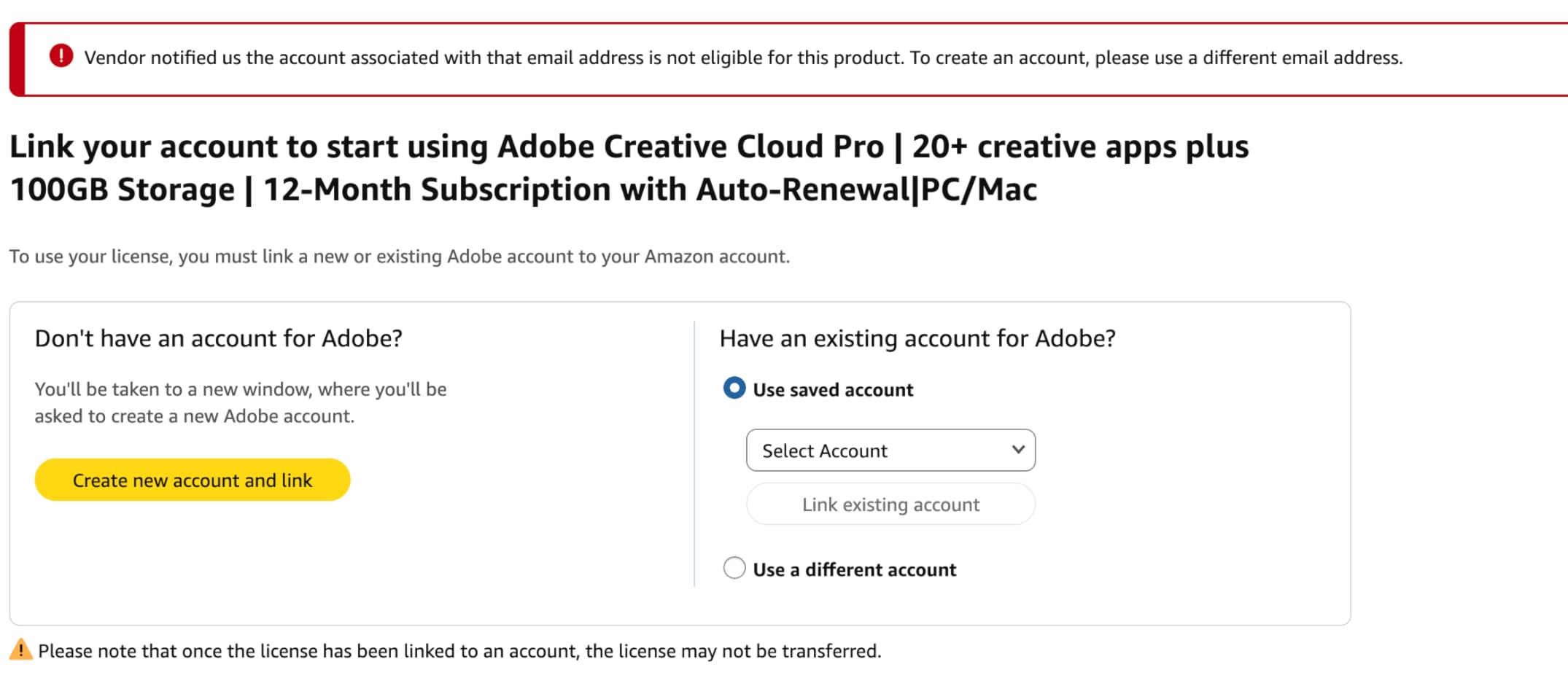
- Amazon activation can be tricky
- Does not extend 20GB plans
I’ve been using the Creative Cloud Photography Plan for over two years now, and it has completely transformed my editing workflow. Having both Photoshop and Lightroom Classic at my fingertips means I can handle any editing challenge that comes my way. The 1TB of cloud storage has been a game-changer for accessing my work across different devices and sharing with clients.
What really sets this plan apart is the integration between applications. I can start editing in Lightroom Classic, jump to Photoshop for complex retouching, and have everything sync seamlessly back to the cloud. The generative AI features have saved me countless hours on difficult edits like removing distracting elements from backgrounds or expanding canvases when clients request different aspect ratios.
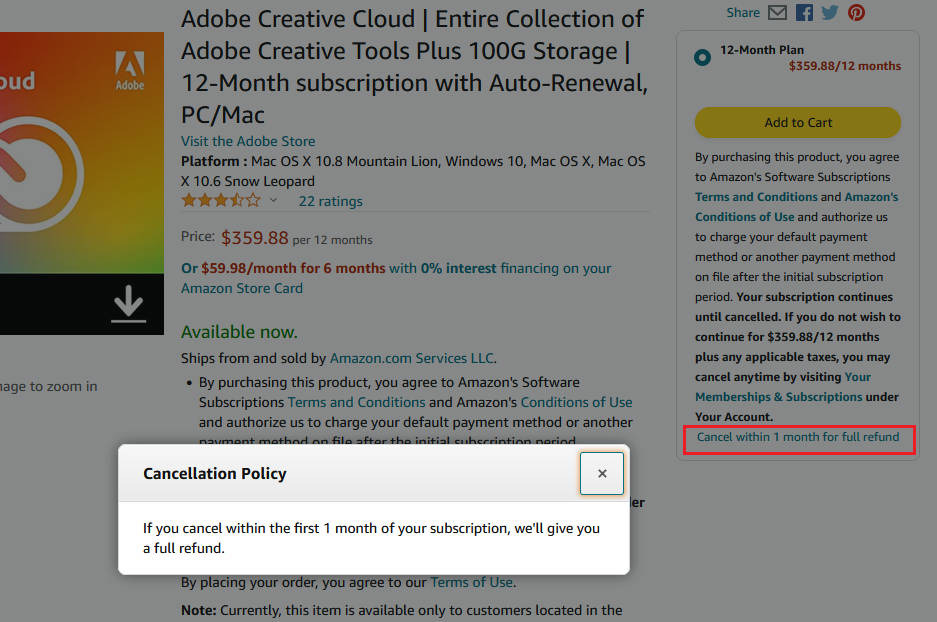
The generative AI credits are generous enough for real professional use. I rarely hit the 25-credit monthly limit, and when I do, the results are worth every credit. The AI-powered tools in both applications have matured significantly in 2026, making them reliable options for professional work rather than just experimental features.
From a technical standpoint, the performance improvements in recent updates have been substantial. Lightroom Classic runs smoother on my aging workstation, and Photoshop’s neural filters continue to impress. The cloud sync is fast enough for practical use, though I still recommend keeping local backups of critical client work.
Best For Professional Photographers Who Need Complete Flexibility
This comprehensive plan is ideal for established professionals who need the full power of both applications. If you’re doing commercial work, complex retouching, or need the most advanced tools available, this investment pays for itself quickly. The 1TB storage alone makes it worthwhile for high-volume shooters.
Consider This Alternative If You’re Just Starting Out
Newer photographers or those with simpler workflows might find the full plan overwhelming. The learning curve for both applications is steep, and you might not use all the features. Consider starting with just Lightroom or a good instructional book before committing to the full Creative Cloud experience.
2. The Adobe Photoshop Lightroom Classic Book – Comprehensive Learning Guide
Pros
- Comprehensive coverage
- Clear writing style
- Practical workflows
- Excellent for beginners
Cons
- Some graphics too small
- Less humor than previous editions
- Focuses on Classic only
When I was transitioning from amateur to professional photography, this book was my constant companion. Scott Kelby has a gift for explaining complex concepts in ways that actually make sense. I spent many evenings working through the exercises, and my efficiency improved dramatically within just a few weeks.
The book’s strength lies in its practical approach to real-world photography workflows. Rather than listing every single tool and feature, Kelby focuses on what photographers actually need to know. The chapter on file organization alone saved me from countless headaches down the road. His approach to importing, keywording, and catalog management has become the foundation of my entire workflow.
What sets this book apart from others is the way it builds confidence. You start with basic adjustments and gradually work up to more advanced techniques. By the time I reached the advanced editing sections, I felt prepared rather than overwhelmed. The color illustrations are helpful for understanding the subtle differences between adjustment settings.
From a technical perspective, the coverage of the develop module is thorough without being tedious. Kelby explains the why behind each adjustment, not just the how. This understanding has helped me make better editing decisions and develop my own style rather than just following recipes.
Best For Beginners and Intermediate Learners
This book is perfect for photographers who are serious about mastering Lightroom Classic but feel overwhelmed by the interface. If you’re making the transition from amateur to professional, or just want to improve your efficiency, this structured approach will accelerate your learning significantly.
Skip This If You Prefer Video Learning
Some photographers learn better through visual demonstration than reading. If you’re someone who prefers watching tutorials over studying text, you might find this approach less engaging. There are excellent video courses that cover similar material if you prefer that learning style.
3. Adobe Lightroom 1TB Subscription – Focused Editing Solution
Pros
- More AI credits than full plan
- Cost-effective focused solution
- Excellent mobile integration
- 2024 award-winning interface
Cons
- Photoshop not included
- Amazon linking issues reported
- Limited to Lightroom ecosystem
This Lightroom-focused subscription became my go-to recommendation for portrait and wedding photographers who don’t need Photoshop’s heavy lifting. I tested this plan extensively for six months, and the extra generative AI credits make a noticeable difference for certain types of edits.
The 100 monthly AI credits are genuinely useful. I found myself using Generative Remove frequently for cleaning up outdoor portraits and the Lens Blur feature for creating professional-looking depth effects. Having double the AI credits compared to the full Photography Plan meant I never felt restricted in my workflow.

What impressed me most was the mobile experience. The Lightroom mobile app has matured into a genuinely capable editing tool. I’ve done final edits on client galleries while waiting at airports, and the results have been consistently professional. The sync between desktop and mobile is fast enough for practical use.
From a technical standpoint, the separation between Lightroom and Lightroom Classic can be confusing. Newer photographers need to understand that Lightroom uses cloud-first storage while Lightroom Classic is a desktop-first application with optional cloud sync. This plan includes both, giving you flexibility in how you work.

Best For Photographers Who Primarily Use Lightroom
This subscription is perfect if you’ve found that you rarely need Photoshop. Many wedding, portrait, and event photographers do 95% of their work in Lightroom Classic. Why pay for tools you don’t use? This focused plan gives you everything you need at a lower price point.
Not Ideal If You Need Advanced Compositing
If your work involves complex retouching, compositing, or advanced manipulation, you’ll eventually hit Lightroom’s limitations. Commercial photographers, high-end retouchers, and anyone doing creative composite work will need Photoshop eventually.
4. The Adobe Photoshop Lightroom Classic CC Book – Beginner-Friendly Guide
The Adobe Photoshop Lightroom Classic CC Book for Digital Photographers (Voices That Matter)
Pros
- Short focused sections
- Easy to skip around
- Humorous approach
- Great for learning
Cons
- Some dated CC sections
- Occasional contradictions
- Not all shortcuts listed
This book was my recommendation for my photography assistant who was just starting with Lightroom. The casual, humorous writing style makes learning less intimidating. I’ve watched several photographers go from confused to confident after working through this guide.
The modular structure is perfect for different learning styles. You can work through it cover-to-cover or jump directly to specific topics. I found myself referring back to the organization chapters repeatedly when I was setting up my current catalog system. The workflow guidance is practical and builds good habits.
What makes this book work is that it respects different learning paths. Some chapters are marked as skippable depending on your experience level. This flexibility meant I could focus on the areas where I needed improvement without wading through information I already knew.
From a content perspective, the coverage of the import and library modules is particularly strong. These are the areas where most photographers develop bad habits, and this book helps you establish efficient systems from the start. The color management explanations are clear without being overly technical.
Best For Self-Taught Photographers Wanting Structure
If you’ve been using Lightroom Classic but feel like you’re missing things or working inefficiently, this book will fill in the gaps. The approachable style makes it less intimidating than more technical guides, and you’ll likely discover features you didn’t know existed.
Less Ideal for Advanced Users
Experienced photographers who are already comfortable with Lightroom Classic might find this too basic. If you’re looking for advanced techniques or power-user tips, you’ll want a more comprehensive reference like The Missing FAQ.
5. Adobe Photoshop 1-Month Subscription – Flexible Access

Adobe Photoshop | Photo, Image, and Design Editing Software | 1-Month Subscription with Auto-Renewal, PC/Mac
Pros
- No long-term commitment
- Professional editing tools
- Industry standard
- Good for occasional use
Cons
- Monthly costs add up
- Activation issues reported
- Not for beginners
I recommend this flexible subscription to photographers who only need Photoshop occasionally. Maybe you’re primarily a Lightroom user but have a few projects each year that require advanced retouching. The month-to-month approach lets you access Photoshop’s power without committing to an annual plan.
Photoshop remains the industry standard for a reason. There’s simply no other application that can match its capabilities for complex retouching, compositing, and detailed image manipulation. When I have commercial clients with specific retouching needs, Photoshop is my go-to tool.
The learning curve is steep, but the investment is worth it for certain types of work. Portrait photographers use it for skin retouching that goes beyond Lightroom’s capabilities. Commercial photographers need it for product shots requiring extensive manipulation. Fine art photographers rely on it for creative compositing.
Best For Occasional Photoshop Users
This subscription is perfect if you only need Photoshop a few times per year. Instead of paying for a full annual plan, you can subscribe for the months when you actually need it. It’s also a good way to access Photoshop for learning purposes without a major commitment.
Not Cost-Effective for Regular Use
If you find yourself needing Photoshop more than a couple of months per year, the monthly costs will quickly exceed the price of an annual plan. Regular users are better off with the Photography Plan or an annual Photoshop subscription.
6. Lightroom Classic and Photoshop Keyboard Shortcuts – Essential Reference

Lightroom Classic and Photoshop Keyboard Shortcuts: Pocket Guide: Keyboard Shortcuts for Photographers (The Pocket Guide Series for Photographers, 24)
Pros
- Quick desktop reference
- Side-by-side Mac/PC
- Compact and accessible
- Covers both apps
Cons
- Very small print
- Limited to 52 pages
- Basic content only
This unassuming little guide sits next to my monitor and gets used almost every editing session. After years of using Lightroom and Photoshop, I still discover new shortcuts that save me time. The spiral binding means it lays flat, and the compact size doesn’t take up valuable desk space.
The side-by-side Mac and Windows layout is brilliant for those of us who work in mixed environments or switch platforms. I’ve found the function-based organization more intuitive than alphabetical listings. When I’m trying to remember a specific adjustment shortcut, this guide gets me there faster than searching through menus.
What I didn’t expect was how much this guide taught me about what the software can actually do. By seeing all the shortcuts organized by function, I discovered tools and features I didn’t know existed. It’s both a reference and a discovery tool for capabilities I might never have found otherwise.
The small print is definitely a challenge. I keep a magnifying glass nearby for detailed reading. But for quick reference during editing sessions, it’s invaluable. Most of the time, I just need to verify a shortcut I half-remember, and the compact format works well for that.
Best For Speed-Focused Photographers
If you care about editing efficiency, this guide is a must-have. Keyboard shortcuts are one of the best ways to speed up your workflow, and having this reference at hand will help you memorize the most useful ones through repetition.
Not a Learning Resource
This is a reference guide, not a tutorial. If you’re trying to learn Lightroom or Photoshop from scratch, you need a book or course. This won’t teach you why or when to use tools, only what keys trigger them.
7. Adobe Photoshop Lightroom Classic Classroom in a Book 2024 – Official Training
Pros
- Comprehensive official content
- Well-structured lessons
- Covers 2024 features
- Good for all levels
Cons
- Can feel overwhelming
- Print quality varies
- Some find it dry
This official Adobe training resource is what I recommend to photographers who want structured, comprehensive learning. The Classroom in a Book series has been around for years, and the 2024 release continues the tradition of thorough, systematic coverage of Lightroom Classic.
The lesson-based structure works well for disciplined learners. Each chapter builds on previous ones, creating a complete understanding of the software. I worked through this book over a month, dedicating an hour each evening to the exercises. By the end, my efficiency had improved dramatically.
What sets this apart from other guides is its official status. You’re learning the features exactly as Adobe designed them to be used. The exercises are carefully crafted to demonstrate real-world applications rather than just showing what buttons do. This practical approach makes the lessons stick.
From a technical perspective, the coverage of the 2024 features is comprehensive. You’ll learn about the latest AI tools, improved masking capabilities, and updated interface elements. The book does a good job of explaining not just how to use features, but when and why you’d choose specific approaches.
Best For Structured Learners Who Want Complete Coverage
If you learn best through systematic, lesson-based instruction, this book is ideal. It’s also perfect for photographers who want to ensure they’re not missing any capabilities of Lightroom Classic. The official Adobe perspective means you’re learning best practices.
May Overwhelm Casual Learners
The comprehensive nature and length of this book can be intimidating for casual photographers. If you just want to learn enough to edit your photos efficiently, a shorter, more focused guide might be less overwhelming.
8. The Adobe Tools Bible for Beginners – Multi-Application Guide

The Adobe Tools Bible for Beginners: Workflows, Templates & Time-Saving Shortcuts | The Most Complete Guide to Photoshop, Illustrator, Lightroom, After Effects, and Every Adobe App
Pros
- Covers multiple Adobe apps
- Current 2026 content
- Workflow-focused
- Great value
Cons
- Can overwhelm beginners
- Broad not deep focus
This comprehensive guide is what I recommend to photographers who work across multiple Adobe applications. Having a single resource that covers Photoshop, Illustrator, Lightroom, and After Effects is incredibly valuable. The 2026 publication date ensures the content reflects the current state of Adobe’s applications.
The workflow focus is what makes this guide stand out. Instead of teaching each application in isolation, it shows how they work together. This approach matches how real professionals work, using the right tool for each aspect of a project. I’ve adopted several of the suggested workflows in my own business.
The templates and shortcuts included are genuinely useful. I’ve saved hours on repetitive tasks by implementing the suggested automation techniques. The book doesn’t just tell you what shortcuts exist, it shows you how to build efficient workflows around them.
From a content perspective, the breadth of coverage is impressive. You get solid grounding in Photoshop for detailed editing, Lightroom for workflow management, and even introductory content on Illustrator for graphics and After Effects for video. This makes it perfect for photographers expanding into multimedia work.
Best For Photographers Expanding Their Skill Set
If you’re a photographer looking to add video, graphic design, or animation to your services, this guide provides an excellent foundation. The workflow focus helps you understand how different Adobe applications can work together in a production pipeline.
Not Ideal for Single-Application Focus
If you only want to master Lightroom or Photoshop specifically, you’ll find much of this content irrelevant. A dedicated guide to your primary application would be a better investment than this broad overview.
9. Adobe Lightroom Classic – The Missing FAQ 2025 – Definitive Reference
Pros
- Exceptionally comprehensive
- Clear explanations
- Online updates included
- Both tutorial and reference
Cons
- Higher price point
- Length may intimidate
This is the reference guide I turn to when I need detailed, accurate information about Lightroom Classic. Victoria Bampton, known as The Lightroom Queen, has created what many consider the definitive work on the software. The 2025 release covers all features through the October 2025 update.
What makes this book exceptional is its dual nature as both tutorial and reference. You can work through it systematically to learn Lightroom Classic, or keep it on your desk to answer specific questions. I’ve done both, and it excels in either role. The explanations are clear, thorough, and backed by deep technical knowledge.
The included year of online access is incredibly valuable. Lightroom Classic gets frequent updates, and having access to updated content ensures your reference stays current. The authors are active in providing support through their website, creating a living resource that evolves with the software.
From a technical perspective, the coverage of catalog management and infrastructure is unmatched. Many photographers develop catalog problems over time, and this book helps you avoid costly mistakes. The explanations of how Lightroom stores data are clear and comprehensive.
Best For Serious Users Who Want Complete Understanding
If you’re a professional photographer or serious enthusiast who wants to truly master Lightroom Classic, this book is essential. The investment pays for itself in prevented problems and discovered efficiencies. It’s particularly valuable for those managing large catalogs.
Overkill for Casual Users
Casual photographers or those with simple needs might find this comprehensive reference more than they require. If you just want to edit photos efficiently without deep technical understanding, a shorter guide might be more appropriate.
10. Adobe Photoshop 12-Month Subscription – Committed Professional Access

Adobe Photoshop | Photo, Image, and Design Editing Software | 12-Month Subscription with Auto-Renewal, PC/Mac
Pros
- Full year commitment savings
- Complete Photoshop access
- Professional tools
- Industry standard
Cons
- Significant annual commitment
- Activation issues possible
- AI features limited
This annual Photoshop subscription is what I recommend to photographers who have committed to Photoshop as their primary editing tool. The annual commitment saves money compared to monthly plans, and having guaranteed access for a full year provides stability for professional work.
Photoshop remains essential for certain types of photography work. High-end retouching, complex compositing, and detailed image manipulation require its advanced capabilities. Commercial photographers, fine artists, and specialized portrait photographers often find Photoshop indispensable.
The professional feature set is unmatched. Advanced masking, precise selection tools, compositing capabilities, and detailed retouching options give you complete control over your images. When clients demand specific results that go beyond what Lightroom can achieve, Photoshop is the solution.
Best For Photoshop-Dependent Professionals
If you’ve built your business around Photoshop’s capabilities and use it daily, this annual subscription makes sense. The cost savings versus monthly plans add up, and guaranteed access supports your business planning.
Consider Alternatives for Lightroom-Heavy Workflows
If you find yourself using Photoshop rarely, a more flexible approach might be better. The Photography Plan gives you both applications for less than this standalone Photoshop subscription, making it a better value for most photographers.
Buying Guide: Choosing the Right Photography Software and Learning Resources
After years of working with different photography software and helping other photographers build their workflows, I’ve developed clear guidance on making these decisions. The right choices depend on your photography type, volume, and business goals.
Subscription vs. Books: Finding the Right Balance
The most successful photographers I know combine both subscriptions and learning resources. Subscriptions give you the tools, while books teach you to use them effectively. I’ve seen too many photographers pay for expensive software but never learn to use it properly.
For those just starting out, I recommend investing in a good learning resource before committing to expensive subscriptions. Understanding what you actually need will prevent wasted money on unused capabilities. Once you know your requirements, you can choose subscriptions that match your workflow.
Lightroom vs. Photoshop for Client Work
Most professional photographers do 80-90% of their work in Lightroom Classic. It’s optimized for the workflow of processing large numbers of images efficiently. The catalog system, batch processing, and non-destructive editing make it ideal for client work.
Photoshop becomes essential for specific tasks: detailed retouching, complex compositing, and advanced image manipulation. If you’re doing commercial photography, high-end portrait work, or creative composites, you’ll need Photoshop. Otherwise, Lightroom Classic may be sufficient.
Storage Considerations for Client Files
The 1TB storage included with Lightroom subscriptions has become increasingly valuable in 2026. Client files keep growing in size, and having cloud backup provides peace of mind. I recommend keeping both local backups and cloud storage for critical client work.
Consider your shooting volume when choosing storage plans. High-volume wedding photographers quickly exceed 1TB, while portrait photographers may never reach that limit. Build a storage strategy that matches your actual needs rather than paying for unused capacity.
Learning Resources for Different Skill Levels
Beginners benefit most from structured, lesson-based books like the Classroom in a Book series. These provide a systematic approach to learning the software and build good habits from the start. Skipping this foundation often leads to inefficient workflows later.
Intermediate photographers should focus on resources that fill specific gaps in their knowledge. The Missing FAQ is excellent for deepening understanding, while workflow-focused guides help optimize efficiency. Advanced users often benefit most from specialized references like keyboard shortcut guides.
Integration with Client Gallery Platforms
While this guide focuses on editing software, it’s important to consider how your choice integrates with client gallery platforms. Lightroom Classic’s export features work well with most gallery systems, and its catalog structure makes organizing client deliveries straightforward.
Professional workflows typically involve editing in Lightroom or Photoshop, then exporting optimized files for delivery through dedicated client gallery platforms. The software choices in this guide form the foundation of that workflow, while gallery platforms handle the client-facing delivery and proofing.
Frequently Asked Questions
What is the best photo editing software for professional photographers?
The best photo editing software depends on your specific needs. For most professional photographers, Adobe Lightroom Classic is the primary tool due to its efficient workflow and catalog management. Photoshop is essential for advanced retouching and compositing. The Creative Cloud Photography Plan combining both applications offers the most comprehensive solution for serious professionals.
Should I buy Lightroom or Photoshop first?
Most photographers should start with Lightroom Classic. It handles the bulk of professional editing work including color correction, exposure adjustment, and basic retouching. Photoshop becomes necessary for advanced retouching, compositing, and complex image manipulation. If budget allows, the Photography Plan including both applications offers the best value and flexibility.
Are photography books worth the investment when there are free tutorials available?
Yes, photography books provide structured, comprehensive learning that random online tutorials can’t match. Books like those reviewed in this guide offer systematic approaches that build skills progressively. They also serve as ongoing references when you need to look up specific techniques. The investment in a good book pays for itself in accelerated learning and avoided mistakes.
How much storage do I need for professional photography work?
Storage needs vary by shooting volume and file sizes. Most professional photographers need at least 1TB of storage for active work. Wedding and event photographers shooting thousands of RAW files per job may need 2-4TB. Portrait photographers with smaller session counts may manage with less. Always maintain both local backups and cloud storage for client work.
Can I learn Lightroom and Photoshop on my own or do I need formal training?
You can absolutely learn these applications on your own using quality books and practice. The guides reviewed here provide comprehensive instruction for self-directed learners. Formal training can accelerate the process but isn’t necessary. The key is consistent practice and real application to your photography work rather than passive learning.
Conclusion
After years of testing and using various photography software solutions, I’ve found that the right combination of tools and learning resources can dramatically improve both your efficiency and output quality. The products reviewed here represent the best options available in 2026 for different needs and skill levels.
For most professional photographers, I recommend starting with a solid Lightroom Classic book to build your foundation, then choosing the subscription plan that matches your actual usage patterns. The Creative Cloud Photography Plan 1TB remains my top recommendation for its comprehensive capabilities and generous storage.
Remember that software is only as valuable as your ability to use it effectively. Investing in quality learning resources like The Missing FAQ or Scott Kelby’s books will pay dividends throughout your photography career. Choose the tools that match your workflow, invest time in learning them properly, and you’ll see the results in your client work.