
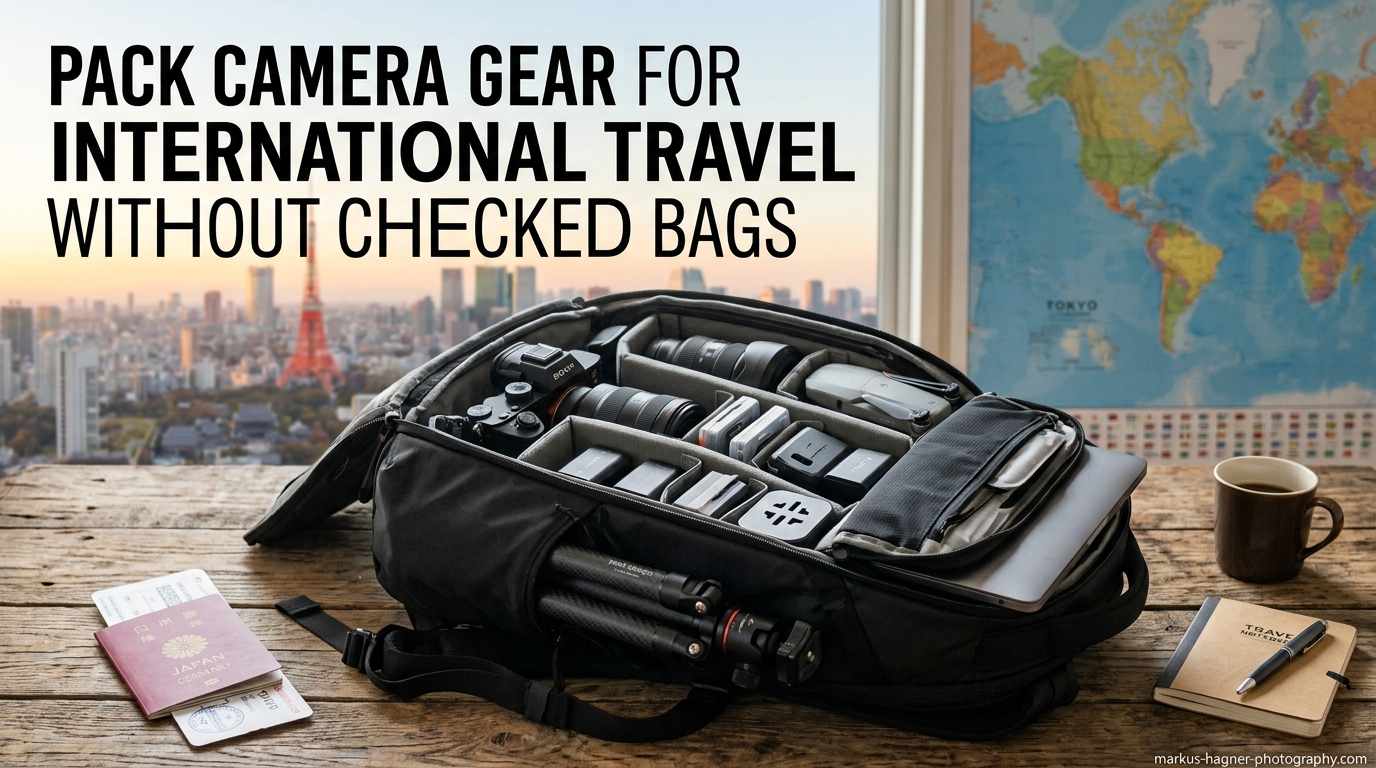
Traveling with expensive photography equipment creates genuine anxiety for most photographers. I have spent years flying internationally with camera gear worth more than my car, and the stress never fully disappears. Learning how to pack camera gear for international travel without checked bags became essential after a close call with lost luggage nearly ruined a destination wedding shoot. The reality is stark: airlines misplace bags more often than they admit, and photography equipment faces rough handling regardless of how carefully you pack it. This guide shares everything I have learned about keeping your gear safe, organized, and within reach during international flights.
Why You Should Never Check Camera Gear
The short answer is simple: it is not worth the risk. Airlines globally lose approximately 26 million bags annually. That number should terrify anyone traveling with a camera body and a few lenses. Professional photographers who travel frequently share a common mantra – checking camera gear is not about if something goes wrong, but when.
Insurance presents another complication. Most standard travel insurance policies cap coverage for electronics in checked luggage at surprisingly low amounts. My camera body alone costs more than typical coverage limits. Specialized photography insurance exists, but many policies exclude checked baggage or require expensive riders.
Rough handling damages equipment even when bags arrive at the correct destination. Checked luggage gets tossed, stacked, and compressed during transport. Delicate lens mechanisms and camera sensors cannot withstand that treatment indefinitely.
Theft remains a legitimate concern too. Expensive camera equipment attracts attention, and reports of items disappearing from checked luggage appear regularly in photography forums. One photographer I know lost a 70-200mm lens this way. The airline denied responsibility.
Understanding Airline Carry-On Regulations
Airline rules vary significantly between carriers and regions. Understanding these differences prevents stressful moments at the gate. Most airlines distinguish between a carry-on bag and a personal item, and maximizing both allowances is key to traveling without checked luggage.
Carry-On vs. Personal Item
Your carry-on bag typically goes in the overhead bin. Standard dimensions hover around 22 x 14 x 9 inches for most US carriers, though international airlines often enforce smaller limits. The personal item fits under the seat in front of you and usually measures around 18 x 14 x 8 inches.
Here is the key insight: personal items rarely get weighed or measured at the gate. Heavy camera gear should go in your personal item whenever possible. Your carry-on can hold lighter accessories, clothing, and less critical items.
International vs. Domestic Differences
European budget airlines like Ryanair and EasyJet enforce stricter size limits than US carriers. Asian carriers vary widely, with some offering generous allowances while others weigh carry-on bags at check-in. Research your specific airline before packing.
Weight limits range from 7kg on budget international carriers to no weight restriction on some US airlines. The enforcement varies dramatically too. Some airports weigh every bag, others only check when bags appear obviously heavy.
Regional Jets and Smaller Aircraft
Connecting flights on smaller regional jets create additional challenges. Overhead bins on these aircraft cannot accommodate standard carry-on bags. Gate-checking becomes mandatory, but you can usually keep your personal item. Plan accordingly by putting essential camera gear in your under-seat bag.
TSA and Security Screening Guidelines
Navigating security with camera equipment requires preparation. TSA agents see cameras daily, but large amounts of gear can trigger additional screening. Understanding the process helps you move through efficiently.
Do Cameras Count as Electronics at TSA?
Yes, cameras count as electronics. In standard security lanes, you must remove cameras from your bag and place them in a bin for X-ray screening. Large lenses should also come out. This rule applies to digital cameras, film cameras, and video equipment alike.
TSA PreCheck members can keep cameras and electronics in their bags. This benefit alone makes PreCheck worthwhile for photographers who travel more than once per year. The application process takes about two weeks and costs $78 for five years.
Does TSA Mess Up Digital Cameras?
X-ray scanners used at airport security do not damage digital cameras or memory cards. Your equipment is safe going through these machines. Film is a different story – higher sensitivity film can be damaged by X-rays, so request hand inspection for film stocks above ISO 800.
Security Screening Tips
Organize your bag so cameras and large lenses are easily accessible. This speeds up the removal process and reduces the chance of agents unpacking everything. Keep small accessories like SD cards, batteries, and lens caps in a dedicated pouch to prevent them from scattering in the bin.
Lithium Battery Regulations You Must Know
Lithium-ion batteries power most modern camera equipment, and TSA has specific rules about traveling with them. Understanding these regulations protects your gear and keeps you compliant with federal law.
The Critical Rule
Spare lithium batteries must go in your carry-on luggage, never in checked bags. This rule exists because lithium battery fires in cargo holds are difficult to extinguish. Batteries installed in devices can travel in checked luggage, but spare batteries cannot.
I use this fact strategically at the gate. If an agent wants to gate-check my camera bag, I politely explain that I have multiple spare lithium batteries that cannot go in checked luggage. This explanation has worked every time.
Watt-Hour Limits
Batteries under 100 watt-hours face no quantity restrictions. Most camera batteries fall well under this limit. Batteries between 100 and 160 watt-hours require airline approval, and you can typically carry only two. Larger batteries are prohibited entirely.
Battery Packing Tips
Store spare batteries in individual plastic cases or cover the terminals with tape to prevent short circuits. A battery organizer keeps everything contained and makes security screening faster. I use a small padded case that holds eight batteries and fits easily in my personal item.
Choosing the Right Travel Camera Bag
Your bag choice determines whether you can fit everything and whether gate agents give you trouble. The right bag makes international travel significantly easier.
Backpack vs. Roller Bag
Camera backpacks attract less scrutiny than roller bags. Gate agents mentally categorize backpacks as personal items even when they approach carry-on size. Roller bags get weighed and measured more frequently.
Backpacks also work better for destination travel. Rolling a heavy camera bag through cobblestone streets or up hotel stairs becomes miserable quickly. Your back might ache, but at least you can move.
Under-Seat vs. Overhead Bin Storage
Under-seat storage offers better protection than overhead bins. Your bag stays within sight and reach throughout the flight. Other passengers cannot accidentally crush your gear with their luggage. The trade-off is legroom, but I prioritize equipment safety.
Choose a bag designed to fit under airline seats. These typically measure around 18 x 14 x 8 inches. My travel backpack fits this profile while still holding two camera bodies, four lenses, and accessories.
Key Features to Look For
Thick padding protects equipment from impacts. Adjustable dividers let you customize the interior for different gear combinations. A dedicated laptop compartment keeps your computer accessible for security screening. External zippered pockets hold items you need during the flight.
Weather resistance matters for destination travel. A rain cover provides backup protection. Some photographers choose bags that look less obviously like camera bags to deter theft.
How to Pack Camera Gear for International Travel Without Checked Bags?
This step-by-step guide covers my exact packing process developed over dozens of international trips. Follow these steps to maximize space while keeping gear protected.
Step 1: Inventory Your Essential Gear
List every item you absolutely need for your trip. Be ruthless about what qualifies as essential. A destination wedding requires different equipment than a wildlife safari. Write down bodies, lenses, batteries, memory cards, and accessories.
Step 2: Separate Essentials from Nice-to-Haves
Mark which items you cannot work without. These go in your personal item. Items you could potentially rent or work around go in your carry-on. This prioritization ensures that even if forced to gate-check your carry-on, your critical equipment stays with you.
Step 3: Choose Your Bag Configuration
Configure your bag dividers before packing. I arrange my backpack with camera bodies and lenses in the main compartment, batteries and chargers in an external pocket, and memory cards in a small zippered section. Take a photo of this configuration for repacking at your destination.
Step 4: Detach Lens Hoods and Caps
Remove lens hoods and store them separately. This saves significant space and prevents hoods from catching on dividers. Keep body caps and rear lens caps in a dedicated pouch so they do not get lost.
Step 5: Pack Bodies and Lenses First
Place camera bodies in the center of your bag where they receive the most protection. Pack lenses around them, using dividers to prevent contact. Heavy items should sit at the bottom of the bag when you carry it.
Step 6: Distribute Weight Strategically
Put your heaviest items in your personal item since it rarely gets weighed. Your carry-on can hold lighter items like clothing, tripod, and accessories. Wear a jacket with pockets for small heavy items like extra batteries or portable hard drives.
Step 7: Organize Cables and Chargers
Wrap cables neatly and secure them with velcro ties. Store chargers in a dedicated pouch. Tangled cables waste time during security screening and at your destination. I use a small electronics organizer that holds all my charging equipment.
Step 8: Add Protection for Sensitive Items
Place silica gel packets in your bag to absorb moisture. This matters especially for humid destinations. Wrap especially delicate items in microfiber cloths for extra padding. Memory cards go in a hard case to prevent damage.
Step 9: Test Your Bag Weight
Weigh your packed bag at home with a portable luggage scale. If it exceeds 7kg, redistribute items between your personal item and carry-on. Practice lifting your bag overhead to ensure you can manage it comfortably.
Step 10: Document Your Gear
Photograph each piece of equipment and record serial numbers. Store this information separately from your camera bag. This documentation helps with insurance claims and police reports if gear is lost or stolen.
Security and Boarding Strategies
How you navigate the airport and board the plane affects whether you keep your gear with you. These strategies have kept my equipment out of cargo holds for years.
Board Early
Overhead bin space fills quickly. Boarding in an early group guarantees space for your carry-on. Pay for priority boarding if necessary. The small fee costs far less than replacing damaged equipment.
Gate Agent Communication
If a gate agent questions your bag, stay calm and polite. Explain that you are carrying professional camera equipment and spare lithium batteries that cannot be checked. Most agents understand and accommodate photographers. Getting defensive or argumentative never helps.
What to Do If Forced to Gate-Check
Sometimes gate-checking becomes unavoidable. Before surrendering your bag, remove your essential camera body, primary lens, memory cards, and spare batteries. These fit in your personal item or even your jacket. Never gate-check spare lithium batteries.
Use Tracking Devices
Place an AirTag or similar tracker in your camera bag. This provides location data if your bag gets lost or misrouted. Multiple photographers I know have recovered lost bags quickly using tracking devices. The small investment provides significant peace of mind.
Protecting Your Gear at Your Destination
Arriving with your gear intact is only the first challenge. Protecting equipment during your trip requires different strategies.
Hotel Storage
Use hotel safes for camera bodies and expensive lenses when not shooting. If the safe is too small, lock your bag to a fixed object using a cable lock. Never leave expensive equipment visible in your room.
Climate Considerations
Humid destinations require extra protection. Silica gel packets absorb moisture in your bag. Allow equipment to acclimate slowly when moving between air-conditioned spaces and hot outdoor environments. This prevents condensation inside lenses.
Documentation and Insurance
Keep your gear documentation accessible during travel. Customs officials in some countries require proof that expensive equipment was not purchased abroad. Consider specialized photography insurance that covers international travel and provides replacement equipment if needed.
Essential Packing Checklist
Use this checklist before every international trip to ensure nothing gets forgotten.
Camera Bodies:
- Primary camera body
- Backup camera body (for professional work)
- Body caps for transport
- Strap and extra mounting hardware
Lenses:
- Primary working lens
- Backup or specialty lenses as needed
- Lens hoods (detached for packing)
- Front and rear caps
- Lens cleaning kit
Power and Storage:
- At least 3 batteries per camera body
- Battery charger with international plug adapter
- Multiple memory cards (more than you think you need)
- Memory card holder
- Card reader for laptop backup
Accessories:
- Portable hard drive for backups
- Laptop and charger
- Cables organized in pouch
- Microfiber cloths
- Silica gel packets
- Small flashlight
- Tracking device (AirTag)
Documentation:
- Equipment list with serial numbers
- Photos of all gear
- Insurance information
- Passport and identification
Frequently Asked Questions
Can I put camera gear in checked luggage?
You technically can, but you should not. Airlines lose millions of bags annually, and photography equipment often exceeds standard insurance coverage limits in checked luggage. Rough handling during transport can damage delicate lens mechanisms and camera sensors. Professional photographers almost universally carry on their essential camera gear.
Does TSA mess up digital cameras?
No, X-ray scanners at airport security do not damage digital cameras or memory cards. Your equipment is safe going through standard screening. However, film can be affected by X-rays, especially higher sensitivity stocks above ISO 800. Request hand inspection for film to avoid any risk.
Do cameras count as electronics at TSA?
Yes, cameras are classified as electronics for TSA screening purposes. In standard security lanes, you must remove cameras and large lenses from your bag and place them in bins for X-ray screening. TSA PreCheck members can keep cameras in their bags during screening.
How to safely pack a camera for travel?
Use a padded camera bag with adjustable dividers. Pack camera bodies in the center surrounded by lenses for maximum protection. Remove lens hoods to save space. Store batteries in carry-on luggage only. Use silica gel packets in humid climates. Document serial numbers before traveling for insurance purposes.
Can I bring camera batteries on a plane?
Yes, you can bring camera batteries on a plane, but spare lithium batteries must go in carry-on luggage only. This is a TSA regulation. Batteries installed in devices can travel in checked luggage, but spare batteries cannot. There is no limit on batteries under 100 watt-hours.
Do camera bags count as carry-on or personal item?
It depends on the size. Smaller camera bags that fit under the seat count as personal items. Larger camera bags that go in overhead bins count as carry-on bags. Most airlines allow one carry-on and one personal item, so you can bring both a camera bag and another small bag.
How heavy can my camera bag be on a plane?
Weight limits vary by airline. US carriers typically do not weigh carry-on bags, while international airlines often enforce limits between 7kg and 10kg. Budget airlines like Ryanair strictly enforce weight restrictions. Check your specific airline policy before traveling and distribute heavy items between your carry-on and personal item.
Can I bring a tripod on a plane carry-on?
It depends on the tripod size and TSA agent discretion. Small travel tripods that fit in your carry-on are usually allowed. Larger tripods might be flagged as potential weapons. Many photographers pack tripods in checked luggage or use a travel tripod designed to fit in carry-on bags. Check your airline specific policies.
Conclusion
Learning how to pack camera gear for international travel without checked bags takes preparation, but the peace of mind is worth the effort. The core principles remain consistent: never check essential equipment, understand airline regulations, pack strategically, and always have a backup plan. Your camera gear represents significant investment and your ability to capture important moments. Protecting it during travel ensures you arrive ready to create.
Start with the right bag, follow the step-by-step packing process, and use the strategies shared by photographers who have learned these lessons through experience. Document your gear, use tracking devices, and prioritize what goes in your personal item. These habits become second nature after a few trips.
Safe travels and happy shooting.