
Standing in front of a stunning sunset, you snap photo after photo on your camera or phone. Later, you notice banding in the sky gradients or realize your storage is filling up fast. The culprit might be your image format choice. The HEIF vs JPEG for everyday camera shooting debate has heated up as more cameras and smartphones adopt newer formats that promise better quality in smaller packages.
HEIF (High Efficiency Image Format) promises better quality at half the file size, while JPEG remains the universal standard that opens everywhere without question. For everyday photographers capturing family moments, travel memories, and casual shots, choosing the right format matters more than you might think. The wrong choice can mean lost quality, compatibility headaches, or wasted storage space.
After testing both formats across multiple cameras and editing workflows over the past several years, I can tell you the answer is not straightforward. HEIF offers genuine technical advantages that matter for image quality, but compatibility headaches remain real in 2026. Some photographers will benefit immediately from switching, while others should stick with what works. This guide breaks down exactly when each format makes sense for your everyday shooting needs.
Quick Answer: HEIF vs JPEG for Everyday Camera Shooting
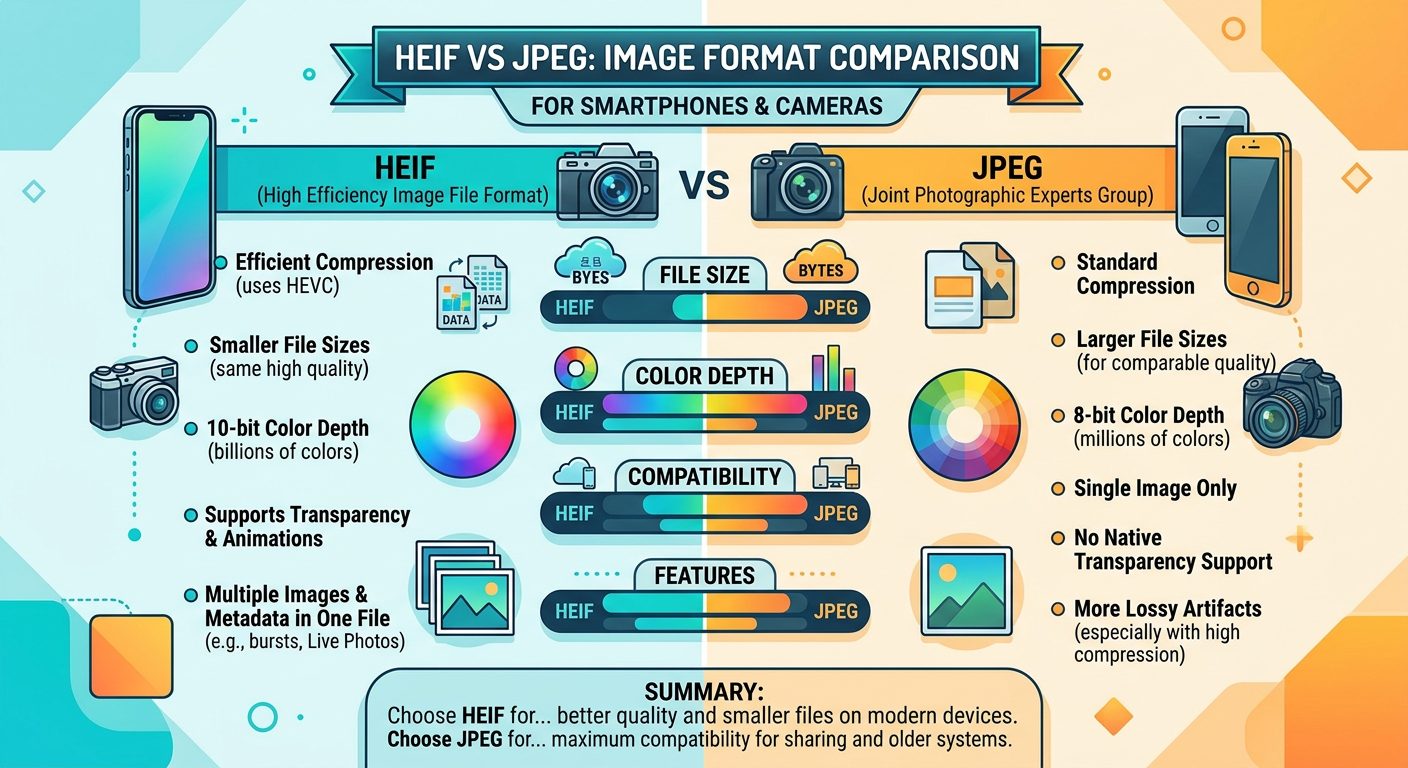
For most everyday photographers in 2026, HEIF provides better image quality and 40-50% smaller file sizes compared to JPEG at equivalent quality levels. HEIF captures 10-bit color depth versus JPEG’s 8-bit, meaning smoother sky gradients and better skin tone reproduction in your photos. The format uses more efficient HEVC compression that preserves more detail while using less storage space on your memory cards and devices.
However, JPEG remains the safer choice if you share photos with others frequently, print at labs, or use older software that may not recognize newer formats. The universal compatibility of JPEG means you never have to worry whether someone can open your files or whether a print lab will accept them. This peace of mind has real value in everyday photography workflows.
Choose HEIF if you shoot primarily within the Apple ecosystem, want maximum quality without RAW file sizes, or need to save storage space on your devices. Stick with JPEG if you deliver photos to clients, print at labs regularly, share across diverse platforms, or want guaranteed compatibility everywhere without any conversion steps.
What Is HEIF/HEIC?
HEIF stands for High Efficiency Image Format, a modern container format developed by the Moving Picture Experts Group (MPEG) and finalized in 2015. The format was designed to address the limitations of older image formats like JPEG by using more efficient compression algorithms while supporting advanced features that photographers need. Apple adopted HEIF in 2017 with iOS 11, making it the default image format for iPhones, and camera manufacturers have gradually added support since then.
Files using this format typically carry the .heic extension (High Efficiency Image Container), though .heif is the broader format name that encompasses various implementations. When you see HEIC on your iPhone or camera, you are looking at a specific implementation of the broader HEIF standard. The distinction matters technically but for everyday photographers, the terms are often used interchangeably.
The key innovation that sets HEIF apart is HEVC (H.265) compression, which is significantly more efficient than the decades-old DCT compression that JPEG uses. HEVC was originally developed for video but works exceptionally well for still images too. The algorithm encodes image data more intelligently, achieving smaller files while preserving more detail in your photographs. Think of it as a better zip algorithm specifically designed for photos that understands how human vision works.
10-Bit Color Depth: The Real Advantage
HEIF supports 10-bit color depth, capturing over 1 billion possible color values versus JPEG’s 8-bit limit of 16.7 million colors. This sounds like technical trivia that only matters to pixel peepers, but it genuinely matters for everyday shooting situations you encounter regularly. Those extra bits prevent banding in smooth gradients like blue skies at sunset or subtle skin tone transitions in portraits.
The difference becomes visible when you have large areas of gradual color change. A sunset sky transitions from deep orange through pink to pale blue across the frame. With 8-bit JPEG, this gradient can show visible stepping or banding where colors jump abruptly instead of flowing smoothly. With 10-bit HEIF, the same scene renders as a continuous, natural gradient that matches what your eyes actually saw.
I noticed the difference immediately when photographing a beach sunset last summer during a family vacation. The HEIF file showed a smooth, natural progression from warm orange to deep blue in the sky that looked exactly like the scene I witnessed. The same shot captured simultaneously in JPEG showed visible stepping or banding in the gradient, especially after any editing adjustments to exposure or contrast. Once you see this difference, you cannot unsee it.
Skin tones benefit similarly from the extra color depth. Portraits shot in HEIF show more natural transitions across facial features, avoiding the posterized look that can appear in JPEG images of faces, particularly in challenging lighting conditions. For photographers who care about accurate color reproduction in their everyday shots, this advantage alone may justify the switch.
Container Format Capabilities Beyond Single Images
Unlike JPEG, which stores a single image and nothing more, HEIF works as a versatile container that can hold multiple images, depth maps, thumbnails, and metadata all in one file. This architecture enables features that were impossible with JPEG’s simpler design. Burst sequences can live in a single HEIF file rather than cluttering your storage with dozens of separate images. Live photos combine a still frame with video in one container.
Portrait mode photos from smartphones store depth map data that enables after-the-fact focus adjustment and background blur modifications. The format also supports transparency through alpha channels, something JPEG has never offered. Additionally, HEIF can handle 16-bit color for applications requiring maximum quality, though most cameras currently output 10-bit HEIF.
These capabilities may seem like overkill for casual snapshots, but they reflect how photography has evolved beyond single static images. Modern computational photography relies on multiple captures, depth sensing, and metadata that older formats were never designed to handle. HEIF provides the infrastructure for these advanced features in a single, efficient package.
What Is JPEG?
JPEG has been the dominant image format since 1992, and understanding why helps explain both its enduring popularity and its limitations. The format uses lossy compression based on discrete cosine transform (DCT), a mathematical technique that discards some image data to achieve smaller file sizes. The algorithm exploits limitations in human vision, removing information that our eyes are less likely to notice while preserving details that matter for perceived quality.
The format is fundamentally limited to 8-bit color depth, meaning each pixel can only represent one of 16.7 million possible colors. While this sounds like plenty, it proves insufficient for smooth gradients and subtle color transitions that appear frequently in real-world scenes. JPEG also does not support transparency, which limits its usefulness for graphics and composite images.
Despite these technical limitations, JPEG’s greatest strength is universal compatibility. Every device manufactured in the past thirty years can display JPEG images. Every operating system, web browser, photo lab, and social media platform handles JPEG files without issue or complaint. You will never encounter a situation where a JPEG file refuses to open or causes an error message. This reliability has real value that goes beyond technical specifications.
Why JPEG Remains Dominant Despite Its Age
Universal acceptance is JPEG’s killer feature that keeps it relevant decades after its introduction. Print labs expect JPEG files and have workflows built around processing them. Clients can open JPEG attachments without installing special codecs or software. Social media platforms process JPEG uploads reliably and consistently. This ubiquity makes JPEG the pragmatic choice for many workflows, regardless of HEIF’s technical superiority on paper.
The 8-bit limitation does cause visible banding in smooth gradients, especially after editing adjustments push the data beyond what 8 bits can represent smoothly. But for photos that go straight from camera to sharing without manipulation, JPEG remains perfectly adequate for most everyday purposes. Many photographers never notice the limitations because their workflow does not stress them.
JPEG also benefits from hardware acceleration in virtually every device. Decoding a JPEG requires minimal processing power, meaning images load instantly on any hardware. This efficiency matters for battery life on mobile devices and performance on older computers. HEIF’s more complex compression requires more processing, which can impact performance in some situations.
HEIF vs JPEG: Key Differences Comparison
Understanding the technical differences helps you make informed decisions about which format fits your everyday shooting style and workflow requirements. Here is how HEIF and JPEG compare across the factors that matter most for practical photography.
| Feature | HEIF/HEIC | JPEG |
|---|---|---|
| Color Depth | 10-bit (1+ billion colors) | 8-bit (16.7 million colors) |
| File Size | 40-50% smaller at same quality | Larger files for same quality |
| Compression | HEVC/H.265 (modern, efficient) | DCT (1992 standard, aging) |
| Compatibility | Limited (requires codecs on some systems) | Universal (works everywhere) |
| Transparency | Supported via alpha channels | Not supported at all |
| Multiple Images | Yes (bursts, depth maps, live photos) | Single image only per file |
| Editing Latitude | More headroom for adjustments | Limited, banding risk increases |
| Print Lab Support | Very limited or nonexistent | Universal acceptance |
| Processing Required | Higher (slower on some devices) | Lower (fast everywhere) |
Image Quality: 10-Bit vs 8-Bit Color in Practice
The most noticeable quality difference between these formats appears in gradients and skin tones. HEIF’s 10-bit color captures 64 times more color values per channel than JPEG’s 8-bit, providing dramatically more gradation steps for smooth transitions. This extra data prevents the stepping or banding effect you see in blue skies, sunset gradients, studio backdrops, and any scene with gradual color changes.
For portrait photographers capturing everyday family moments, skin tone reproduction improves noticeably with HEIF. The subtle pink-to-red transitions across facial features render more smoothly and naturally. You have more latitude to adjust exposure and color balance without posterization artifacts appearing in faces. This matters especially for photos you plan to edit or adjust after capture.
The quality advantage becomes most apparent when you push files in editing. Raising exposure, recovering shadows, or shifting white balance all stress the limited data in 8-bit files. HEIF’s extra bit depth provides more room for these adjustments before visible degradation occurs. Many working photographers describe HEIF as sitting between JPEG and RAW in terms of editing flexibility, offering genuine benefits without RAW’s file size and processing overhead.
File Size Savings That Add Up
HEIF files are genuinely 40-50% smaller than equivalent quality JPEGs based on extensive testing across multiple cameras and subjects. This is not marketing hype but a real advantage that compounds over time. On a recent two-week family trip to national parks, I shot roughly 2,000 photos capturing landscapes, wildlife, and candid moments. In HEIF, these occupied about 8GB of storage on my memory cards and backup drive. The same photos captured in JPEG would have filled 14-16GB of space.
That 6-8GB difference matters enormously when traveling with limited memory cards, shooting events where you cannot easily swap cards, or backing up to cloud storage with monthly quotas. The savings effectively double your practical storage capacity without requiring additional hardware purchases. Over months and years of everyday shooting, the cumulative space savings become substantial.
The storage savings also apply to cloud backups and device storage more broadly. If you back up photos to iCloud, Google Photos, Amazon Photos, or similar services, HEIF files consume roughly half the quota while delivering equal or better visual quality. For photographers with large archives or limited cloud storage plans, this efficiency directly impacts costs and convenience.
Editing Latitude for Post-Processing
HEIF provides significantly more headroom for post-processing adjustments than JPEG. The extra bit depth means you can push exposure, recover shadow detail, and adjust white balance more aggressively before artifacts appear in your images. This latitude matters even for photographers who do minimal editing, as basic adjustments like exposure compensation and cropping can stress JPEG’s limited data.
Forum discussions and user reports consistently emphasize this advantage. Users describe HEIF as having “way more range” and “far more edit ability” than JPEG for practical adjustments. One experienced photographer noted in a forum discussion that HEIF files are “vastly superior to JPEG and only slightly inferior to RAW” for everyday editing purposes. This positioning between JPEG and RAW represents HEIF’s core value proposition for many shooters.
The editing flexibility also means you can rescue photos that might otherwise be lost. An underexposed shot captured in HEIF can often be brightened significantly while maintaining smooth tones. The same adjustment on a JPEG might introduce visible banding, posterization, or noise that ruins the image. For important moments you cannot reshoot, this safety margin has real value.
Everyday Shooting Scenarios: When Each Format Shines
Abstract technical comparisons only go so far in guiding practical decisions. Here is how HEIF vs JPEG for everyday camera shooting plays out in specific real-world situations you will actually encounter as a photographer capturing daily life.
Family Photography and Casual Moments
For family photos and casual everyday moments, HEIF shines when capturing candid situations indoors or at events with challenging mixed lighting. The 10-bit color handles fluorescent and LED lighting situations better, producing more accurate skin tones and fewer color casts. If you primarily view and share photos within the Apple ecosystem using iPhones, iPads, and Macs, HEIF works seamlessly throughout your entire workflow without any conversion needed.
However, family photography often involves sharing photos with relatives using different devices and platforms. If you frequently send photos to grandparents using Android phones, older Windows computers, or basic tablets, JPEG eliminates compatibility problems that can frustrate recipients. Many family photographers I know end up converting HEIF to JPEG anyway for sharing with extended family, which negates some workflow benefits of shooting HEIF initially.
The decision often comes down to your specific family situation. If everyone uses Apple devices and you rarely share outside that circle, HEIF offers clear advantages. If you regularly share with people on diverse platforms or via email attachments, JPEG’s universal compatibility saves time and prevents support requests from confused relatives.
Travel Photography and Extended Trips
Travel photography is where HEIF’s file size savings matter most practically. On extended trips lasting weeks or covering remote locations, storage fills quickly and memory cards cannot always be purchased or backed up conveniently. HEIF effectively doubles your card capacity without sacrificing image quality, meaning you can shoot freely without constantly monitoring remaining space or swapping cards during critical moments.
The format also handles high-contrast travel scenes like sunset landscapes, bright beaches, and shadowy streets better than JPEG. Graduated filters in skies, backlight situations, and scenes with extreme dynamic range all benefit from HEIF’s additional bit depth and editing latitude. For landscape-focused travel photography, these advantages compound across thousands of shots.
The trade-off appears when sharing travel photos on social media or with travel companions during or after the trip. Most platforms convert HEIF to JPEG during upload anyway, though quality typically remains high through this conversion. For travel bloggers or social media influencers who need rapid turnaround, JPEG might simplify the workflow by eliminating a conversion step. Consider your sharing habits when choosing formats for travel.
Event Photography and Fast-Paced Situations
Event photographers capturing weddings, parties, sports, and other fast-paced situations face a different consideration: buffer performance and continuous shooting speed. HEIF encoding requires more processing power than JPEG compression, which can slow burst shooting rates and reduce buffer depth on some cameras. If you shoot rapid sequences at sports events, dance performances, or weddings with key moments that cannot be repeated, test whether HEIF impacts your camera’s performance in real conditions.
Forum discussions reveal mixed experiences across different camera models. Some photographers report noticeable buffer and frames-per-second drops when shooting HEIF on certain cameras, particularly older models or those with less powerful processors. Others report no perceptible difference in performance. This variation means you cannot assume HEIF will work smoothly without testing your specific gear under the conditions you actually shoot.
For critical events where you cannot afford to miss moments, many photographers prefer the reliability and speed of JPEG. The format’s lighter processing requirements ensure maximum burst rates and buffer depth regardless of camera model. If HEIF introduces any uncertainty into your event coverage, the quality benefits may not justify the risk for professional or once-in-a-lifetime situations.
Social Media Sharing and Online Use
Most major social media platforms now accept HEIF uploads and convert them automatically to formats suitable for web display. Instagram, Facebook, Twitter, and similar services handle HEIF without issues in 2026, making the format viable for social-first photographers. However, some platforms compress uploaded images heavily regardless of source format, which reduces HEIF’s quality advantage in the final displayed result.
For photographers who prioritize social media reach over archival quality, the format choice matters less than it once did. Instagram’s aggressive compression will impact your images regardless of whether you upload HEIF or JPEG. HEIF’s benefits are more apparent in the original files you keep, the editing flexibility you maintain, and the storage space you save than in compressed social media output viewed on phone screens.
Consider your priorities when choosing formats for social-focused photography. If you want maximum quality in your archives and are willing to accept whatever compression platforms apply, HEIF makes sense. If you want to control exactly what appears on social media and prefer editing in your final delivery format, JPEG provides a more predictable workflow from capture through posting.
Camera and Device Compatibility in 2026
Hardware support for HEIF has improved dramatically since Apple’s 2017 adoption, but important gaps remain that affect everyday photographers. Here is how major camera brands and device manufacturers handle HEIF support currently.
Canon HEIF Support and Implementation
Canon added HEIF output to recent EOS R series mirrorless cameras including the R5, R6 Mark II, R8, and newer models introduced in recent years. The implementation is solid and well-integrated, offering 10-bit color depth with good integration into Canon’s picture styles and color science. Some photographers report that Canon HEIF files have excellent color accuracy for skin tones, making them particularly suitable for portrait work.
Older Canon DSLRs and early mirrorless models generally do not support HEIF capture, limiting the format to photographers using recent equipment. If you shoot with a Canon 5D Mark IV, original EOS R, or similar older models, you will need to upgrade to access HEIF capabilities. This hardware dependency means format choice is often dictated by what you already own.
Sony HEIF Support Across Alpha Series
Sony Alpha cameras from the A7 IV onward include HEIF capture capability, with support extending to newer models in the A7 and A1 series. The implementation includes full 10-bit color depth and works seamlessly with Sony’s creative looks and picture profiles. Sony users on photography forums generally praise the quality of HEIF output but note the same compatibility caveats that affect all camera brands.
As with Canon, older Sony cameras like the original A7 III and earlier models lack HEIF support entirely. Photographers invested in older Sony equipment cannot access the format without upgrading bodies. This limitation keeps JPEG relevant for many working photographers using perfectly capable but older camera systems.
Nikon HEIF Support and HDR Features
Nikon’s Z series mirrorless cameras including the Z6 II, Z7 II, Z8, Zf, and newer models offer HEIF output with full 10-bit support. Nikon’s implementation notably includes HLG (Hybrid Log-Gamma) support for HDR content creation, which pairs exceptionally well with HEIF’s extended dynamic range capabilities. Photographers shooting hybrid stills and video content may find this combination particularly valuable.
The integration with Nikon’s picture controls works smoothly, allowing photographers to apply their preferred color profiles to HEIF captures just as they would with JPEG. Early reports suggest the quality is comparable to other major brands, though Nikon’s HEIF implementation is newer than Canon’s or Sony’s and may see further refinement through firmware updates.
Fujifilm HEIF Support for X and GFX Series
Fujifilm added HEIF support to X series and GFX medium format cameras through firmware updates in recent years, demonstrating commitment to the format across their product lineup. Fujifilm users particularly appreciate how 10-bit HEIF complements the company’s renowned film simulations, preserving subtle color gradations that 8-bit JPEG sometimes flattens or posterizes.
The combination of Fujifilm’s distinctive color science with HEIF’s extended bit depth produces distinctive results that many photographers prefer over JPEG output. For Fujifilm shooters, HEIF may offer more noticeable quality improvements than users of other brands experience, particularly for images using classic film simulation profiles that emphasize subtle tonal transitions.
iPhone and Android Smartphone Support
iPhones have defaulted to HEIF capture since iOS 11 launched in 2017, making Apple’s ecosystem the most HEIF-friendly environment available. Macs, iPads, and iPhones all handle HEIF natively with no conversion needed for viewing, editing, or sharing within the ecosystem. The Photos app performs non-destructive edits on HEIF files, and sharing to other Apple users happens seamlessly without format conversion.
Android HEIF support varies significantly by manufacturer and device generation. Samsung, Google Pixel, and other major Android brands support HEIF capture on recent devices, but quality and implementation details differ across manufacturers. Android users report mixed experiences with HEIF quality compared to Apple’s implementation, with some finding the results comparable and others noticing differences in compression artifacts or color accuracy.
For smartphone photographers, the HEIF decision is often made by default. iPhone users are likely already shooting HEIF unless they changed settings. Android users should check their camera settings to see if HEIF is available and enabled. The convenience of smartphone HEIF support makes it practical for everyday casual photography even when your dedicated camera lacks the capability.
Software and Workflow Compatibility
Hardware support means nothing if your editing software, operating system, and sharing platforms cannot handle the files properly. Here is how the major software applications and operating systems stack up for HEIF workflows in everyday use.
Adobe Lightroom and Photoshop Support
Adobe Lightroom and Photoshop fully support HEIF import and editing on both Mac and Windows platforms as of current versions. The editing experience is similar to working with JPEG files, with the added benefit of more adjustment latitude before artifacts appear. Catalog organization, keyword tagging, and export options all work identically regardless of source format.
However, forum users have reported occasional metadata corruption issues in earlier versions where Lightroom wrote metadata incorrectly into HEIF files, causing problems when files were accessed by other applications. Adobe has addressed most of these problems through updates, but the history suggests caution for critical professional workflows where metadata integrity is essential. Always maintain backups before batch metadata operations on HEIF files.
For most photographers, current versions of Adobe applications handle HEIF smoothly and reliably. The editing latitude improvements are genuinely useful for everyday image adjustments, and the workflow feels natural after a brief adjustment period. If you are already invested in the Adobe ecosystem, HEIF integration should not present significant obstacles.
Windows vs macOS Operating System Support
macOS has native HEIF support built directly into the operating system since High Sierra (2017). Preview, Photos, Quick Look, and all native applications open HEIF files without requiring additional software or configuration. The operating system handles HEIF as smoothly as it handles JPEG, making the format completely transparent for Mac users.
Windows 11 includes native HEIF support out of the box, addressing years of user frustration with the format on Microsoft platforms. However, Windows 10 and earlier versions require installing the HEIF Image Extensions and HEVC Video Extensions from the Microsoft Store before the operating system can display HEIF thumbnails or open files in native applications. Some users find this installation process confusing, and corporate IT policies sometimes block Store access or codec installations entirely.
This platform difference matters for photographers who work across both operating systems or share files with Windows users. A HEIF file sent to a Mac user opens immediately. The same file sent to a Windows 10 user without codecs displays as an unrecognized format, requiring explanation and often conversion. For cross-platform workflows, JPEG eliminates this friction entirely.
Print Lab Compatibility and Considerations
Most professional and consumer print labs do not accept HEIF files for printing, regardless of their technical capabilities. Labs expect JPEG files, have quality control workflows built around JPEG, and often have automated systems that reject unfamiliar formats. MPIX, Bay Photo, WHCC, Nations Photo Lab, and similar services universally require JPEG or TIFF uploads for print orders.
If you print photos regularly at labs, whether for personal projects or client delivery, you will need to convert HEIF files to JPEG before uploading. This conversion step adds friction to the printing workflow and potentially negates HEIF’s quality benefits if the lab applies additional JPEG compression during their processing. For photographers who print frequently, JPEG remains the practical choice that eliminates conversion steps.
Some photographers work around this limitation by maintaining dual archives: HEIF for digital viewing and editing, with JPEG exports for print orders. This approach captures HEIF’s benefits while ensuring print compatibility, but doubles storage requirements and adds organizational complexity. Consider whether the quality benefits justify the workflow overhead for your printing habits.
Client Delivery and Professional Workflows
Professional photographers delivering images to clients face a simple reality: clients expect JPEG files and may not understand or accept alternatives. Most clients do not know what HEIF is, cannot distinguish it from other formats, and may not have software installed to open it properly. Delivering HEIF files risks frustrated clients, support requests, and perceptions of unprofessionalism.
Even photographers who shoot HEIF for its quality benefits typically convert to JPEG for client delivery. This extra step may fit naturally into existing workflows that already involve export and resizing, or it may add an additional task that complicates post-processing. The decision depends on your specific client relationships and delivery processes.
For photographers who deliver primarily digital galleries where clients download their own images, JPEG ensures everyone can access their photos without technical barriers. The format choice here prioritizes client experience over photographer convenience, which often makes good business sense even when HEIF offers technical advantages.
When to Use HEIF for Everyday Camera Shooting
HEIF makes the most sense in these specific everyday photography situations where its advantages clearly outweigh compatibility considerations:
1. Apple Ecosystem Users: If you shoot with iPhone, edit on Mac using Photos or compatible applications, and share primarily with other Apple users through iMessage, AirDrop, or iCloud sharing, HEIF works seamlessly throughout your entire workflow. The format’s compatibility advantages disappear within Apple’s walled garden, leaving only the quality and storage benefits.
2. Storage-Conscious Travelers: The 40-50% file size reduction matters enormously when traveling with limited memory cards, shooting extended events without backup opportunities, or working with cloud storage quotas that charge by the gigabyte. For photographers who regularly hit storage limits, HEIF effectively doubles capacity without sacrificing quality.
3. Quality-Focused Enthusiasts: If you want better than JPEG quality without RAW’s massive file sizes and mandatory editing workflow, HEIF hits that middle ground perfectly. The format offers meaningful quality improvements for photographers who care about image quality but do not want the overhead of RAW processing for every shot.
4. High-Contrast and Gradient Scenes: Sunset landscapes, backlit portraits, studio work with graduated backgrounds, and any scene featuring smooth color transitions benefit visibly from HEIF’s 10-bit color depth. For photographers who frequently shoot these subjects, the quality difference is immediately apparent.
5. Personal Archives: For photos you keep for yourself without sharing externally, HEIF’s quality and size advantages accumulate over years of shooting. Your archive will be smaller and higher quality, even if you convert selected images to JPEG for occasional sharing.
When to Stick with JPEG for Everyday Shooting
JPEG remains the better choice for these common scenarios where compatibility and simplicity outweigh quality benefits:
1. Client Delivery Work: Professional photographers delivering images to clients should use JPEG to ensure universal compatibility and meet client expectations. The format eliminates questions, prevents support requests, and ensures every client can access their photos immediately without technical barriers.
2. Print Lab Output: If you print photos at professional or consumer labs, JPEG eliminates conversion steps, prevents potential quality loss from double compression, and ensures your files are accepted without question by automated upload systems.
3. Cross-Platform Sharing: When sharing with Android users, Windows users, extended family members with varied devices, or posting to platforms with uncertain HEIF support, JPEG guarantees everyone can open and view your images without installing codecs or converting formats.
4. Fast Workflow Priority: If you prioritize getting photos from camera to sharing with minimal steps, JPEG’s universal acceptance simplifies the process. No format conversion, no compatibility checks, no codec installations – just capture, transfer, and share.
5. Older Software and Systems: Legacy editing applications, older operating systems, corporate IT environments with restricted software installation, and some web platforms still struggle with HEIF or cannot open it at all. JPEG works everywhere without exception.
6. Maximum Burst Performance: For sports, wildlife, and event photography where maximum continuous shooting speed matters, JPEG’s lighter processing requirements ensure your camera performs at its rated specifications without buffer slowdowns.
Frequently Asked Questions
Is it better to shoot in JPEG or HEIF?
HEIF is better for quality and storage, offering 10-bit color depth and 40-50% smaller file sizes than JPEG at equivalent quality. JPEG is better for compatibility, opening on any device, platform, or application without requiring codecs or conversion. Choose HEIF if you want maximum quality without RAW complexity; choose JPEG if you need guaranteed universal access across all devices and platforms.
Does HEIF reduce image quality?
No, HEIF does not reduce image quality compared to JPEG. In fact, HEIF maintains equal or better visual quality at significantly smaller file sizes due to more efficient HEVC compression technology. HEIF also supports 10-bit color depth versus JPEG’s 8-bit limit, enabling smoother gradients in skies and better skin tone reproduction without visible banding artifacts.
What are the disadvantages of HEIF?
HEIF’s main disadvantages are limited compatibility compared to JPEG. Windows 10 requires additional codec downloads, most print labs do not accept HEIF files, older software cannot open the format, and some social media platforms handle HEIF inconsistently. HEIF encoding also requires more processing power, which can slow burst shooting rates on some camera models.
Should I choose HEIF or JPEG for everyday photography?
Choose HEIF if you shoot within the Apple ecosystem, prioritize image quality and storage savings, and share photos primarily through digital channels with compatible recipients. Choose JPEG if you deliver photos to clients, print at professional labs, share across diverse platforms and devices, or want guaranteed compatibility without any conversion steps in your workflow.
Will HEIF eventually replace JPEG?
HEIF adoption is growing steadily but JPEG is unlikely to disappear completely anytime soon. HEIF offers clear technical advantages in quality and efficiency, but JPEG’s universal compatibility and decades of entrenched support across all platforms and devices mean both formats will likely coexist for the foreseeable future. Newer formats like AVIF may emerge as additional alternatives in coming years.
Can professional photographers use HEIF?
Professional photographers can use HEIF for personal work, archival purposes, and digital-only workflows within controlled ecosystems, but most still deliver JPEG files to clients for universal compatibility. HEIF works well for photographers who control their entire workflow from capture through delivery, but print labs, client expectations, and cross-platform sharing requirements favor JPEG for professional delivery in most situations.
Final Verdict: HEIF vs JPEG for Everyday Camera Shooting
The HEIF vs JPEG for everyday camera shooting question does not have a single correct answer that applies to everyone. Both formats have legitimate use cases in 2026, and your optimal choice depends entirely on your specific workflow, sharing habits, equipment, and priorities as a photographer.
HEIF offers genuine technical advantages that matter in practice: 10-bit color for smoother gradients in skies and skin tones, 40-50% smaller file sizes that effectively double your storage capacity, and more editing latitude for post-processing adjustments. These benefits are real, visible, and valuable for photographers who can take advantage of them within compatible workflows.
JPEG’s universal compatibility remains its killer feature that keeps it relevant despite technical disadvantages. For photographers who share widely across platforms, print at labs, deliver to clients, or simply want files that open everywhere without thought or conversion, JPEG remains the pragmatic choice. The quality difference between formats matters less than the workflow friction HEIF can introduce in incompatible situations.
My recommendation after years of shooting both formats: Test HEIF thoroughly in your complete workflow before committing to it as your default format. Shoot for a full week in HEIF, process the files through your usual applications, share them with your typical recipients, and note any friction points or compatibility problems that arise. If everything works smoothly throughout your workflow, the quality and storage benefits are genuinely worth having. If you encounter repeated compatibility problems or find yourself constantly converting to JPEG anyway, stick with JPEG for reliability.
Many photographers find a hybrid approach works best in practice: shoot HEIF for personal work, archival purposes, and situations where quality matters most; convert to JPEG when sharing externally, printing, or delivering to clients. This compromise captures HEIF’s technical benefits while maintaining JPEG’s universal compatibility where it genuinely matters. The format choice becomes situational rather than absolute, which reflects how most photographers actually work with their images.
Ultimately, the best format is the one that fits seamlessly into your workflow without requiring constant attention or workarounds. For some photographers in 2026, that means embracing HEIF’s advantages. For others, JPEG’s reliability remains more valuable than theoretical quality improvements. Both choices are valid for everyday camera shooting.