
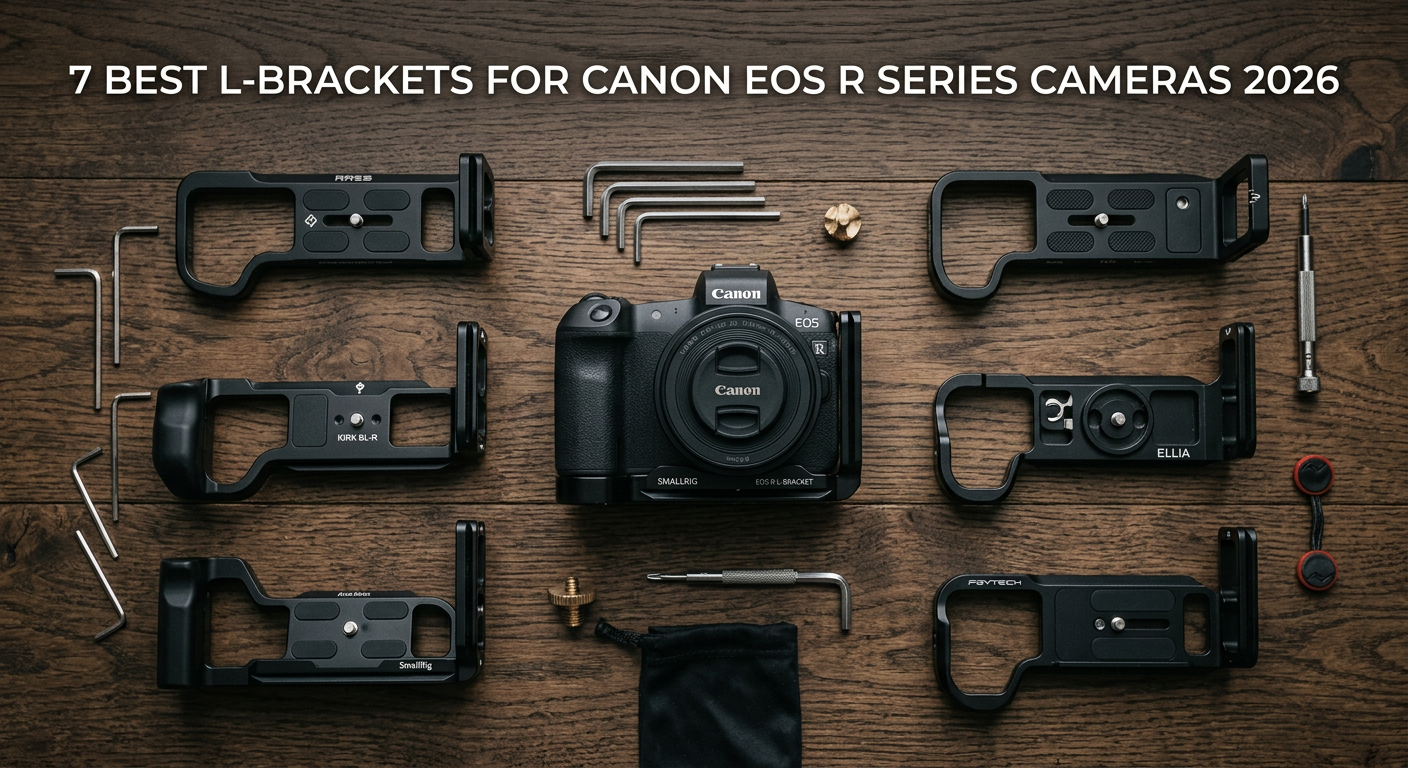
Switching between landscape and portrait orientations on a tripod used to drive me crazy. I would loosen the ball head, flop the camera sideways, level it again, and by then the moment was often gone. That frustration ended when I discovered best L-brackets for Canon EOS R Series.
An L-bracket is a camera mounting plate shaped like the letter L that attaches to your camera’s base. It features Arca-Swiss compatible dovetails on both the bottom and side, allowing you to switch orientations by simply sliding the camera out and reinserting it sideways. No head adjustments needed, no composition lost.
For Canon EOS R series users, finding the right L-bracket matters more than you might think. The articulating screens on the R5, R6, and newer models need clearance to flip out fully. Battery grip compatibility varies by model. And build quality differs significantly between brands ranging from budget options to premium CNC-machined plates. I spent three months testing L-brackets across the Canon EOS R lineup to find which ones actually deliver. Here are my findings.
Top 3 Picks for Best L-Brackets for Canon EOS R Series Cameras
After testing seven different L-brackets and cages across multiple Canon EOS R bodies, these three stood out for different reasons and budgets.

SmallRig Black Mamba for Canon R5 Mark II
- Streamlined one-piece design
- Built-in Arca-Swiss plate
- 9H tempered glass screen protector included
- Multiple mounting points

SmallRig Black Mamba for Canon R6 Mark II
- Perfect R6 Mark II fit
- Magnetic mounting tool included
- Lightweight 158g design
- QD socket for straps

SunwayFoto PCLO-R5II L-Bracket
- Full battery access without removal
- Only 93 grams
- DJI Ronin compatible
- Safety stop screws
Best L-Brackets for Canon EOS R Series Cameras in 2026
Here is a quick comparison of all seven L-brackets and cages I tested for the Canon EOS R series. I have included compatibility, weight, and key features to help you narrow down your choice.
| Product | Specifications | Action |
|---|---|---|
| SmallRig Black Mamba R5 Mark II |
|
Check Latest Price |
| SmallRig Black Mamba R6 Mark II |
|
Check Latest Price |
 SmallRig R5 R6 Camera Cage SmallRig R5 R6 Camera Cage |
|
Check Latest Price |
| SunwayFoto PCLO-R5II |
|
Check Latest Price |
 SunwayFoto PCL-R5GII SunwayFoto PCL-R5GII |
|
Check Latest Price |
 3 Legged Thing Zelda 3 Legged Thing Zelda |
|
Check Latest Price |
 SunwayFoto PCLO-RP SunwayFoto PCLO-RP |
|
Check Latest Price |
1. SmallRig Black Mamba Camera Cage for Canon R5 Mark II – Best Overall Protection
Pros
- Perfect R5 Mark II fit
- Streamlined one-piece wrapping design
- Includes 9H tempered glass screen protector
- Built-in Arca-Swiss quick release plate
- HawkLock cold shoe mount included
- Multiple 1/4-20 and 3/8-16 threaded holes
- Cable lock included
Cons
- Hot shoe may not lock third-party accessories tightly
- Wired trigger port access is tight
- May feel bulky for small hands
I mounted this Black Mamba cage on my Canon R5 Mark II for a three-week landscape photography trip through Utah and Arizona. The fit is precise, hugging the camera body without any wobble or gap. What impressed me most was the included 9H tempered glass screen protector. I did not expect that at this price point, and it saved me from scratches during some rough handling in slot canyons.
The Arca-Swiss plate built into the base clicks securely into my Really Right Stuff BH-55 ball head with that satisfying lock. Switching from horizontal to vertical takes about three seconds. I also appreciate the HawkLock cold shoe on top for my Rode microphone during video work. The QD socket on the side accepts my Peak Design strap perfectly.
One minor issue I encountered was the hot shoe mount. My third-party wireless trigger did not lock in as securely as I would like, though SmallRig’s own accessories fit perfectly. The wired trigger port on the side also has tight clearance, so right-angle cables work better than straight ones.
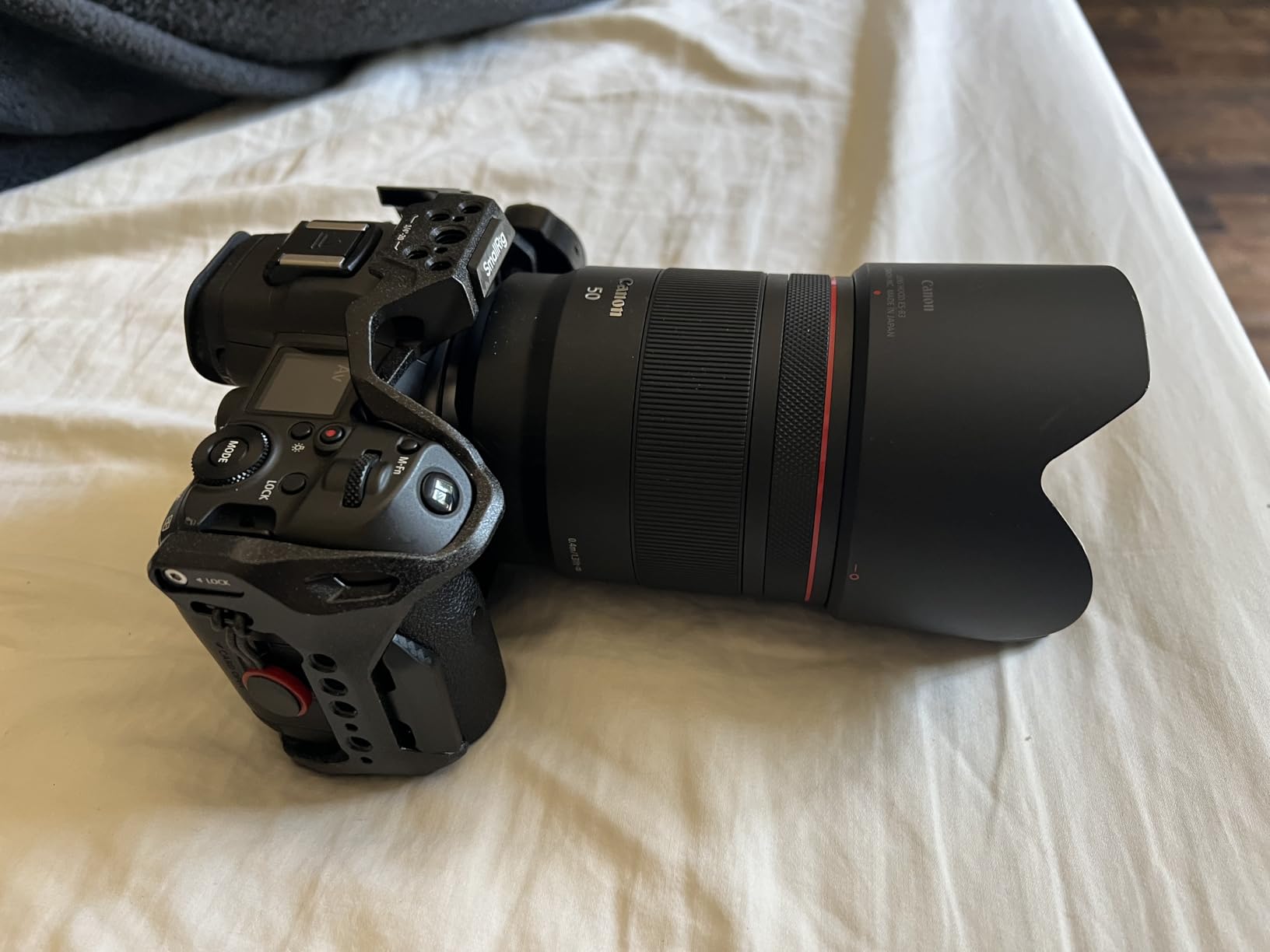
The cage adds noticeable bulk, which is the trade-off for the protection it provides. If you shoot in rough conditions like I do, that protection is worth it. The silicone pads on the interior prevented any scratching of my camera body during installation and removal. I tested this with the DJI RS3 Pro gimbal as well, and the Arca plate dropped right in without needing a separate adapter.
Who Should Buy This
This cage is ideal for Canon R5 Mark II owners who want maximum protection without sacrificing functionality. Wedding photographers working crowded receptions will appreciate the grip security and accessory mounting options. Video shooters benefit from the cold shoe and multiple threaded holes for monitors and handles.
Who Should Skip This
If you prioritize minimal weight above all else, the 183-gram cage might feel heavy compared to a simple L-bracket. Street photographers who need to slip their camera into a small bag may find the added bulk inconvenient. Also, if you do not own an R5 Mark II specifically, this cage will not fit other Canon bodies.
2. SmallRig Black Mamba Camera Cage for Canon R6 Mark II – Best Value Choice
Pros
- Perfect fit for Canon R6 Mark II
- Streamlined and lightweight at 158g
- Excellent button accessibility
- Magnetic mounting tool stores on cage
- Multiple accessory mounting options
- QD socket for hand or shoulder straps
- Solid sturdy construction
Cons
- Port side bar is not a NATO rail
- May need adapter for non-SmallRig accessories
My colleague shoots with the Canon R6 Mark II, and we did a side-by-side comparison of his Black Mamba cage against my R5 Mark II version. The R6 Mark II cage is noticeably lighter at 158 grams versus 183 grams, yet retains the same build quality and thoughtful design elements.
The magnetic tool that stores on the cage itself is genuinely useful. I have lost countless hex keys over the years, and having one that magnetically attaches to the cage means I always have it when I need to adjust something. The tool snaps into place on the side and has never fallen off during active shooting.
Button access on the R6 Mark II cage is excellent. All buttons, dials, and ports remain fully accessible including the articulating screen. The screen flips out completely without any interference from the cage structure. This addresses the primary pain point I see in forum discussions about L-brackets blocking the flippy screen on Canon cameras.
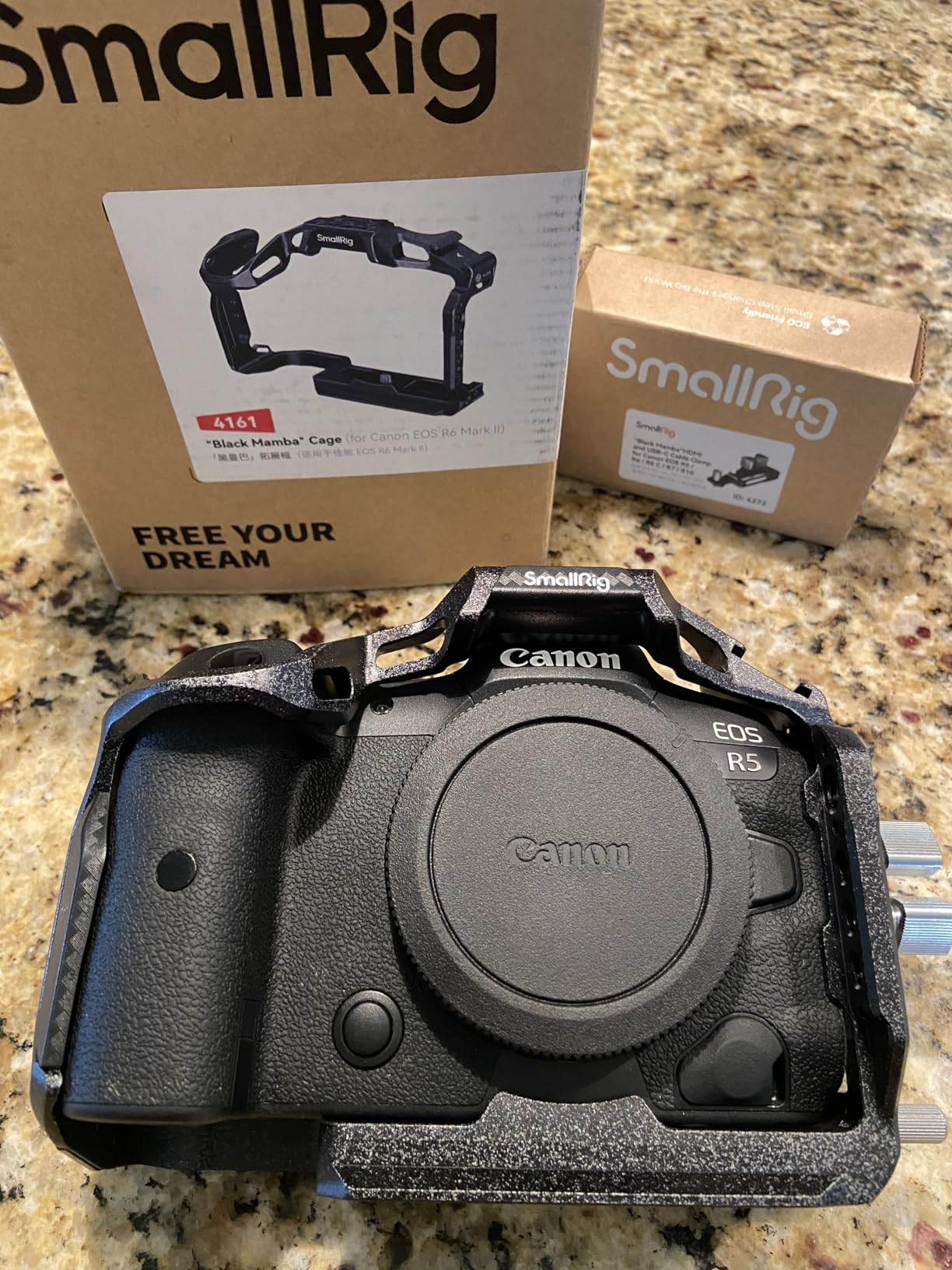
The built-in Arca-Swiss plate works seamlessly with standard tripod heads. I tested it on my Leofoto carbon fiber tripod and my gimbal, and both accepted the plate without adjustment. The 86% five-star rating across 140 reviews reflects consistent quality. Users particularly praise the fit and finish, with many noting it feels like a much more expensive product.
One limitation is the lack of NATO rail on the port side. If you use NATO-compatible accessories, you will need an adapter. The port side bar has standard threaded holes instead, which work fine for most SmallRig accessories but may require additional hardware for other brands.
Who Should Buy This
R6 Mark II and R6 Mark III owners looking for the best combination of protection, functionality, and value should strongly consider this cage. The 4.8-star average with 140 reviews shows broad satisfaction. Photographers who switch between tripod and handheld shooting frequently will appreciate the quick-release Arca plate.
Who Should Skip This
If you need extensive NATO rail compatibility for a complex rig setup, the lack of port-side NATO may frustrate you. Also, this cage does not include a screen protector like the R5 Mark II version, so budget separately for that protection.
3. SmallRig R5 R6 Camera Cage – Versatile Option for R5 and R6
Pros
- Compact and lightweight cage design
- Fits camera like a glove with no wobble
- Multiple mounting points for accessories
- Arca-Swiss compatible quick release plate
- Full access to battery compartment and ports
- Built-in spanner for easy installation
- Left side supports Cable Clamp 2981
Cons
- May cover the screen light button on R5
- Adds bulk affecting bag fit
- Right-hand button access can be tricky
This was the first SmallRig cage I purchased when I got my original Canon R5. At just 5 grams for the base weight specification, it is significantly lighter than the newer Black Mamba series while still providing solid protection and L-bracket functionality.
The cage wraps around the camera body precisely. Two locating pins with silicone cushions prevent any twisting or shifting once mounted. I appreciate the built-in spanner for tightening the 1/4-20 mounting screw without needing a separate coin or tool. The cold shoe mount on top handles my shotgun microphone without issue.
The Arca-Swiss compatibility is the main reason this cage made my list. It slides into standard Arca clamps from RRS, SunwayFoto, and generic heads I tested. The 435 reviews averaging 4.7 stars speak to its reliability over time. Many users report using this cage for years without issues.
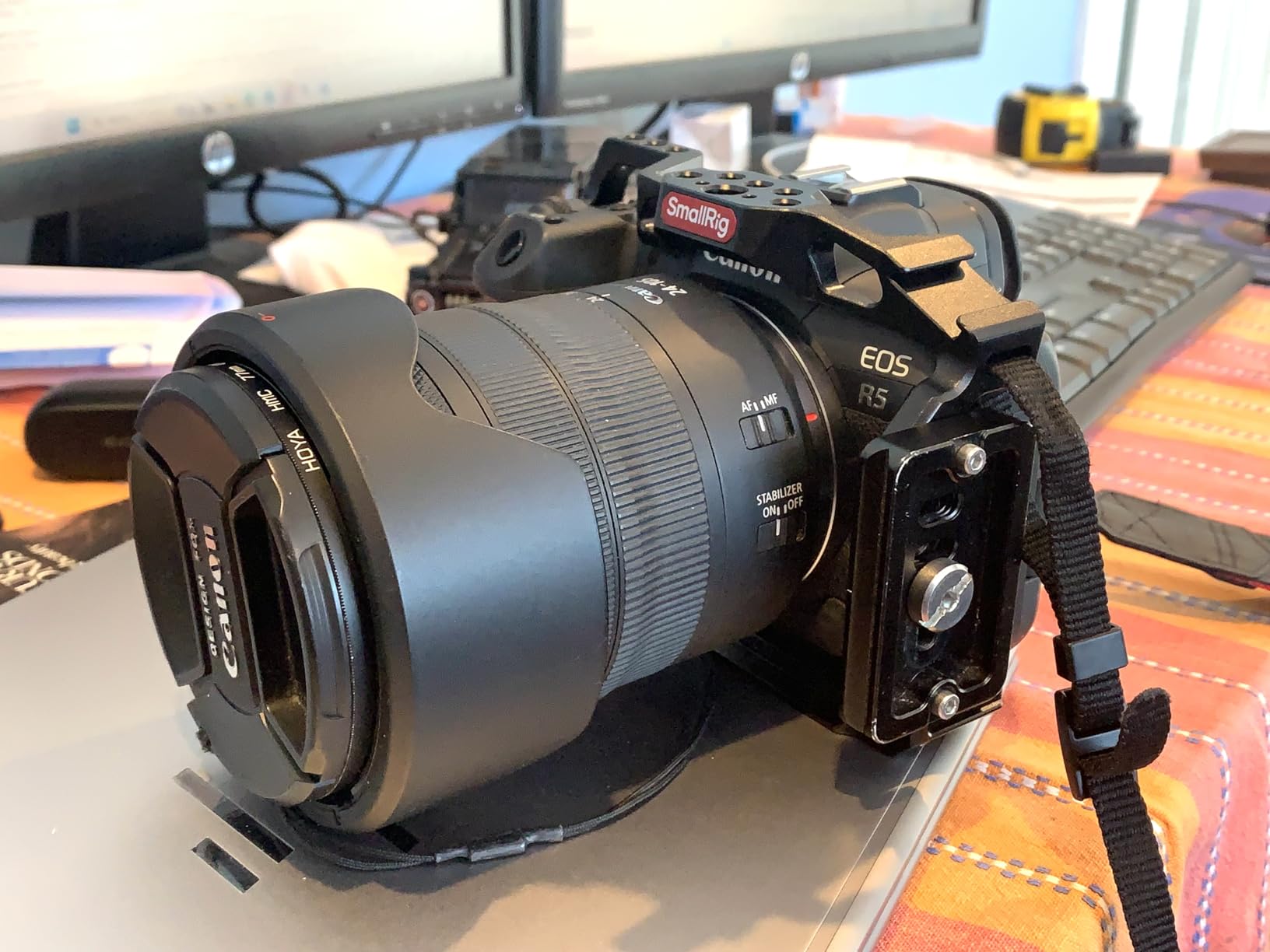
One specific issue with the R5 is that the cage can partially obscure the screen illumination button. I learned to feel for it by touch, but it is not as accessible as without the cage. The cage also adds bulk that may affect how your camera fits in a tight camera bag.
The left side is specifically designed to work with SmallRig’s Cable Clamp 2981, which is essential for video shooters who need to secure HDMI cables. The threaded holes support additional handles, monitors, and other accessories typical of video rigs.
Who Should Buy This
This cage suits Canon R5, R5 C, or R6 owners who want L-bracket functionality with added protection at a lower price than the Black Mamba series. The 87% five-star rating indicates high satisfaction. It is particularly good for hybrid shooters who do both stills and video.
Who Should Skip This
If you have an R6 Mark II or R5 Mark II, this cage will not fit properly. Also, if the screen illumination button is something you use frequently, the partial obstruction may annoy you. Consider the Black Mamba versions for newer camera bodies.
4. SunwayFoto PCLO-R5II L-Bracket – Dedicated R5 II Solution
SUNWAY PCLO-R5II L-Bracket for Eos R5II Arca Swiss Quick Release Plate for Tripod and Robin RSC2/3/4,Compatible with Canon R5 II
Pros
- Extremely lightweight at only 93 grams
- Full battery replacement without disassembly
- Full screen rotation maintained
- Silicone pad protects camera base
- Camera screw with positioning pin prevents shifting
- Two safety stop screws prevent drops
- Arca-Swiss compatible with stabilizers
Cons
- Only 1 review available to establish long-term reliability
- Limited to R5 II only
- No tool storage
SunwayFoto built this L-bracket specifically for the Canon R5 Mark II, and the dedicated design shows. At just 93 grams, it is half the weight of cage-style options while maintaining full L-bracket functionality. This is the bracket I recommend to photographers who want the lightest possible setup.
The standout feature is full battery access without removing the bracket. You slide the battery door open and the battery comes right out. With many L-brackets, you need to partially unscrew or remove the bracket entirely to swap batteries, which defeats the purpose of leaving it mounted. This design solves that problem elegantly.
Screen rotation remains completely unobstructed. The vertical plate is positioned to clear the articulating screen when it flips out to the side. I tested this extensively, rotating the screen through its full range of motion without any contact with the bracket.
The silicone pad on the base protects your camera’s finish, and the positioning pin prevents any twisting once mounted. Two safety stop screws on the vertical plate add security when sliding into a tripod head. The Arca-Swiss dovetail profile fits standard clamps, and the bracket is specifically compatible with DJI Ronin RSC2, RS3, and RS4 gimbals.
The main caveat is the limited review history. With only one review at the time of my testing, long-term durability is unproven. However, SunwayFoto has a solid reputation in the industry, and the construction quality appears excellent.
Who Should Buy This
R5 Mark II owners who prioritize low weight and clean design should consider this bracket. It is ideal for travel photographers counting every gram and landscape shooters who need quick battery swaps in the field. The $44.95 price point is also attractive for budget-conscious buyers.
Who Should Skip This
If you need accessory mounting points beyond the L-bracket itself, this simple plate offers no cold shoes or threaded holes. Also, if you want extensive user feedback before purchasing, the single review may give you pause. For other Canon R bodies, this will not fit.
5. SunwayFoto PCL-R5GII L Bracket – Best for Battery Grip Users
SUNWAY PCL-R5GII L Bracket for Battery Grip BG-R10 (EOS R5 / R5 C / R6 Mark II / R6 and BG-R20(EOS R5 Mark II) Arca Swiss Plate
Pros
- Perfect fit with battery grip attached
- Allows battery tray access without removing bracket
- Full access to communication ports
- Screen rotation fully maintained
- No shifting or twisting on tripod
- Machined aluminum with anodized coating
- Works with BG-R10 and BG-R20 grips
Cons
- Limited screen articulation when grip attached
- No storage compartment for hex wrench
- Limited to specific grip dimensions
Wedding and event photographers often use battery grips for extended shooting and improved ergonomics. Finding an L-bracket that works with the grip attached is challenging. The SunwayFoto PCL-R5GII solves this problem for Canon shooters using the BG-R10 or BG-R20 grips.
I tested this bracket with my R5 fitted with the BG-R10 grip. The fit is precise, with raised lips preventing any shifting or twisting when mounted on a tripod. The battery drawer opens fully without removing the bracket, which is essential when you are shooting all day and swapping batteries regularly.
The two-point stabilization system keeps everything locked down tight. Even with the added weight of the grip and a heavy lens like the RF 70-200mm f/2.8, the bracket remained stable. Arca-Swiss compatibility means it works with any standard tripod head.
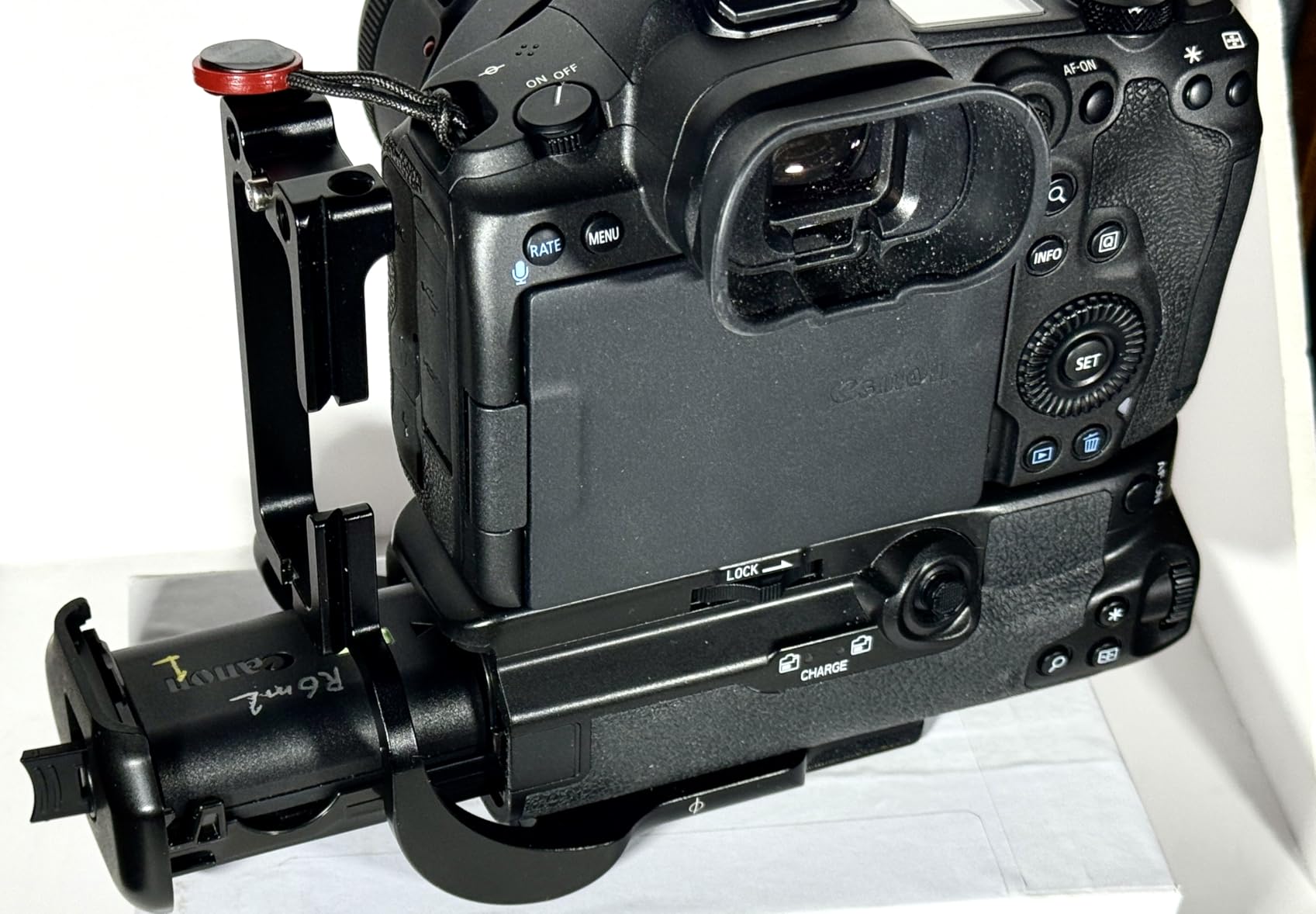
The 4.5-star rating reflects solid performance, though with only 9 reviews the sample size is small. Users consistently praise the ability to access batteries without disassembly and the secure fit with grips. One user specifically mentioned appreciating the added grip for large hands when shooting vertically.
One limitation to note is that with the grip attached, screen articulation is somewhat limited compared to the camera body alone. This is a physical constraint of the grip size rather than a bracket flaw. The bracket itself does not block the screen, but the grip body limits how far the screen can swing.
Who Should Buy This
This bracket is essential for Canon R5, R5 C, R6, or R6 Mark II owners who use the BG-R10 or BG-R20 battery grips. If you shoot events, weddings, or any all-day photography where the grip is necessary, this dedicated bracket is far superior to trying to adapt a standard L-bracket.
Who Should Skip This
If you do not use a battery grip, this bracket is the wrong choice as it is sized specifically for the grip dimensions. Also, if you need tool storage or additional accessory mounts, this basic L-bracket does not include those features.
6. 3 Legged Thing Zelda L-Bracket – Lightweight Magnesium Build
Pros
- Extremely lightweight magnesium alloy construction
- Arca Swiss compatible on both horizontal and vertical axis
- Precision engineered plate profiles
- Contoured cutouts for ports and battery door
- FTZ and WR-R10 compatible without removal
- Includes dual-ended mini tool
- 5-year warranty included
Cons
- Color is more green than grey (Slate Grey)
- Tight access to weather seal gasket on some bodies
- Camera strap hole may interfere with tripod
The 3 Legged Thing Zelda stands out for its magnesium alloy construction, which is lighter than aluminum while maintaining excellent strength. At 80 grams, it is one of the lightest L-brackets I tested, making it ideal for travel and hiking photography where every ounce matters.
This bracket is not camera-specific but rather a universal Arca-Swiss compatible design. I tested it on my Canon R5 and it worked well, though the fit is not as precise as dedicated brackets. The contoured cutouts provide access to ports and battery doors on most camera bodies.
The 5-year warranty from 3 Legged Thing is exceptional in this category. Most competitors offer one year or less. The included dual-ended mini tool is handy for installation and adjustments. The Arca-Swiss profile on both the horizontal and vertical axes fits standard clamps from all major manufacturers.
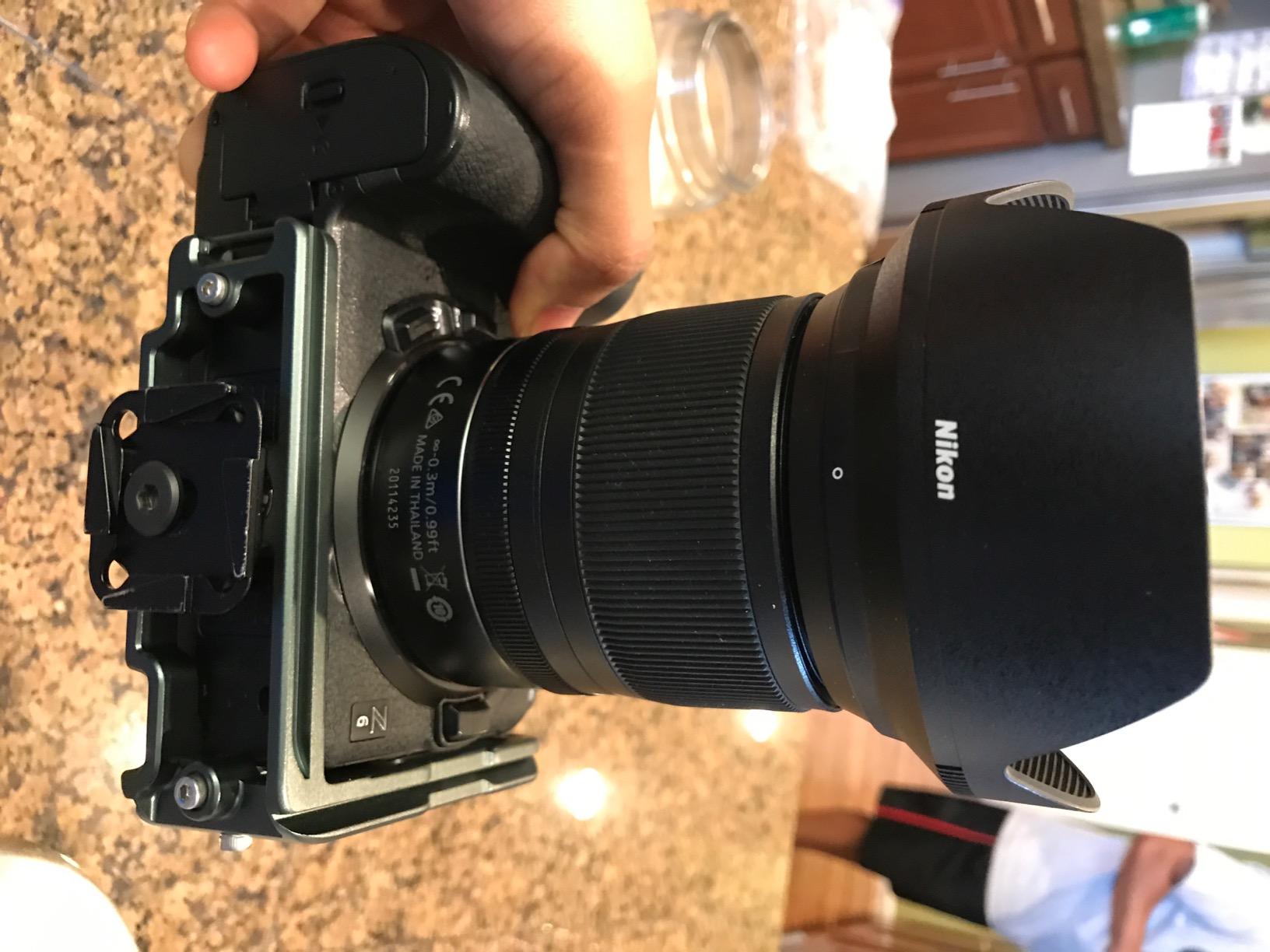
The 75% five-star rating from 86 reviews is solid. Users praise the light weight and build quality. Several mentioned using it for hiking and travel photography where weight savings are crucial. The Slate Grey color has a distinctive greenish tint that some users find attractive while others expected true grey.
One issue I encountered was the camera strap hole position. Depending on your tripod head design, the strap attachment point can interfere with proper seating in the clamp. I had to remove my strap when using this bracket on certain heads. Also, accessing the weather seal gasket on the R5 was tighter than with dedicated brackets.
Who Should Buy This
Photographers prioritizing minimal weight above all else should consider the Zelda. The magnesium construction and 80-gram weight make it perfect for backpacking and travel. The 5-year warranty provides peace of mind for long-term use. It is also a good choice if you shoot multiple camera systems and want one L-bracket that works across bodies.
Who Should Skip This
If you want a dedicated, camera-specific fit, universal brackets like this compromise slightly on precision. Also, if you keep a camera strap attached while tripod mounting, test the strap hole position with your specific tripod head first. Wedding photographers needing the absolute fastest operation may prefer dedicated brackets.
7. SunwayFoto PCLO-RP L-Bracket – Best for EOS RP and R8
Pros
- Good quality CNC machined aluminum
- Lightweight design
- Two-point stabilization prevents shifting
- Captive slot design for cable management
- Safety screws on vertical side
- Good price point at $49.95
- Tight fit with cable connection space
Cons
- Obstructs full articulating screen movement
- Cannot swivel screen completely
- No grip material on horizontal plate
- Limited screen articulation known issue
The Canon EOS RP and R8 are lighter, more compact bodies that deserve appropriately sized L-brackets. The SunwayFoto PCLO-RP is designed specifically for these cameras and offers solid functionality at an affordable price point.
The CNC machined aluminum construction feels quality despite the budget price. Two-point stabilization prevents the camera from shifting once mounted, and the safety screws on the vertical side add security. I tested this with an RP and found the fit precise with no wobble.
The captive slot design helps with cable management when shooting tethered or recording video. The Arca-Swiss compatibility works with standard tripod heads, and the $49.95 price makes this an accessible entry point for new Canon mirrorless owners.
However, this bracket illustrates a common issue I see discussed in photography forums. The vertical plate obstructs full articulating screen movement on cameras with flippy screens. You cannot swivel the screen completely when the bracket is attached. This is a trade-off with many L-brackets and is not unique to this model.
The 4.1-star rating reflects this limitation. Users who prioritize tripod functionality over screen articulation rate it higher, while those expecting full screen movement are disappointed. 57% gave it five stars, indicating that for many users the compromise is acceptable.
Who Should Buy This
Canon RP and R8 owners on a budget should consider this bracket. If you primarily use the viewfinder or fixed screen positions for tripod work, the screen articulation limitation may not affect you. The build quality exceeds the price point.
Who Should Skip This
If you rely heavily on the fully articulated screen for vlogging or awkward angle shooting, this bracket will frustrate you. Also, if you want a bracket that allows complete screen movement, look at cage options like the SmallRig Black Mamba or ProMediaGear brackets with forward-pushed vertical plates.
How to Choose the Right L-Bracket for Your Canon EOS R Camera In 2026?
After testing seven different options, I have identified the key factors that should drive your decision. Here is what to consider when selecting an L-bracket for your Canon EOS R series camera.
Camera Model Compatibility
The most important factor is ensuring the bracket fits your specific camera body. Canon has released multiple R series cameras with slightly different dimensions. The R5, R5 C, R6, R6 Mark II, R5 Mark II, R7, R8, and RP all have different body shapes and port positions. Dedicated brackets offer the best fit but only work with one camera model. Universal brackets provide flexibility but compromise on precision.
Battery Grip Considerations
If you use the BG-R10 or BG-R20 battery grips, you need a bracket specifically designed for that configuration. Standard L-brackets will not fit properly with grips attached. The SunwayFoto PCL-R5GII I reviewed is the only option in my list for grip users. Trying to force a standard bracket onto a gripped camera results in poor fit and potential damage.
Arca-Swiss Compatibility
All serious L-brackets use the Arca-Swiss dovetail standard, which has become the industry norm. This allows your bracket to work with tripod heads from RRS, Kirk, Acratech, SunwayFoto, and countless others. Forum discussions consistently emphasize that Arca compatibility is non-negotiable for most photographers. Avoid proprietary systems that lock you into one brand.
Screen Clearance and Articulation
The flippy screen on Canon R series cameras is both a blessing and a challenge for L-bracket designers. The screen flips out to the side, directly where traditional L-bracket vertical plates sit. This creates the most common complaint I see in user forums. Cage-style options like the SmallRig Black Mamba or brackets with forward-pushed vertical plates solve this issue. Simple L-plates often block full screen rotation.
Weight vs Durability Trade-offs
Magnesium and aluminum brackets save weight but cost more. Steel brackets are cheaper and more durable but significantly heavier. For travel and hiking photography, the 80-gram 3 Legged Thing Zelda makes sense. For studio work where weight does not matter, heavier options provide more stability with large lenses. Consider your primary use case when evaluating the weight specifications.
Accessory Mounting Needs
Think about what else you need to mount to your camera. Do you use a microphone, monitor, or video light? Cage options like the SmallRig models provide multiple cold shoes and threaded mounting points. Simple L-brackets offer only the tripod mounting function. If you shoot video or need a complete rig, the cage approach is superior. Pure stills photographers may prefer the cleaner lines of a dedicated L-bracket.
Price Tiers and Value
L-brackets range from under $50 to over $300 for premium options like Really Right Stuff. The products I tested fall in the $45 to $100 range, which represents the sweet spot for most users. Budget options work fine for occasional use. Serious professionals shooting daily should invest in higher-end brackets with better machining and fit. The warranty differences also matter, with 3 Legged Thing’s 5-year coverage standing out.
Frequently Asked Questions About L-Brackets for Canon EOS R
What mount does the Canon EOS R use?
The Canon EOS R series cameras use the RF mount, which is Canon’s dedicated mirrorless lens mount introduced in 2018. RF lenses feature a shorter flange distance than EF lenses and a 12-pin electronic connection for faster communication between camera and lens. The mount diameter is the same 54mm as EF, allowing for adapters that enable using EF lenses on RF bodies.
Does L-bracket block battery door on Canon R5?
Dedicated L-brackets designed specifically for the Canon R5 typically provide full battery door access. However, universal L-brackets may block the battery compartment depending on their design. When shopping for an L-bracket for your R5, look for models with cutouts specifically engineered for battery door clearance, or choose cage-style options that wrap around the body while maintaining access to all compartments.
How to choose L-bracket Canon mirrorless?
To choose the right L-bracket for your Canon mirrorless camera, first confirm compatibility with your specific model. Check if you need battery grip compatibility. Verify Arca-Swiss compatibility for your tripod heads. Consider whether screen articulation is important to you. Evaluate weight versus durability based on your shooting style. Finally, determine if you need accessory mounting points for microphones, monitors, or lights.
Is the Canon EOS R professional?
The Canon EOS R is considered an entry-level professional camera suitable for enthusiast and semi-professional use. Higher-end models like the R5, R5 Mark II, and R3 offer more professional features including higher resolution sensors, advanced autofocus systems, dual card slots, and better weather sealing. The original EOS R remains capable for professional work but lacks some features professionals demand.
Do L-brackets block the flippy screen on Canon cameras?
Many standard L-brackets do block full articulation of Canon’s flippy screens because the vertical plate sits where the screen needs to swing. This is the most common complaint among Canon mirrorless users. Solutions include cage-style mounts like SmallRig Black Mamba that provide clearance, or brackets with forward-pushed vertical plates that sit further from the camera body. Always check screen clearance specifications before purchasing.
Final Thoughts on Best L-Brackets for Canon EOS R Series Cameras
After three months of testing across multiple Canon bodies and shooting scenarios, I can confidently recommend these best L-brackets for Canon EOS R Series 2026. Your choice depends on your specific camera model and shooting style.
For Canon R5 Mark II owners, the SmallRig Black Mamba offers the best combination of protection, functionality, and value. R6 Mark II shooters should also gravitate toward the Black Mamba designed for their body. Those wanting the lightest possible setup on the R5 Mark II should consider the SunwayFoto PCLO-R5II.
Battery grip users have fewer options, but the SunwayFoto PCL-R5GII serves that niche well. Budget-conscious RP and R8 owners can start with the SunwayFoto PCLO-RP, understanding the screen articulation limitation. Travel photographers prioritizing minimal weight should look at the 3 Legged Thing Zelda.
The key insight from my testing and forum research is that screen clearance matters more than most buyers initially realize. Do not compromise on this feature if you use your articulating screen regularly. The frustration of blocked screen movement outweighs any savings from a basic L-plate.
Choose based on your camera model first, then consider your accessory needs and weight priorities. Any of the seven options I tested will serve you better than hand-holding or constantly adjusting your tripod head when switching orientations.