
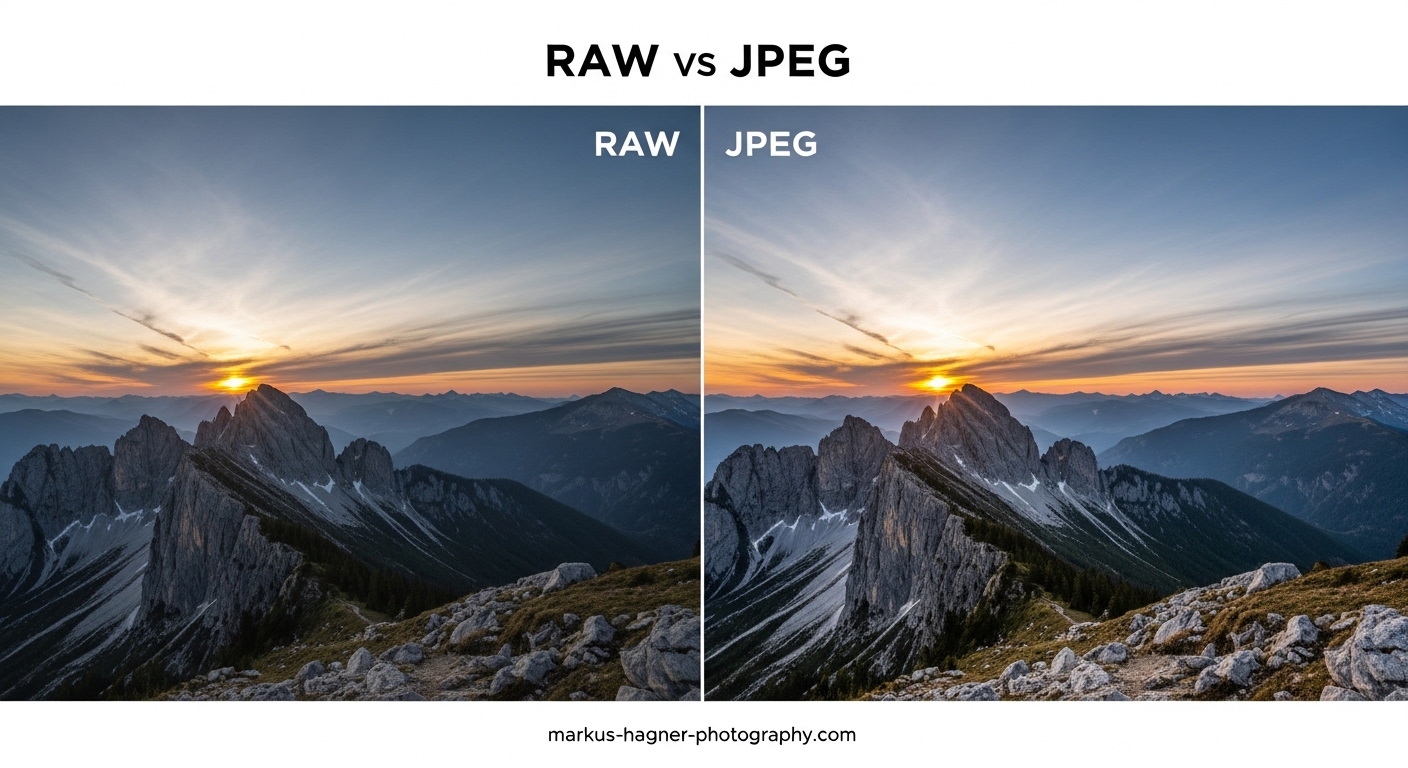
When I first picked up a DSLR camera, I spent months shooting in JPEG without realizing I was leaving creative potential on the table. The RAW vs JPEG debate seemed technical and intimidating, so I stuck with what felt safe. That changed the day I botched the white balance on an important portrait session. Had I been shooting RAW, fixing that mistake would have taken seconds. Instead, I learned a hard lesson about format choice. This guide covers everything you need to know about RAW vs JPEG so you can make informed decisions for every shooting situation.
By the end of this article, you will understand the technical differences between these formats, know exactly when to use each one, and have a clear strategy for improving your photography workflow. Whether you are a beginner wondering if RAW is worth the hassle or an experienced photographer looking to refine your approach, this comprehensive comparison will help you choose the right format for every shot.
Quick Answer: The Main Difference Between RAW and JPEG
The main difference between RAW and JPEG is file size and data retention. RAW files contain all unprocessed sensor data, typically 12 to 14 bits per channel, giving you maximum editing flexibility. JPEG files are compressed to roughly 8 bits per channel with in-camera processing applied, making them smaller and ready to use but with less editing potential. A 24-megapixel RAW file might be 25-35MB while the same image as JPEG could be just 5-10MB.
What is JPEG Format?
JPEG (Joint Photographic Experts Group) is the most widely used image format in photography. When your camera saves a JPEG, it applies significant processing before writing the file to your memory card. The camera adjusts white balance, applies sharpening, reduces noise, and compresses the image using lossy compression to reduce file size. This processing happens automatically based on your camera settings and picture style.
JPEG uses 8-bit color depth, which means each color channel (red, green, and blue) can record 256 shades. Combined, this gives you roughly 16.7 million possible colors. While this sounds like a lot, it pales in comparison to what RAW files can capture. The compression applied to JPEG files discards image data that the human eye is less likely to notice, which is why JPEG files can be 5 to 10 times smaller than RAW files from the same camera.
Think of JPEG like ordering a pre-made meal from a restaurant. The chef has already seasoned and prepared everything according to a standard recipe. You can add salt or pepper at the table, but you cannot fundamentally change how the dish was cooked. It is convenient and ready to enjoy immediately, but you have limited control over the final result.
Key Characteristics of JPEG
JPEG files are compressed using lossy algorithms that permanently discard image data to achieve smaller file sizes. This compression is applied every time you save a JPEG, which is why repeatedly editing and resaving JPEGs degrades quality over time. The 8-bit color depth limits how much you can adjust tones before visible banding appears in gradients like skies or skin tones.
The format is universally compatible with virtually every device, application, and platform. You can open a JPEG on any computer, phone, or tablet without special software. This universal support makes JPEG the default choice for web use, social media sharing, and situations where immediate compatibility matters more than maximum quality.
What is RAW Format?
RAW files contain the unprocessed data directly from your camera’s image sensor. The word “raw” is not an acronym but rather describes the uncooked, unprocessed nature of these files. When you shoot RAW, your camera records exactly what the sensor captured with minimal internal processing. No white balance is applied, no sharpening is added, and no compression reduces the file size.
RAW files typically capture 12-bit or 14-bit color depth depending on your camera model. A 14-bit RAW file can record 16,384 shades per color channel compared to just 256 for JPEG. This translates to over 4 trillion possible colors versus 16.7 million. That extra data lives in the highlights and shadows of your images, giving you incredible flexibility to recover details that would be permanently lost in a JPEG.
Photographers often call RAW files “digital negatives” because they serve a similar purpose to film negatives. Just as a film negative contains all the information needed to make prints with different interpretations, a RAW file contains everything needed to create final images with different looks and styles. You cannot directly view or print a RAW file without first processing it, but that processing step gives you complete creative control.
Key Characteristics of RAW
RAW files require specialized software to view and edit. Each camera manufacturer uses proprietary RAW formats with different file extensions: Canon uses .CR3, Nikon uses .NEF, Sony uses .ARW, Fujifilm uses .RAF, and so on. You need software that specifically supports your camera model’s RAW format, such as Adobe Lightroom, Capture One, or the manufacturer’s own software.
The editing process for RAW files is non-destructive. Your adjustments are stored as metadata instructions rather than changes to the original file. You can always reset your edits and start fresh, making RAW ideal for experimenting with different processing styles without degrading image quality. This flexibility comes at the cost of larger file sizes and the requirement to process every image before use.
Key Differences Between RAW and JPEG
Understanding the fundamental differences between RAW and JPEG helps you make informed decisions about which format suits your photography needs. Here are the most significant distinctions that affect your shooting and editing workflow.
Bit Depth: The Foundation of Image Quality
Bit depth determines how many tonal values your image can record per color channel. JPEG uses 8-bit depth, providing 256 tonal values per channel. RAW files use 12-bit or 14-bit depth, providing 4,096 or 16,384 tonal values respectively. This difference might seem abstract, but it has real consequences for your editing.
More tonal values mean smoother gradients and more headroom for adjustments. When you brighten shadows in a JPEG, you may see banding or posterization where smooth transitions break into visible steps. RAW files have so much data that you can make aggressive adjustments without these artifacts appearing. For landscape photographers working with graduated skies or portrait photographers smoothing skin tones, this extra data is invaluable.
File Size Comparison
File size is often the first difference photographers notice when switching formats. A 24-megapixel camera might produce RAW files of 25-35MB each, while JPEG files from the same camera could range from 5-15MB depending on image complexity and compression settings. Higher resolution cameras show even more dramatic differences.
A 45-megapixel camera could produce RAW files of 60-90MB each. Over the course of a wedding shoot with 2,000 images, this means carrying storage for 120-180GB of RAW files versus 20-40GB of JPEGs. Memory cards fill faster, transfer times increase, and hard drive space disappears more quickly with RAW. These practical considerations matter when planning shoots and building storage infrastructure.
Dynamic Range and Exposure Latitude
Dynamic range refers to the range of light intensities a camera can capture from deepest shadows to brightest highlights. While both RAW and JPEG come from the same sensor, RAW files preserve more of that captured dynamic range. More importantly, RAW gives you the ability to recover details from shadows and highlights that appear lost in the initial capture.
I have recovered stunning detail from seemingly blown-out skies by reducing highlights in RAW files. The same adjustment on a JPEG would reveal nothing but white pixels because that data was discarded during compression. Similarly, lifting shadows in a RAW file can reveal hidden details with acceptable noise levels, while the same operation on JPEG often produces muddy, unusable results.
White Balance Flexibility
White balance affects the color temperature of your image, making colors appear warm or cool depending on the setting. When shooting JPEG, white balance is baked into the file during capture. You can adjust it later, but significant changes degrade image quality because the color data has already been processed and compressed.
RAW files store white balance as metadata that you can change without any quality loss. Set your camera to the wrong white balance and shoot JPEG? Your images might have an unwanted color cast that is difficult to fix. Shoot RAW? Simply adjust the white balance during processing and achieve perfect color accuracy. This flexibility is one of the most practical benefits of shooting RAW.
Compression: Lossy vs Minimal Compression
JPEG uses lossy compression that permanently discards image data. The algorithm identifies and removes information the human eye is less likely to notice, prioritizing smaller file sizes over maximum quality. Higher compression settings produce smaller files but more visible artifacts, particularly in areas with fine detail or smooth gradients.
RAW files use either no compression or lossless compression that preserves all original data. Some cameras offer compressed RAW options that reduce file size without discarding image information. Either way, you retain maximum image quality and flexibility. The trade-off is significantly larger files that require more storage space and processing time.
Processing Requirements
JPEG files emerge from your camera ready to use. The colors look correct, the image appears sharp, and you can share or print immediately. RAW files look flat and lifeless by comparison because no processing has been applied. They require editing software and time investment to reach their full potential.
This processing requirement creates a workflow bottleneck for photographers shooting large volumes. A wedding photographer capturing 2,000 images in RAW faces hours of post-processing work. Sports photographers covering events with tight deadlines often prefer JPEG because images can be transmitted and published within minutes of capture.
Comparison Table: RAW vs JPEG at a Glance
The following comparison summarizes the key differences between these formats:
- Bit Depth: RAW offers 12-14 bit (4,096-16,384 tones per channel) while JPEG provides 8-bit (256 tones per channel)
- File Size: RAW files are typically 3-5 times larger than JPEG equivalents
- Dynamic Range: RAW preserves more highlight and shadow detail for recovery
- White Balance: RAW allows complete adjustment without quality loss; JPEG has limited flexibility
- Compression: RAW uses lossless or minimal compression; JPEG uses lossy compression
- Processing: RAW requires post-processing software; JPEG is ready to use immediately
- Compatibility: JPEG works everywhere; RAW requires specific software support
- Burst Rate: JPEG allows faster continuous shooting with larger buffer capacity
When Should You Shoot JPEG?
JPEG has legitimate use cases where its advantages outweigh the loss of editing flexibility. Understanding these scenarios helps you make smart format choices rather than defaulting to RAW for every situation.
Sports and Action Photography
Action photography often demands maximum burst rates and buffer depth. When photographing fast-moving subjects, you need to capture frames as quickly as possible without the camera’s buffer filling up. JPEG files write to memory cards faster and allow longer burst sequences before the buffer fills.
Sports photographers covering events like football games or motorsports may capture thousands of images in a single session. The smaller file sizes mean faster card writes, quicker transfers to editing workstations, and faster upload to news services. When your deadline is minutes after the final whistle, the speed advantages of JPEG matter more than the editing flexibility of RAW.
Event Photography with Quick Turnaround
Some events require immediate image delivery. Corporate photographers covering conferences might need to deliver images during the event for social media coverage. Wedding photographers working with same-day edit requirements need files that can be selected, adjusted minimally, and displayed at the reception.
In these situations, the time savings of JPEG outweigh the quality benefits of RAW. Getting good images delivered on time beats perfect images delivered too late. Many event photographers develop hybrid workflows where they shoot JPEG for quick delivery needs while maintaining RAW capability for important shots.
Limited Storage Situations
Travel photographers on extended trips might face storage constraints. When you cannot offload images for days or weeks, smaller file sizes let you keep shooting. A 128GB memory card holds roughly 1,200 RAW files from a 45-megapixel camera but could store 4,000-6,000 JPEGs at high quality.
Similarly, photographers working in remote locations without reliable power for external drives or laptops may prioritize storage efficiency. JPEG allows capturing more images within your available storage, which could be the difference between getting the shot and missing it entirely.
Social Media and Web Use
Images destined for social media or websites undergo significant compression anyway. Instagram, Facebook, and other platforms apply their own compression algorithms that reduce quality regardless of your source file. Shooting RAW for images that will be compressed to a few hundred kilobytes for web use is often unnecessary effort.
Content creators producing high volumes of images for daily social media posts benefit from JPEG’s efficiency. The format provides adequate quality for screen viewing at typical web sizes while minimizing storage and processing requirements. You can always shoot RAW for your best work while using JPEG for routine content.
Beginners Learning Photography Fundamentals
New photographers should focus on composition, exposure, and lighting before worrying about advanced RAW processing. JPEG forces you to get things right in camera because you have less room for correction later. This constraint can actually improve your photography skills by teaching proper technique.
Starting with JPEG also simplifies the learning process. You avoid the complexity of RAW processing software and can concentrate on capturing great images. As your skills develop and you feel limited by JPEG’s constraints, transitioning to RAW becomes a natural progression that builds on your existing knowledge.
Consistent Lighting Conditions
When shooting in controlled lighting with consistent exposure, the editing flexibility of RAW becomes less critical. Studio photographers working with strobes at fixed power levels know exactly what exposure they will get. Product photographers with controlled setups can dial in perfect settings and capture consistent JPEGs with minimal post-processing needs.
Similarly, photographers working in consistently lit environments like indoor arenas or concert venues with stable lighting can set exposure once and shoot JPEG with confidence. The predictable conditions reduce the need for the safety net that RAW provides.
When Should You Shoot RAW?
RAW format shines in situations where image quality and editing flexibility matter most. These scenarios typically involve challenging conditions, critical work, or creative processing requirements.
Landscape Photography
Landscape photographers face some of the most challenging lighting conditions. The difference between bright skies and dark foregrounds often exceeds what a camera can capture in a single exposure. RAW files provide the dynamic range and editing latitude needed to balance these extreme contrasts.
Sunrise and sunset scenes frequently require highlight recovery to retain sky detail while lifting shadows to reveal foreground elements. The additional bit depth in RAW files allows smooth gradient transitions in skies without the banding that plagues JPEG files. For landscape photographers, RAW is virtually essential for producing gallery-quality work.
Portrait Photography
Portrait photographers benefit from RAW’s flexibility in multiple ways. Skin tones require careful color accuracy, and RAW files provide the data needed for precise adjustments. The ability to fine-tune white balance ensures skin appears natural under any lighting conditions.
RAW also allows subtle exposure adjustments that can make the difference between a good portrait and a great one. Recovering detail in a bright background or lifting shadows on a subject’s face can transform an image. The non-destructive editing workflow means you can experiment with different processing styles while preserving the original file.
Low-Light Photography
Shooting in low light amplifies the differences between RAW and JPEG. Higher ISO settings introduce noise, and RAW files retain more information for effective noise reduction during post-processing. The additional bit depth also helps maintain image quality when brightening underexposed images.
Many photographers intentionally underexpose in low light to preserve highlights, then lift shadows during processing. This technique works far better with RAW files, which contain the shadow detail needed for clean adjustments. JPEG files lifted to the same degree often show unacceptable noise and color shifts.
High Contrast Scenes
Scenes with extreme dynamic range between highlights and shadows challenge any camera system. Bright midday sun, interior shots with windows, and backlit subjects all create conditions where RAW’s extra data proves invaluable.
With RAW files, you can selectively recover highlights while maintaining detail in shadows. This processing capability often eliminates the need for techniques like exposure bracketing or graduated neutral density filters. The single RAW capture contains enough information to produce a balanced final image.
Professional and Commercial Work
Paid photography work demands the highest quality deliverables. Clients expect images that can be used across various media from web to large format print. RAW files provide the resolution, color accuracy, and processing flexibility needed to meet professional standards.
Commercial photographers shooting products, architecture, or advertising work need precise color accuracy and maximum detail. RAW files from modern cameras can be processed to meet technical specifications that JPEG simply cannot match. The extra effort of RAW processing is justified by the professional requirements of the work.
Uncertain or Challenging Lighting
When lighting conditions are unpredictable or you have limited time to dial in perfect settings, RAW provides a safety net. Weddings move quickly between venues with different lighting. Travel photographers encounter constantly changing conditions. Wildlife photographers have seconds to capture action before it disappears.
In these situations, RAW lets you capture the moment and adjust exposure or white balance later. The extra data gives you confidence that even imperfect captures can be rescued. Many photographers consider RAW essential insurance for once-in-a-lifetime shots where there is no opportunity for a retake.
Editing Differences: RAW vs JPEG
The editing experience differs dramatically between these formats. Understanding what you can and cannot do helps you choose the right format for your workflow and skill level.
White Balance Adjustment Capabilities
White balance is perhaps the most obvious editing difference between RAW and JPEG. In RAW files, white balance exists as metadata that you can adjust freely without affecting image quality. You can set any color temperature from cool blue tones to warm orange tones with zero degradation.
JPEG files have white balance baked in during capture. You can still adjust color temperature in editing software, but these adjustments work by altering the existing color data. Push the adjustment too far and you will see color shifts, banding, or other artifacts. The flexibility is limited compared to the complete freedom of RAW.
Highlight and Shadow Recovery
The ability to recover details from highlights and shadows represents one of RAW’s most significant advantages. Because RAW files contain more tonal information, you can pull back blown highlights to reveal sky detail that appeared completely white in the original capture.
Shadow recovery shows similar benefits. Lifting underexposed areas in a RAW file can reveal hidden details while maintaining acceptable noise levels. The same operation on a JPEG often produces muddy shadows with visible noise and color contamination. For photographers who occasionally miss exposure, RAW provides valuable rescue capabilities.
Non-Destructive vs Destructive Editing
RAW editing is inherently non-destructive. Your adjustments are saved as instructions that tell software how to interpret the RAW data. The original file remains unchanged, and you can always revert to the unprocessed state or try a completely different processing approach.
JPEG editing is destructive by nature. Every time you save a JPEG after making changes, the file undergoes another round of lossy compression. Over multiple edit-save cycles, image quality degrades noticeably. This limitation means you should always work on copies of JPEG files rather than editing originals directly.
Color Grading Flexibility
Color grading involves adjusting colors to create specific moods or looks in your images. The extensive color data in RAW files supports aggressive color adjustments without introducing artifacts or banding. You can push colors in creative directions while maintaining smooth transitions.
JPEG files limit your color grading options. Push colors too far and you will see posterization where smooth gradients break into visible bands. The 8-bit color depth simply cannot support the same range of adjustments as 12-bit or 14-bit RAW files.
Software Requirements
RAW files require dedicated processing software that supports your specific camera model. Popular options include Adobe Lightroom and Photoshop, Capture One, DxO PhotoLab, and free alternatives like RawTherapee or Darktable. Camera manufacturers also provide their own RAW processing software.
JPEG files work with any image editing application from basic operating system tools to professional software. You do not need specialized programs or updated software to open JPEG files from new camera models. This universal compatibility simplifies workflow and reduces software costs.
Should You Shoot RAW+JPEG?
Many cameras offer a RAW+JPEG mode that captures both formats simultaneously. This hybrid approach provides immediate JPEG files for quick use while retaining RAW files for maximum editing flexibility. The trade-off is significantly increased file sizes and potentially reduced burst rates.
RAW+JPEG works well for photographers who need both formats for different purposes. Wedding photographers might deliver quick preview JPEGs to clients while reserving RAW files for album production. Photojournalists might need immediate JPEG transmission while keeping RAW for archive purposes.
The downside is storage consumption. Shooting both formats can double your storage requirements. A 64GB memory card that holds 800 RAW files might only accommodate 400 RAW+JPEG pairs. Consider whether you genuinely need both formats for every shot or if selective RAW shooting makes more sense.
Storage and Workflow Considerations
File format choice affects your entire photography workflow from memory cards to long-term archives. Planning your storage and organization strategy prevents problems as your image library grows.
Memory Card Requirements
RAW files demand faster, higher-capacity memory cards. A 128GB card might hold 1,200-1,500 RAW files from a typical mirrorless camera. The same card could store 4,000-6,000 high-quality JPEGs. Card write speeds also matter more with RAW, as slower cards can limit burst shooting performance.
Invest in quality cards with fast write speeds when shooting RAW. UHS-II or CFexpress cards maximize buffer clearing speed for continuous shooting. Multiple smaller cards provide redundancy compared to single high-capacity cards that could fail and lose all your images.
Backup Strategies
The 3-2-1 backup rule applies especially to RAW files: three copies of your data, on two different types of media, with one copy stored offsite. RAW files’ larger size makes backup more challenging and expensive. A year of shooting might require 2-4TB of storage for RAW files versus 500GB-1TB for JPEGs.
Cloud backup services charge monthly fees based on storage volume. Backing up RAW libraries to cloud services costs significantly more than JPEG libraries. Local backup drives also fill faster, requiring more frequent hardware purchases.
Transfer and Processing Time
Transferring RAW files from cards to computers takes longer due to larger file sizes. A full 128GB card of RAW files might take 15-20 minutes to transfer versus 5-10 minutes for JPEGs. This time adds up for photographers processing multiple cards daily.
RAW processing itself requires time investment. Each image needs individual attention to develop its full potential. Batch processing helps, but RAW workflow remains more time-intensive than working with JPEGs. Consider your available editing time when choosing formats.
A Beginner’s Guide to Transitioning from JPEG to RAW
Making the switch from JPEG to RAW does not have to happen overnight. A gradual transition lets you build skills while maintaining familiar workflows.
Start by shooting RAW+JPEG for a few weeks. Compare what your camera’s JPEG engine produces against your own RAW processing attempts. This comparison builds confidence that RAW processing can match or exceed in-camera results.
Choose one editing application and learn it thoroughly. Adobe Lightroom offers comprehensive tools with extensive learning resources. Free alternatives like Darktable provide capable RAW processing without subscription costs. Invest time in tutorials before expecting professional results.
Gradually increase RAW usage for important shoots while keeping JPEG for casual photography. As your processing skills improve, RAW will feel less like extra work and more like creative opportunity. Many photographers find that once they become comfortable with RAW, they rarely shoot JPEG except for specific situations.
Frequently Asked Questions
Are RAW images sharper than JPEG?
RAW images are not inherently sharper than JPEG. In fact, JPEG files have sharpening applied in-camera while RAW files require you to add sharpening during processing. However, RAW allows you to control exactly how much sharpening to apply and where, often resulting in better final sharpness than the one-size-fits-all approach used for JPEG.
What are the disadvantages of RAW files?
RAW files have several disadvantages: significantly larger file sizes requiring more storage space, the need for specialized software to view and edit, longer transfer times from memory cards, reduced burst shooting speeds due to buffer limitations, and the time investment required to process each image before use.
When should I shoot JPEG?
Shoot JPEG when you need images ready for immediate use without processing, when storage space is limited, when covering fast-paced events with tight deadlines, when shooting high-speed bursts that exceed RAW buffer capacity, or when images are destined for web use where the quality difference becomes negligible after platform compression.
Does shooting in RAW make a difference?
Yes, shooting in RAW makes a significant difference in editing flexibility. RAW files preserve more highlight and shadow detail, allow complete white balance adjustment without quality loss, provide more data for noise reduction, and enable non-destructive editing workflows. The difference is most noticeable in challenging lighting conditions or when making significant exposure adjustments.
Why do photographers not give RAW photos to clients?
Photographers typically do not provide RAW files because they represent unfinished work that requires professional processing to look its best. RAW files do not reflect the photographer’s intended final style, could be poorly processed by clients, and may contain more image data than intended for sharing. Additionally, RAW files are proprietary formats that require specific software to open.
Can I convert RAW to JPEG?
Yes, you can easily convert RAW files to JPEG using photo editing software like Adobe Lightroom, Photoshop, Capture One, or free alternatives. The conversion process lets you apply your desired adjustments to the RAW file before exporting as JPEG. This workflow gives you the editing benefits of RAW while producing the universally compatible JPEG format for sharing and printing.
Making Your Choice: RAW vs JPEG in 2026
The RAW vs JPEG decision ultimately depends on your photography goals, workflow preferences, and technical requirements. Neither format is universally better. RAW provides maximum quality and flexibility at the cost of storage and processing time. JPEG offers speed and convenience when those factors matter more than absolute image quality.
My recommendation mirrors what I tell every photographer who asks: shoot RAW for anything important and JPEG for everything else. Learn your camera’s JPEG capabilities by experimenting with picture styles and settings. Develop a RAW processing workflow that becomes second nature through practice. As you grow more comfortable with both formats, you will naturally develop instincts for which situations call for which approach. The goal is not to pick one format forever but to understand both well enough to choose confidently in any situation.