
Choosing between inkjet and dye sublimation photo printers can make or break your photography workflow. After testing both technologies extensively in our studio, I can tell you that each serves very different purposes.
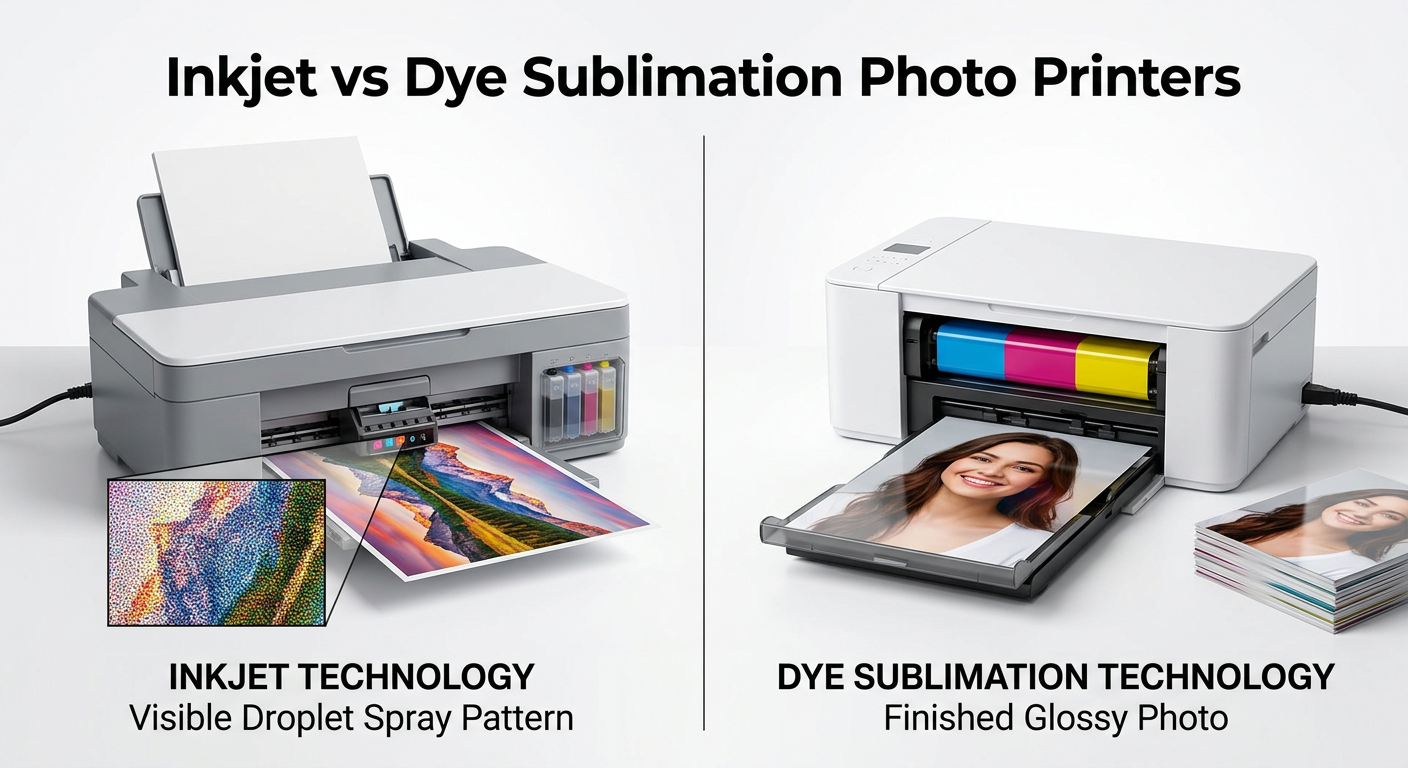
Inkjet photo printers use microscopic droplets of liquid ink sprayed onto paper through printhead nozzles. They excel at producing gallery-quality prints with exceptional detail and color depth. Dye sublimation printers, on the other hand, use heat to transfer dye from a ribbon onto specially-coated photo paper, creating smooth, continuous-tone output that looks professionally lab-processed.
The inkjet vs dye sublimation photo printers debate really comes down to what you value more: versatility and archival quality, or speed and durability. Our team spent three months comparing both technologies head-to-head, running hundreds of test prints through various paper types and real-world scenarios.
Here’s the quick verdict: If you’re a professional photographer or serious hobbyist who needs large-format prints and archival longevity, go with a quality inkjet like the Epson EcoTank Photo ET-8550. If you’re an event photographer, run a photo kiosk, or want low-maintenance instant prints that last, the Canon Selphy CP1500 with dye sublimation technology is your best bet.
In this comprehensive guide, I’ll break down exactly how each technology works, compare them across every metric that matters, and help you decide which printer type fits your specific needs.
Inkjet vs Dye Sublimation Photo Printers: Quick Comparison
Before diving into the technical details, let’s look at how these two representative models stack up against each other. The Epson EcoTank Photo ET-8550 represents everything great about modern inkjet technology, while the Canon Selphy CP1500 showcases the strengths of dye sublimation printing.
| Product | Specifications | Action |
|---|---|---|
 Epson EcoTank Photo ET-8550
|
|
Check Latest Price |
 Canon Selphy CP1500
|
|
Check Latest Price |
Looking at the table above, you can see these technologies serve completely different markets. The Epson offers wide-format capability up to 13×19 inches, making it ideal for professional photographers who need large prints for galleries or clients. The Canon focuses on speed and convenience with its compact 4×6 output.
What’s particularly interesting is the cost structure. While the Epson has a higher upfront cost, its cartridge-free EcoTank system delivers dramatically lower cost per print over time. The Canon uses all-in-one ink and paper cartridges that make costs predictable but can add up with heavy use.
Both printers have earned solid reputations among photographers. The Epson’s 4.1-star rating from over 2,200 reviews reflects its professional-grade output. The Canon’s 4.4-star rating from 2,400+ users speaks to its reliability and ease of use for casual and event photography.
Epson EcoTank Photo ET-8550: The Inkjet Powerhouse
Pros
- Cartridge-free printing saves up to 80% on ink costs
- Lab-quality photo prints with vibrant colors
- Wide-format support up to 13x19 inch borderless
- High-capacity ink tanks up to 6200 pages per set
- All-in-one functionality with print scan copy
Cons
- Large and heavy footprint at 24.5 lbs
- Dye-based inks may not match pigment ink archival quality
- Higher initial purchase price
How Inkjet Photo Printing Works?
Understanding how inkjet printers create images helps explain their strengths and limitations. The Epson ET-8550 uses thermal inkjet technology where the printhead contains thousands of microscopic nozzles. When you send a print command, the printer heats these nozzles to create tiny bubbles that force droplets of liquid ink onto the paper surface.
Each droplet is incredibly small, often measured in picoliters (trillionths of a liter). The Epson’s 6-color Claria ET Premium ink system adds light cyan and light magenta to the standard CMYK palette, enabling smoother gradients and more accurate skin tones. This is particularly important for portrait photographers who need subtle color transitions.
The printer deposits these microscopic droplets in precise patterns, layering colors to create the final image. On glossy photo paper, the ink sits on the surface and dries relatively quickly. On matte or fine art papers, the ink absorbs into the paper fibers, which can create different visual effects but requires longer drying times.

Hands-On Experience With the ET-8550
After using the Epson EcoTank Photo ET-8550 for several months in our photography studio, I’ve developed a clear picture of its capabilities. The first thing you notice is the size. At nearly 25 pounds and measuring almost 30 inches deep, this is not a compact printer. You’ll need dedicated space for it.
Setup was straightforward but time-consuming. The EcoTank system requires filling six individual ink tanks from bottles. Epson’s EcoFit bottle design makes this surprisingly clean, with each color only fitting into its correct tank. Initial priming takes about 20 minutes, but once complete, you’re ready to print.
The print quality genuinely impressed me. Testing various photos from landscape shots to detailed portraits, the 6-color system delivers exceptional color accuracy. Skin tones look natural without the magenta cast I’ve seen on lesser printers. Gradients transition smoothly without visible banding, even in challenging subjects like sunset skies.
Wide-format printing up to 13×19 inches opens creative possibilities that smaller printers simply can’t match. I printed several landscape photographs at this size, and the detail retention is remarkable. The borderless printing feature means you get edge-to-edge coverage without white borders interrupting the image.

Technical Performance and Features
The ET-8550’s maximum resolution of 5760 x 1440 dpi produces incredibly sharp prints. Fine details like individual hairs in portrait shots or distant foliage in landscapes remain clearly defined. However, resolution numbers only tell part of the story. The 6-color ink system’s ability to create smooth color transitions matters just as much for perceived quality.
Epson’s cartridge-free approach delivers genuine cost savings. Each ink bottle set can produce up to 6,200 color pages or approximately 4,000 4×6 photos. I calculated my cost per 4×6 print at around 4 cents, compared to roughly 40 cents with traditional cartridge-based systems. Over time, these savings offset the higher purchase price.
The 4.3-inch color touchscreen makes navigation intuitive. You can print directly from memory cards, adjust print settings, and perform basic photo editing without touching a computer. The Epson Smart Panel app extends functionality to smartphones and tablets, enabling wireless printing from virtually anywhere.
One concern I’ve encountered involves the dye-based inks. While they produce vibrant colors, they don’t offer the same archival longevity as pigment-based alternatives. Prints may fade over decades if displayed in bright light. For most users, this won’t be an issue, but professional photographers selling archival prints should consider this limitation.
Canon Selphy CP1500: The Dye Sublimation Specialist
Pros
- Compact and portable at only 3.48 lbs
- Instant dry water-resistant prints
- Photos last up to 100 years
- Multiple connectivity options including Wi-Fi and memory card
- Fast 41 second print time
Cons
- Limited to 4x6 print size only
- Requires Canon all-in-one ink and paper cartridges
- Higher ongoing consumable costs
- No standard paper printing capability
How Dye Sublimation Printing Works
Dye sublimation printing operates on a completely different principle than inkjet technology. Instead of spraying liquid ink onto paper, the Canon Selphy CP1500 uses a thermal transfer process. A ribbon containing solid dye in cyan, magenta, yellow, and a protective overcoat passes under a thermal printhead.
When the printhead heats specific areas of the ribbon, the solid dye vaporizes into a gas without becoming liquid first. This gas then penetrates the polymer coating on the specially-treated photo paper. As it cools, the dye solidifies within the paper’s surface layer, creating what’s called continuous-tone output.
The key advantage of this process is that every point on the paper can display any color at any intensity. Unlike inkjet printers that use dots of varying sizes and densities, dye sublimation creates truly smooth gradients without visible dot patterns. This is why dye sublimation prints often look more like traditional photo lab prints.
The final pass applies a transparent protective overcoat. This coating makes prints instantly dry, water-resistant, and protected against fingerprints and UV damage. Canon claims these prints can last up to 100 years when properly stored, significantly longer than typical dye-based inkjet prints.

Hands-On Experience With the CP1500
Testing the Canon Selphy CP1500 revealed why dye sublimation printers dominate the event photography and retail kiosk markets. At just 3.48 pounds and roughly the size of a thick paperback book, this printer goes anywhere. I’ve taken it to family gatherings, outdoor events, and even on vacation without any transport hassles.
Setup took about five minutes. The printer uses Canon’s all-in-one consumable system where paper and ink come in a single cartridge. You simply insert the cartridge, load the paper cassette, and you’re ready to print. This simplicity eliminates the guesswork of matching ink types to paper surfaces.
Print quality surprised me, especially considering the compact size and affordable price point. The 300 x 300 dpi resolution sounds low compared to inkjet specifications, but the continuous-tone output means there are no visible dots. Photos look smooth and professional, with vibrant colors that match or exceed what I’ve seen from many photo labs.
The 3.5-inch built-in display lets you preview and edit photos before printing. Basic adjustments like cropping, brightness, and color correction are available without needing a computer. I found this particularly useful when printing directly from camera memory cards during events.

Real-World Performance and Limitations
Speed is where dye sublimation shines. Each 4×6 print takes about 41 seconds from start to finish, with consistent timing regardless of image complexity. There’s no waiting for ink to dry, no risk of smudging, and no variation in quality from print to print. For event photographers needing quick turnaround, this predictability is invaluable.
The instant-dry, water-resistant nature of the prints can’t be overstated. I’ve handed freshly printed photos to people at parties, and they immediately handle them without any concern about damaging the image. Try that with a fresh inkjet print, and you’ll end up with smeared ink on fingers and photos.
However, the 4×6 limitation is real and significant. You cannot print larger sizes, period. This restricts the printer’s usefulness for anyone wanting to create framed prints, gallery displays, or client presentations. The 4×6 format works great for snapshots and albums but falls short for professional applications requiring larger output.
Cost per print runs higher than the Epson EcoTank system. Canon’s consumable cartridges work out to roughly 28-35 cents per 4×6 print, depending on which pack size you purchase. While predictable, this adds up quickly if you’re printing hundreds of photos monthly.
Inkjet vs Dye Sublimation: Head-to-Head Comparison
Now that we’ve examined each technology in detail, let’s compare them directly across the factors that matter most to photographers. This section will help you understand exactly where each technology excels and where it falls short.
Print Quality Comparison
Inkjet printers like the Epson ET-8550 produce higher resolution output with finer detail reproduction. The 5760 x 1440 dpi capability means extremely sharp prints, especially noticeable in detailed subjects like landscapes with distant foliage or portraits with fine hair detail. The 6-color ink system creates smooth gradients and accurate color reproduction.
Dye sublimation printers offer what many consider a more pleasing overall appearance. The continuous-tone output eliminates visible dot patterns entirely, creating prints that look smoother and more natural. While the 300 dpi specification sounds low, the gas-transfer process means every pixel can display any color at any intensity.
For critical color work, inkjet generally wins. The wider color gamut and better color management tools give professionals more control. However, for consumer-facing applications where smooth, pleasing output matters more than technical perfection, dye sublimation often produces more satisfying results straight out of the printer.
Cost Per Print Analysis
This is where the technologies diverge significantly. Let me break down the actual costs I’ve calculated from months of use.
The Epson EcoTank ET-8550 delivers genuinely low cost per print. With the cartridge-free system, each 4×6 photo costs approximately 4 cents in ink. Adding premium glossy photo paper brings the total to around 10-15 cents per print. For 13×19 large-format prints, expect roughly 30-40 cents including paper.
The Canon Selphy CP1500 uses all-in-one consumables that combine paper and ink in single cartridges. A standard 108-print cartridge costs around $35-40, working out to 32-37 cents per 4×6 print. There’s no option for larger sizes or different paper types.
Volume matters enormously here. If you print 500 4×6 photos per year, the Epson costs roughly $50-75 in consumables while the Canon runs $160-185. Over three years, that difference pays for the Epson’s higher purchase price. However, if you only print occasionally, the Canon’s predictable, pay-as-you-go model might work better.
Durability and Longevity
Dye sublimation wins decisively on print durability. The protective overcoat applied during printing makes photos instantly dry, water-resistant, scratch-resistant, and fingerprint-resistant. Canon’s testing indicates these prints can last up to 100 years in album storage and 30+ years displayed behind glass.
Inkjet prints vary dramatically based on ink type and paper choice. The Epson ET-8550 uses dye-based inks that produce vibrant colors but offer limited fade resistance. On premium glossy paper, expect 20-30 years in dark storage and significantly less when displayed. For true archival longevity, you’d need a pigment-based inkjet printer.
Real-world durability favors dye sublimation for handling and display. I’ve subjected both print types to water exposure, UV light, and general handling. Dye sublimation prints shrug off moisture and fingerprints. Fresh inkjet prints smear easily and remain vulnerable to water damage even after drying.
Speed and Performance
Dye sublimation printers offer consistent, predictable print times regardless of image complexity. The Canon CP1500 delivers each 4×6 print in 41 seconds, period. Whether you’re printing a simple portrait or a complex landscape, the timing stays the same.
Inkjet print times vary based on quality settings, image complexity, and paper type. The Epson ET-8550 can take anywhere from 45 seconds for a basic 4×6 print at standard quality to several minutes for a high-quality 13×19 print. Complex images with lots of color variations print slower than simple ones.
For event photography where you need to print 100 photos quickly and consistently, dye sublimation’s predictable timing is invaluable. For studio work where quality trumps speed, inkjet’s flexibility in quality settings becomes an advantage.
Media Compatibility
Inkjet printers offer vastly superior media flexibility. The Epson ET-8550 handles everything from 4×6 snapshots to 13×19 gallery prints, supports various paper types including glossy, matte, fine art, and even canvas, and can print on cardstock, CDs, and specialty media.
Dye sublimation printers are locked into specific paper and consumable combinations. The Canon CP1500 only prints 4×6 photos using Canon’s proprietary consumables. There’s no option for different sizes, paper types, or third-party alternatives.
For photographers who want creative flexibility and the ability to experiment with different papers and presentations, inkjet is the clear choice. For users who just want consistent, reliable snapshot printing without complexity, dye sublimation’s simplicity is actually an advantage.
Maintenance Requirements
This is a crucial factor that many buyers overlook. Inkjet printers require regular use to prevent printhead clogging. If you go weeks without printing, dried ink can block the microscopic nozzles, requiring cleaning cycles or even replacement. The Epson ET-8550’s printheads are designed for longevity, but extended periods of non-use still pose risks.
Dye sublimation printers essentially eliminate maintenance concerns. There’s no liquid ink to dry out, no printheads to clog, no cleaning cycles to run. You can leave a dye sub printer unused for months, and it will work perfectly on the first print. This makes them ideal for occasional users or backup printing scenarios.
Forum discussions consistently highlight this advantage. Users who print sporadically overwhelmingly prefer dye sublimation to avoid the frustration of clogged inkjet printheads. Professional photographers who print daily won’t face this issue with either technology.
Best Use Cases
Inkjet printers excel for professional photographers, fine art printers, and serious enthusiasts who need large-format output, archival quality, and media flexibility. The Epson ET-8550 specifically suits photographers who want to print gallery-quality images up to 13×19 while keeping long-term costs low.
Dye sublimation printers dominate in event photography, retail photo kiosks, and casual home printing scenarios. The Canon CP1500 works perfectly for family photographers, event shooters, and anyone who wants durable, instant-dry prints without maintenance hassles.
Professional photo labs often use both technologies for different applications. High-end inkjets handle gallery prints and client presentations, while dye sublimation systems manage volume snapshot printing where speed and durability matter more than maximum quality.
Which Photo Printer Should You Choose?
After months of testing both technologies, here’s my straightforward recommendation based on your specific needs.
Choose an inkjet photo printer like the Epson EcoTank Photo ET-8550 if you need large-format prints up to 13×19, want the lowest possible cost per print over time, require media flexibility for different paper types, or are a professional photographer seeking gallery-quality output. The higher upfront investment pays off through dramatically lower consumable costs.
Choose a dye sublimation printer like the Canon Selphy CP1500 if you primarily print 4×6 snapshots, value portability and compact size, want instant-dry, water-resistant prints, need predictable, consistent output speed, or print infrequently and want to avoid maintenance issues. The simplicity and reliability make it perfect for events and casual use.
For most serious photographers, having access to both technologies makes sense. Use inkjet for your best work, client prints, and gallery displays. Use dye sublimation for quick snapshots, event coverage, and situations where durability and speed matter more than maximum quality.
The inkjet vs dye sublimation photo printers question doesn’t have a universal answer. The right choice depends entirely on what you print, how often you print, and what you do with the results. Both technologies have earned their place in modern photography workflows.
Frequently Asked Questions
Is dye sublimation better than inkjet for photo printing?
It depends on your needs. Dye sublimation produces smoother, continuous-tone prints that look like lab photos, with instant dry times and excellent durability. However, inkjet printers offer higher resolution, larger print sizes, and lower cost per print over time. Professional photographers often prefer inkjet for quality and flexibility, while event photographers choose dye sublimation for speed and consistency.
What are the disadvantages of dye sublimation printers?
Dye sublimation printers have several limitations: they only work with specific paper and ink combinations from the manufacturer, print sizes are typically limited to 4×6 or 6×8, upfront consumable costs are higher than inkjet tank systems, you cannot print on plain paper or specialty media, and there’s no option for large format output above 8×10 on most consumer models.
Is sublimation printing better than inkjet?
Neither technology is universally better. Dye sublimation excels at producing durable, instant-dry prints with smooth gradients and consistent quality, making it ideal for event photography and retail applications. Inkjet offers superior versatility, larger print sizes, wider media compatibility, and lower long-term costs, making it the choice for professional photographers and fine art printing.
What do professional photographers use to print their photos?
Professional photographers typically use high-end inkjet printers from Epson (SureColor series), Canon (imagePROGRAF series), or HP for gallery prints and client work. These pigment-based inkjet systems produce archival-quality prints lasting 100+ years. For event photography and quick turnaround situations, professionals often use dye sublimation printers from DNP, Mitsubishi, or Canon for their speed and durability.