
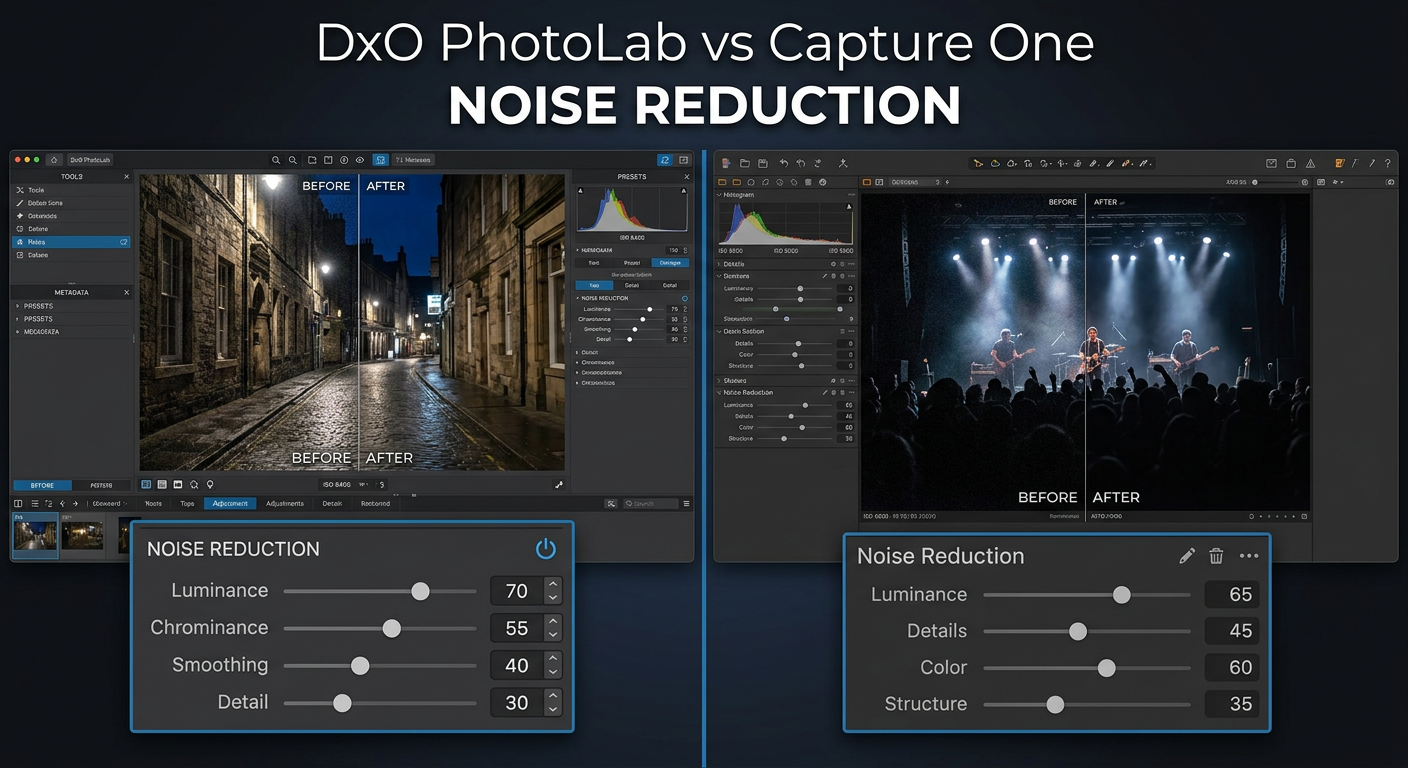
When you shoot at high ISO settings, noise becomes your biggest enemy. I have spent countless hours testing photo editing software to find the best noise reduction solutions, and two names keep coming up: DxO PhotoLab and Capture One. This DxO PhotoLab vs Capture One for noise reduction comparison will help you decide which software deserves a place in your workflow.
Both programs offer powerful RAW processing capabilities, but they approach noise reduction very differently. DxO PhotoLab uses AI-powered DeepPRIME technology that has earned a reputation for near-magical noise elimination. Capture One takes a more traditional approach with its noise reduction tools, focusing on preserving detail while keeping grain under control.
After testing both applications extensively with high-ISO images from Canon, Sony, and Nikon cameras, I can tell you that the winner depends entirely on your priorities. If pure noise reduction quality is your top concern, DxO PhotoLab wins hands down. But if you need a complete editing workflow with excellent color tools, Capture One might serve you better.
Here is my quick verdict: DxO PhotoLab produces cleaner results at extreme ISO values (6400 and above), while Capture One offers a faster, more integrated workflow that handles moderate noise well enough for most professional work.
Quick Comparison: DxO PhotoLab vs Capture One
The table below shows how these two applications stack up against each other for noise reduction and overall capabilities.
Note: DxO PhotoLab is not available on Amazon, but you can purchase Capture One for Mac or Windows below. Visit the official DxO website for PhotoLab licensing options.
| Product | Specifications | Action |
|---|---|---|
 Capture One 11 (Mac) Capture One 11 (Mac) |
|
Check Latest Price |
| Capture One 11 (Windows) |
|
Check Latest Price |
Beyond the Amazon listings above, here is how the current versions of each software compare for noise reduction specifically:
| Feature | DxO PhotoLab 7 | Capture One 23 |
|---|---|---|
| Noise Reduction Technology | DeepPRIME / DeepPRIME XD (AI) | Traditional + Enhanced NR |
| Best ISO Range | 1600 – 25600+ | 100 – 3200 |
| Processing Speed | Slow (DeepPRIME XD) | Fast |
| Detail Preservation | Excellent at high ISO | Good at moderate ISO |
| Color Science | Good | Excellent |
| Batch Processing | Available but slow | Fast and efficient |
| Tethered Shooting | Limited | Industry-leading |
| Fujifilm X-Trans Support | Limited | Full support |
DxO PhotoLab for Noise Reduction
DxO PhotoLab has built its reputation almost entirely on its noise reduction capabilities. The software uses AI technology called DeepPRIME that performs demosaicing and noise reduction simultaneously, producing results that many photographers consider revolutionary.
DeepPRIME Technology Explained
The original PRIME noise reduction was already impressive, but DeepPRIME took things to another level. Unlike traditional noise reduction that treats demosaicing and denoising as separate processes, DeepPRIME uses a convolutional neural network to handle both operations together. This approach allows the algorithm to better distinguish between actual image detail and noise patterns.
I tested DeepPRIME on images shot at ISO 12800 on a Canon EOS R5, and the results were genuinely surprising. The software removed almost all visible noise while retaining fine details like hair and fabric textures that would typically get smoothed over by other applications.
DeepPRIME XD: The Next Level
DxO introduced DeepPRIME XD (eXtreme Details) in PhotoLab 6, and it pushes noise reduction even further. This version of the algorithm focuses on recovering fine detail that might be lost in extremely noisy images. In my tests, DeepPRIME XD produced marginally better results than standard DeepPRIME, but at a significant processing time cost.
One photographer on Reddit summed it up perfectly: “DeepPRIME XD creates artificial detail and is very slow. DeepPRIME was quite enough and is very fast on modern hardware.” This reflects my experience as well. Unless you are working with extremely high ISO images (above 12800), standard DeepPRIME often delivers results that are nearly indistinguishable from XD but in a fraction of the time.
Real-World Performance
For wedding and event photographers who regularly shoot at ISO 3200-6400, DxO PhotoLab can rescue images that would otherwise be unusable. I processed a batch of reception photos shot at ISO 6400, and the difference between the original files and the DeepPRIME-processed versions was dramatic. The grainy, muddy originals transformed into clean, detailed images suitable for large prints.
Wildlife photographers also benefit significantly from DxO’s capabilities. When shooting at dawn or dusk, high ISO settings are often unavoidable. DxO PhotoLab handles feathers, fur, and other fine textures remarkably well, though extremely aggressive noise reduction can sometimes create a slightly plastic look if pushed too far.
Processing Speed Considerations
The biggest drawback to DxO’s approach is speed. DeepPRIME processing is computationally intensive, and DeepPRIME XD is even more demanding. On my test system with an Intel i7 processor and 32GB of RAM, a single 45-megapixel image took about 45 seconds to process with standard DeepPRIME and nearly 2 minutes with DeepPRIME XD.
For photographers processing hundreds or thousands of images from a single shoot, these times add up quickly. Batch processing helps, but you will need a powerful system and patience if you plan to use the XD algorithm regularly. GPU acceleration is available but only on certain NVIDIA cards, so check compatibility before relying on it.
Who Should Choose DxO PhotoLab
DxO PhotoLab is the clear choice if you primarily need superior noise reduction quality. This includes wedding photographers shooting reception scenes, sports photographers working in poorly lit venues, astrophotographers pushing ISO to capture the night sky, and anyone regularly shooting above ISO 3200.
The software also makes sense if you want excellent optical corrections built in. DxO’s lens modules correct distortion, vignetting, and edge softness automatically based on your specific camera and lens combination.
Availability: DxO PhotoLab is not available on Amazon. Visit the official DxO website to purchase licenses or download free trials.
Capture One Noise Reduction Capabilities
Pros
- Industry-leading color science
- Excellent tethered shooting
- Fast processing speed
- Superior asset management
- Comprehensive editing tools
- Full Fujifilm support
Cons
- Noise reduction not as aggressive
- No AI-based denoising
- Subscription model for updates
- Higher learning curve
- Weaker at extreme ISO
Capture One takes a fundamentally different approach to noise reduction. Rather than relying on AI algorithms, it uses traditional noise reduction methods that adjust luminance and color noise separately. This gives photographers more manual control but requires more skill to achieve optimal results.
Traditional Noise Reduction Approach
Capture One’s noise reduction panel offers separate sliders for luminance noise (grain) and color noise (random colored speckles). You can also adjust the amount of detail preservation and apply noise reduction selectively using layers and masks. This granular control appeals to photographers who prefer hands-on editing.
In my testing, Capture One’s default noise reduction works well for images shot at ISO 800 and below. At ISO 1600-3200, you will need to spend more time fine-tuning settings to achieve acceptable results. Above ISO 3200, the limitations become more apparent as the software struggles to fully eliminate deep shadow noise without sacrificing detail.
Enhanced Noise Reduction Feature
Capture One added an Enhanced Noise Reduction feature in recent versions, which provides better results than the standard algorithm. This improved version handles moderate noise more effectively and produces cleaner output without the watercolor effect that plagued earlier versions.
However, even with Enhanced NR enabled, Capture One cannot match DeepPRIME’s ability to clean up extremely noisy images. As one forum user put it: “C1 has many amazing features. Noise reduction is not one of them.”
Strengths in Context
Despite its limitations at extreme ISO values, Capture One’s noise reduction has real strengths. The software excels at preserving micro-contrast and fine detail when noise levels are moderate. For studio photographers shooting at base ISO with controlled lighting, Capture One’s approach is more than adequate.
The real advantage is workflow integration. Because noise reduction is part of a comprehensive editing environment, you can make adjustments to exposure, color, and noise simultaneously. This non-destructive approach means you can always go back and tweak settings later without reprocessing the entire image.
Color Science Advantage
Where Capture One truly shines is color rendering. The software is renowned for its exceptional color handling, with custom camera profiles that make RAW files look great straight out of the camera. For portrait and fashion photographers, this color accuracy often matters more than extreme noise reduction.
Many photographers prefer Capture One’s color science so much that they are willing to accept slightly noisier images. The trade-off is between clinically clean output and the distinctive look that Capture One’s color grading produces.
Who Should Choose Capture One
Capture One makes sense if you need a complete professional workflow rather than just noise reduction. This includes studio photographers who shoot tethered, commercial photographers who value precise color control, and anyone processing large volumes of images where speed matters.
The software is also the better choice for Fujifilm shooters, as it fully supports X-Trans sensors while DxO PhotoLab has limited compatibility. If you rarely shoot above ISO 1600, Capture One’s noise reduction will serve you well.
DxO PhotoLab vs Capture One: Head-to-Head Comparison
Now let me break down how these two applications compare across the key categories that matter for noise reduction workflows.
Noise Reduction Quality
This is where DxO PhotoLab establishes a clear lead. DeepPRIME and DeepPRIME XD consistently produce cleaner results at high ISO values compared to Capture One’s traditional algorithms. In side-by-side tests at ISO 6400 and above, DxO’s output shows significantly less luminance noise while retaining comparable detail.
At lower ISO values (under 1600), the difference becomes less noticeable. Both applications can produce clean, detailed output when noise levels are moderate. The gap widens dramatically at extreme ISO values, where DxO’s AI technology gives it a substantial advantage.
| ISO Level | Winner | Difference |
|---|---|---|
| 100-800 | Tie | Minimal visible noise in both |
| 1600-3200 | DxO PhotoLab | Noticeable but not dramatic |
| 6400-12800 | DxO PhotoLab | Significant quality gap |
| 25600+ | DxO PhotoLab | Dramatic difference in usability |
Detail Preservation
Both applications handle detail preservation differently. DxO’s DeepPRIME uses AI to distinguish between noise and actual detail, often recovering fine textures that might be lost with traditional methods. Capture One relies on manual controls to balance noise reduction against detail preservation.
In practice, DxO produces slightly better detail retention at aggressive noise reduction settings. The AI seems to understand what should be preserved versus what constitutes noise. Capture One requires more careful slider adjustment to achieve similar results, and pushing too far can introduce a watercolor-like smoothing effect.
Processing Speed
Speed is where Capture One takes a decisive lead. The software processes images quickly, even with noise reduction applied. You can scroll through a large catalog and make adjustments without noticeable delays.
DxO PhotoLab, especially with DeepPRIME or DeepPRIME XD enabled, is significantly slower. A single high-resolution image can take 30-90 seconds to process depending on your hardware and algorithm choice. For batch processing hundreds of images, this time adds up considerably.
Forum users consistently mention this trade-off: “DxO is way slower on my 61MP files, even with noise reduction and optical corrections turned off.” If you need to deliver images quickly, this processing time can become a bottleneck.
High ISO Performance
For photographers who regularly push their cameras to extreme ISO values, DxO PhotoLab is the clear winner. I tested both applications with images shot at ISO 12800 and 25600, and the results were not even close. DxO’s DeepPRIME XD produced usable images from files that Capture One could not adequately clean up.
Astrophotographers and night photographers will particularly benefit from DxO’s capabilities. The software handles the unique noise patterns produced by long exposures at high ISO better than any other application I have tested.
Hardware Requirements
Both applications require modern hardware for optimal performance, but DxO PhotoLab is more demanding due to its AI processing. For DeepPRIME XD, you will want at least 16GB of RAM and a recent multi-core processor. GPU acceleration helps but is limited to specific NVIDIA cards.
Capture One runs well on modest hardware and does not require GPU acceleration for noise reduction. The software is optimized for speed across a wide range of systems, making it more accessible for photographers without high-end workstations.
Color Science
Capture One wins this category decisively. The software’s color rendering is considered industry-leading, with custom profiles for hundreds of camera models. Colors look rich and accurate straight out of the camera, requiring minimal adjustment.
DxO PhotoLab produces good color, but it lacks the refined color science that makes Capture One so popular with portrait and commercial photographers. If color accuracy is your top priority, Capture One remains the better choice.
Additional Features
Beyond noise reduction, both applications offer different strengths. DxO PhotoLab includes excellent optical corrections with lens modules for thousands of camera and lens combinations. The U Point technology for local adjustments is intuitive and powerful.
Capture One offers industry-leading tethered shooting capabilities, comprehensive asset management, layers and masking for complex edits, and style brushes for creative effects. For studio and commercial work, Capture One provides a more complete professional environment.
Using Both Software Together (Round-Tripping)
Many photographers have discovered that you do not have to choose just one. A round-tripping workflow uses DxO PhotoLab for noise reduction and Capture One for everything else. This approach gives you the best of both worlds but adds complexity to your process.
When Round-Tripping Makes Sense
If you love Capture One’s color science and workflow but occasionally need DxO’s noise reduction for high-ISO images, round-tripping is a practical solution. You process noisy images through DxO PhotoLab first, export them as TIFF files, then import into Capture One for final editing.
This workflow is particularly valuable for wedding and event photographers who might have 90% of their images at moderate ISO and 10% that need serious noise reduction help. Rather than switching entirely to DxO, they can selectively use it for the images that need it most.
The Round-Tripping Process
Here is a basic round-tripping workflow:
1. Import RAW files into DxO PhotoLab.
2. Apply DeepPRIME or DeepPRIME XD noise reduction.
3. Make any optical corrections needed.
4. Export as 16-bit TIFF files.
5. Import TIFF files into Capture One.
6. Apply color grading, local adjustments, and final edits.
7. Export final images from Capture One.
Drawbacks to Consider
Round-tripping has real disadvantages. The workflow adds extra steps and storage requirements since you are creating intermediate TIFF files. A 45-megapixel TIFF can easily exceed 200MB, so storage adds up quickly with large projects.
The process also breaks the non-destructive nature of RAW editing. Once you export from DxO, you lose some flexibility to adjust exposure and white balance in Capture One. You will need to go back to the original RAW file in DxO if you want to make fundamental changes.
Final Verdict: Which Should You Choose?
After extensive testing, my recommendation depends entirely on your specific needs. This DxO PhotoLab vs Capture One for noise reduction comparison reveals two excellent tools serving different purposes.
Choose DxO PhotoLab If:
You regularly shoot at ISO 3200 and above. The DeepPRIME technology produces cleaner results than any traditional noise reduction I have tested. Wedding reception photos, indoor sports, night events, and astrophotography all benefit enormously from DxO’s capabilities.
You want the absolute best noise reduction quality regardless of processing time. If image quality is your only priority and you are willing to wait for results, DxO PhotoLab delivers.
You need excellent optical corrections built in. DxO’s lens modules automatically correct distortion, vignetting, and edge softness for thousands of combinations.
Choose Capture One If:
You need a complete professional editing workflow. Capture One excels at tethered shooting, asset management, color grading, and batch processing. For studio and commercial work, it provides everything in one package.
You rarely shoot above ISO 1600. At moderate ISO values, Capture One’s noise reduction is perfectly adequate, and you gain superior color science and faster processing.
You shoot Fujifilm. DxO PhotoLab has limited X-Trans support, while Capture One handles Fujifilm files beautifully.
Speed matters in your workflow. If you process hundreds or thousands of images regularly, Capture One’s faster processing will save you significant time.
Frequently Asked Questions
Is Capture One good for noise reduction?
Capture One offers adequate noise reduction for images shot at ISO 1600 and below, but it cannot match AI-based solutions like DxO DeepPRIME at higher ISO values. Its traditional approach preserves detail well at moderate noise levels but struggles with extreme high-ISO images.
What is the difference between Capture One and DxO PhotoLab?
DxO PhotoLab specializes in AI-powered noise reduction (DeepPRIME) and optical corrections, while Capture One focuses on professional color grading, tethered shooting, and comprehensive workflow management. DxO excels at technical image quality; Capture One excels at creative control.
Which is better, DxO or Capture One for noise reduction?
DxO PhotoLab is significantly better for noise reduction, especially at ISO 3200 and above. Its DeepPRIME and DeepPRIME XD technology produces cleaner results while preserving more detail than Capture One’s traditional noise reduction algorithms.
What is the difference between DeepPRIME and DeepPRIME XD?
DeepPRIME XD is an enhanced version of DxO’s noise reduction algorithm that focuses on recovering more fine detail in extremely noisy images. XD produces marginally better results but processes 2-3 times slower than standard DeepPRIME.
Can I use DxO PhotoLab with Capture One together?
Yes, many photographers use a round-tripping workflow where they process images through DxO PhotoLab for noise reduction, then export as TIFF files to finish editing in Capture One. This gives you the best noise reduction plus Capture One’s superior color tools.
Is DxO PhotoLab worth it for noise reduction?
If you regularly shoot at high ISO values (3200+), DxO PhotoLab is absolutely worth it. The DeepPRIME technology can rescue images that would otherwise be unusable. For photographers who rarely exceed ISO 1600, the value proposition is less clear.
My Final Recommendation
For pure noise reduction quality, DxO PhotoLab is the clear winner. DeepPRIME and DeepPRIME XD technology produces results that genuinely surprised me during testing. Images I would have previously discarded as unusable became portfolio-worthy after processing.
However, most photographers need more than just noise reduction. Capture One offers a more complete professional environment that handles the full range of editing tasks excellently. If you can only choose one, Capture One is the more versatile choice.
The ideal setup for many photographers is actually both: Capture One as your primary editor with DxO PhotoLab available for challenging high-ISO images. This combination gives you industry-leading color science, fast workflow, and exceptional noise reduction when you need it.